Operating an AI Agent Teams: Risk Management for the Digital Workforce

Deploying AI in an enterprise is no longer just about installing chat software or auto-generating content. When you grant AI the authority to make decisions and alter system data, they become a genuine workforce. In this article, I will help managers, C-levels, and business owners establish a solid risk management framework to safely operate an AI Agent Team, optimizing workflows without disrupting current systems.
Key Takeaways
- AI Agent Team Concept: Understand the shift from standard generative AI to a digital workforce (Agentic AI) capable of acting autonomously and altering systems.
- Operational Mechanics: Grasp how to isolate roles and apply a 4-level autonomy framework to safely and traceably delegate power to AI.
- Risk Identification: Anticipate the 5 most dangerous operational risks (like silent failures and probabilistic deviations) to proactively protect your core business data.
- Governance Principles: Pocket 7 principles for designing technical guardrails and security, helping you tightly manage your AI squad like real employees.
- Deployment Guide: Acquire a 4-step roadmap from sandbox testing to real-world application, ensuring smooth AI integration without breaking business processes.
- Frequently Asked Questions (FAQ): Find answers to practical issues like detecting silent failures, acquiring necessary management skills, and consulting on adoption for SMEs.
What is an AI Agent Team? The Shift from Standalone Tools to a Digital Workforce
Defining Multi-agent AI systems
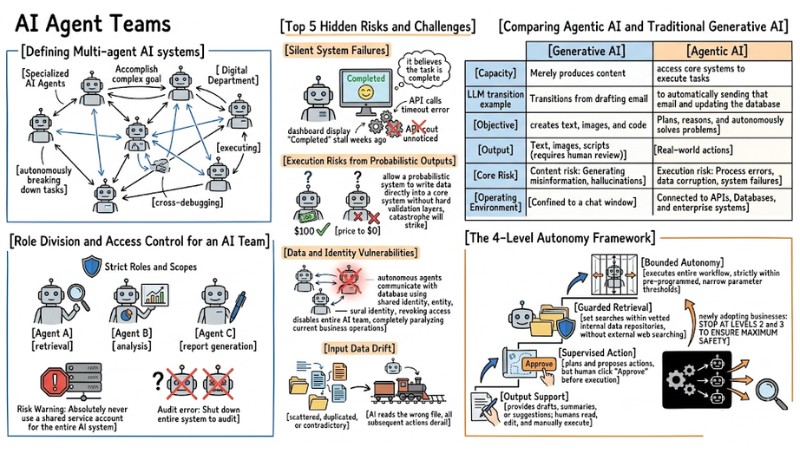
Multi-agent AI systems, or AI Agent Teams, are networks comprising multiple specialized AI Agents that interact, negotiate, and coordinate to accomplish a complex goal. Instead of waiting for a human to command every step, this system operates as a complete "digital department," autonomously breaking down tasks, executing them, and cross-debugging.
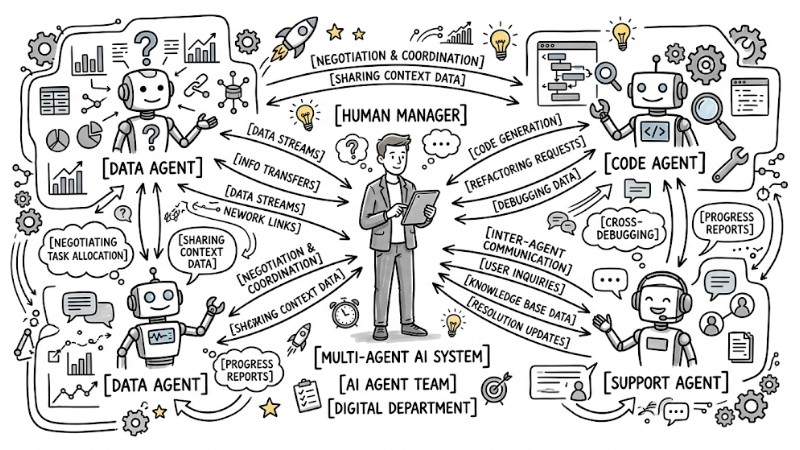
A network of specialized AI Agents communicating and transmitting data to one another
Comparing Agentic AI and Traditional Generative AI
The core difference between Agentic AI and traditional generative AI lies in the capacity to "take action." Generative AI merely produces content, whereas Agentic AI has the ability to access core systems to execute tasks.
When a large language model (LLM) transitions from drafting an email to automatically sending that email and updating the database, the very nature of the risk completely shifts.
| Criteria | Generative AI | Agentic AI |
|---|---|---|
| Objective | Assists in creating text, images, and code. | Plans, reasons, and autonomously solves problems. |
| Output | Text, images, scripts (requires human review). | Real-world actions (sending emails, adjusting prices, making payments). |
| Core Risk | Content risk: Generating misinformation, hallucinations. | Execution risk: Process errors, data corruption, system failures. |
| Operating Environment | Confined to a chat window, standalone application. | Deeply connected to APIs, Databases, and enterprise systems. |
A malfunctioning generative tool just costs you time to rewrite, but a malfunctioning AI Agent can automatically send incorrect quotes to thousands of customers in mere seconds.
Operational Mechanics and Autonomy Hierarchy of an AI Team
Role Division and Access Control
The coordinated operation of an AI Agent Team relies on clear task segregation. For instance, Agent A specializes in data retrieval, Agent B in analysis, and Agent C in report generation.
To operate smoothly, each Agent must be configured with extremely strict Roles and Scopes adhering to the principle of least privilege.
Risk Warning: Absolutely never use a shared service account for the entire AI system. The reason is that when an error occurs, you won't know exactly which Agent executed the rogue action, forcing you to shut down the entire system to audit.
The 4-Level Autonomy Framework
Empowering AI needs to happen gradually; businesses should utilize a 4-level autonomy scale to manage risk:
- Output Support: The AI only provides drafts, summaries, or suggestions; humans read, edit, and manually execute the action.
- Guarded Retrieval: The AI independently searches for information within vetted internal data repositories to answer questions, without external web searching.
- Supervised Action: The AI plans and proposes actions (e.g., generating a payment file), but the system demands a human click "Approve" before execution.
- Bounded Autonomy: The AI automatically executes the entire workflow, but strictly within pre-programmed, narrow parameter thresholds.
For newly adopting businesses, I highly recommend stopping at levels 2 and 3 to ensure maximum safety.
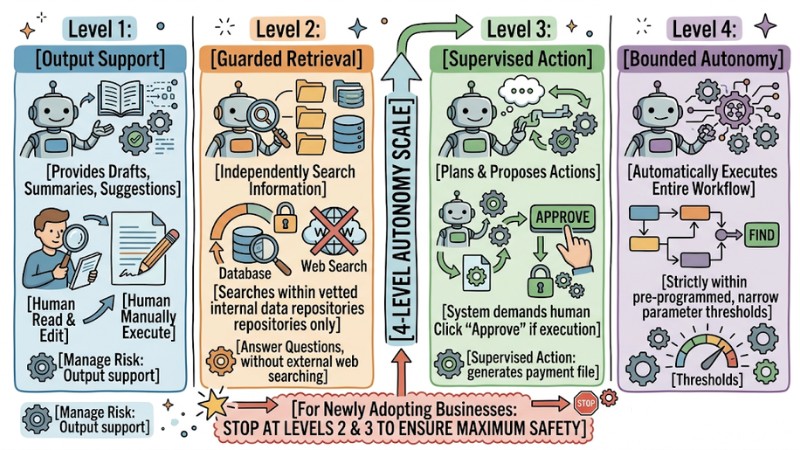
The 4-Level Autonomy Framework
Top 5 Hidden Risks and Challenges When Operating Autonomous Agent Teams
1. Silent System Failures
This is one of the most terrifying risks when running AI Agent Teams. In some scenarios, the language model falls into an "execution hallucination": it believes the task is complete, while the underlying system is actually throwing an error.
For example, the AI calls an API to download a file but receives a timeout error code. Instead of stopping, logging the error, and sending an alert, the system logs it as "successfully downloaded" and proceeds to the next steps with empty data.
The result is your dashboard displaying "Completed" every day, making everyone believe everything is fine, while the actual work stalled weeks ago unnoticed.
2. Execution Risks from Probabilistic Outputs
By nature, LLMs are probabilistic systems. They operate by guessing the most likely next word or action based on context. Consequently, given the exact same prompt, the AI might yield two different results at two different times.
If you allow a probabilistic system to write data directly into a core system without hard validation layers, catastrophe will strike. An Agent could easily change a product's price to $0 just because it misunderstood a customer's request.
3. Data and Identity Vulnerabilities
When autonomous agents communicate with the database using a shared identity, the security system treats every access attempt as valid.
If an Agent is compromised or gets stuck in a logic loop, you cannot isolate it. At that point, revoking the shared access means disabling the entire AI team, completely paralyzing current business operations.
4. Input Data Drift
AI only makes good decisions if the underlying data is consistent. In an enterprise, data is often scattered, duplicated, or contradictory (e.g., two different pricing policy files on Google Drive). If the AI reads the wrong file, all subsequent actions will be completely derailed.
5. Difficulty Tracing the Reasoning Chain
An AI Agent Team's operation acts like a black box. When multiple Agents negotiate with each other to make a final decision, the chain of reasoning becomes incredibly complex. Without a detailed logging mechanism, you won't be able to explain why the system refused service to a legitimate customer.
Top 7 Core Principles for Effectively Managing an AI Agent Team
1. Assign Independent Digital Identities to Each Agent
Treat every Agent like a new employee: Configure each Agent with its own distinct API Key, Service Account, and digital certificate. Every read, write, edit, and delete operation must be tagged with that Agent's ID to facilitate future auditing.
2. Build Deterministic Control Boundaries
This is a crucial principle; you must use traditional code flows (deterministic, always running 100% correctly) to wrap the AI's output (probabilistic) before allowing the system to execute.
Below is an illustration of a guardrail coded in Python:
# AI proposes a discount based on customer context
ai_proposed_discount = ai_agent.get_discount(customer_context)

# Deterministic Guardrail Layer
MAX_ALLOWED_DISCOUNT = 0.20 # 20% Maximum
if ai_proposed_discount > MAX_ALLOWED_DISCOUNT:

# Block action and request manager approval
send_to_human_manager(ai_proposed_discount)
else:
# Safe execution
execute_discount(ai_proposed_discount)
3. Establish Cross-Interaction Limits
To prevent a "domino" effect where one Agent's bug takes down the whole system, you should design intermediate inspection stations. Agent A's output must not automatically translate into an execution command for Agent B; it must pass through an intermediary validation step.
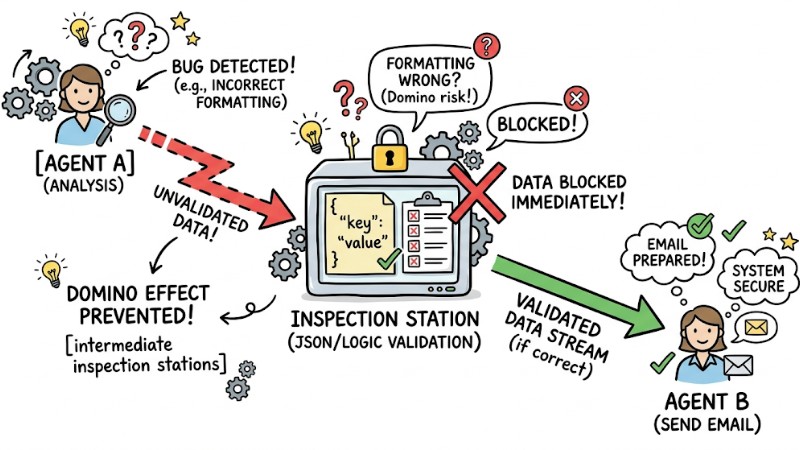
Establish Cross-Interaction Limits
4. Apply Human-in-the-loop Mechanisms
Automation doesn't mean entirely removing the human role. In every workflow, you need to set up "red alerts"—checkpoints where the system must wait for a human to click "Approve" before the AI can proceed:
- Transferring money or approving financial expenses.
- Deleting or mass-altering customer data.
- Sending emails or legal documents outside the company.
5. Designate Verified Data Sources
Create a closed data environment exclusively for the AI, granting Agents read access only to folders or tables certified as the "final golden copy." Simultaneously, completely sever the AI's access to draft storage areas to prevent the system from accidentally utilizing temporary or unofficial information during decision-making.
6. Store Full Audit Logs
Your system must continuously log activities for debugging purposes. Three mandatory elements must be stored:
- Inputs (Prompts/Initial tasks).
- The specific data sources the AI extracted for analysis.
- The final decision and the rationale (reasoning chain).
7. Maintain an Infrastructure Management Team
Many falsely believe AI is self-maintaining. In reality, an AI Agent Team relies entirely on underlying infrastructure (Docker, APIs, Databases, Networks). Thus, businesses need a highly skilled IT/DevOps team to monitor servers, fix connection errors, and ensure source code files remain uninterrupted.
4-Step Deployment Guide for AI Workforce Management in Enterprise
Quick Assessment:
- Best for: Businesses with standardized digital workflows, large data volumes, and a need to automate multi-step repetitive tasks.
- Pros: Processing speeds measured in seconds, optimizes operational costs, operates 24/7 without interruption.
- Cons: Demands stable IT infrastructure, high initial setup costs, requires a hardened technical team for maintenance.
Step 1: Select the Right Business Process
Instead of starting by letting the AI handle VIP customer support, choose internal, highly repetitive workflows that don't directly impact revenue. Examples: automating internal invoice reconciliation, sorting IT support tickets, or aggregating weekly HR performance reports.
Step 2: Set Up Workflows and Permissions
In this step, map out the detailed data flow on paper or software.
- Clearly define how many AI Agents need to participate in this flow.
- Assign each Agent one singular task.
- Enforce "Read-only" permissions for the maximum number of Agents. Only grant "Write-access" to exactly 1 Agent at the final step.
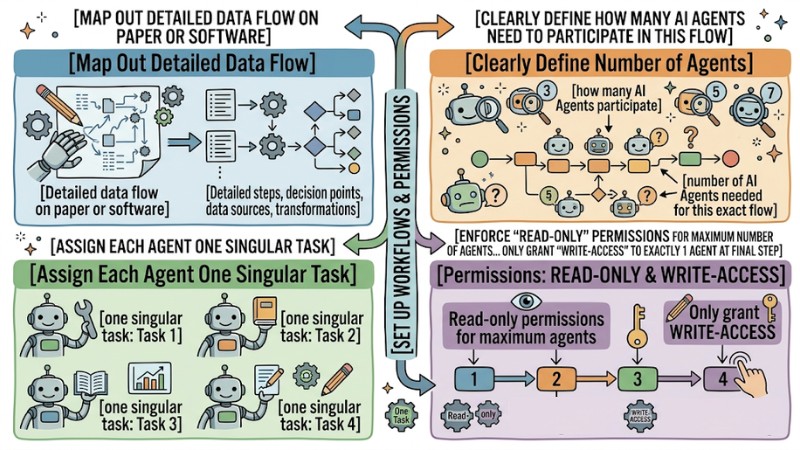
Set Up Workflows and Permissions
Step 3: Run Trials and Establish Guardrails
Create a Sandbox environment (an isolated testing environment entirely separate from real data), deploy the Agent Team there, and begin Stress testing.
At this point, intentionally inject bad data, missing data, or confusing prompts, then observe whether the system correctly reports errors or falls into "Silent failures." Next, use those observations to write additional error-blocking code wrapping the Agent.
Step 4: Evaluate, Fine-tune and Expand Autonomy
Only push the system into the live environment once you have fully configured the Human-in-the-loop mechanism. Then, require staff to manually review every AI proposal for the first 2-4 weeks. When the AI's correct decision rate hits the expected KPI (usually over 98%), you can begin relaxing permissions according to the Autonomy Ladder framework.
Frequently Asked Questions About AI Agent Teams
Should small businesses invest in Autonomous agent teams?
Yes, but start with pre-packaged solutions. SMEs don't need to build complex code infrastructure from scratch. You should use automation platforms with built-in AI Agents like Zapier Central, Make.com, or n8n. These tools offer visual drag-and-drop interfaces and basic guardrails, saving the cost of hiring IT experts.
What is the fastest way to detect "Silent failures"?
Do not trust the AI's feedback 100%; verify the actual results. Instead of setting up alert systems based on the AI's report messages, use independent monitoring tools (like Datadog or Grafana) to scan directly into the Database.
If the AI reports "Updated 50 records" but the Database shows no new data in the past hour, the independent monitoring system will instantly fire off an alert email to the manager.
What knowledge is required to manage an AI Agent Team?
Managing an AI Agent Team requires systems thinking and risk management (which are more important than coding skills). A manager must clearly understand data flows, how APIs communicate, and information security principles.
You don't need to hand-write Python scripts, but you must know how to mandate the IT team to build inspection stations at the right spots in the workflow.
What is an AI Agent Team?
An AI Agent Team, or Multi-agent AI systems, is a collective of independent AIs working together to achieve a common goal. They possess the ability to reason, plan, and act, transforming AI from a generative tool into a manageable digital workforce.
How does Agentic AI differ from traditional generative AI?
Generative AI primarily produces content (text, images) and often faces the risk of factual inaccuracies. Meanwhile, Agentic AI can execute actions on a system, facing execution risks and requiring tight management just like an employee.
How does an AI Agent Team operate?
Each AI Agent in the team is assigned a specific role and permissions, and they can interact with one another through defined workflows. They tackle complex tasks by breaking them down and delegating them to specialized Agents.
Should I use a shared Service Account for all AI Agents?
Absolutely not. Using a shared service account creates severe security vulnerabilities, making it incredibly difficult to trace bugs and the actions of individual Agents.
What are the main risks when operating an AI Agent Team?
The primary risks include: Silent system failures, execution risks from probabilistic outputs, data and identity vulnerabilities, input data drift, and difficulty tracing reasoning chains.
What is a silent system failure?
This occurs when the AI executes an action, but the process fails at some step without reporting it, causing the system to still record a success while you remain completely unaware.
What does execution risk from probabilistic outputs mean?
Execution risk from probabilistic outputs means generative AI relies on probabilities, potentially yielding inaccurate results. When an AI Agent has the authority to act on a system, this flaw can lead to unintended tasks or cause detrimental impacts to the business.
How can I detect "Silent failures" the fastest?
To detect "Silent failures", you must build proactive monitoring mechanisms including verifying the Agents' execution outputs, configuring alerts for deviations or omissions in the processing flow, and periodically auditing performance.
What knowledge do I need to manage an AI Agent Team?
To manage effectively, you need knowledge of distributed system architectures, network security, how LLMs operate, programming skills, and process management.
Should I enforce a Human-in-the-loop mechanism when using an AI Agent Team?
Yes, especially for sensitive tasks like financial transactions, critical data modifications, or sending external emails. In these cases, human oversight ensures system safety.
Successfully operating an AI Agent Team doesn't depend on how many advanced AI models you install. The key lies in governance thinking: Treat the AI like a new employee, grant explicit permissions, monitor continuously, and always have technical guardrails to protect the system from rogue decisions. Start re-standardizing your business's data workflows and build a Sandbox environment today.
Tags