What is MCP Security? Risk Management Guide for AI Agents

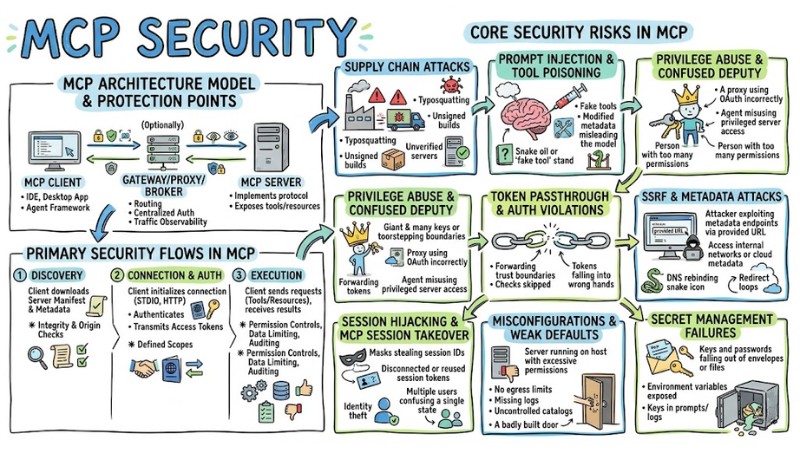
MCP Security is a set of technical measures and operational procedures used to protect Model Context Protocol implementations when AI Agents are permitted to call tools and manipulate real data systems directly. This article presents the concept of MCP security, core risks, design principles, supply chain control, OAuth management, and a runbook for safe MCP operation.
Key Takeaways
- MCP Security Concept: Understand that this is a set of technical measures and operational procedures that help protect systems when allowing AI Agents to communicate directly with internal data via MCP.
- Identifying Core Risks: Grasp the Client-Server architecture of MCP along with critical control points from tool discovery and authentication token transmission to resource access execution.
- Secure Design Principles: Learn the Zero-trust design mindset, least privilege, and multi-layered defense to build a robust MCP system, minimizing risks from attacks.
- 5-Step Security Process: Master the deployment roadmap from supply source control and mandatory human approval to system monitoring.
- Supply Chain Protection: Explore how to counter hidden malware by only using MCP Servers from reputable Registries, using digital signatures, and strictly auditing dependency installation files.
- Identity and Permission Management: Know how to apply the OAuth 2.1 standard for secure authentication, narrowing access scope, and preventing AI from using tokens for the wrong purposes.
- FAQ: Get answers to questions about the risk differences between Local and Remote MCP Servers, how to detect tool "poisoning" early, and why using OAuth alone is insufficient to protect the system.
What is MCP Security?
MCP Security is a set of protective mechanisms applied to the Model Context Protocol to ensure the security, integrity, and availability of AI systems using MCP to connect with external tools and data. In other words, MCP Security includes architectural measures, access controls, and operational procedures designed to mitigate risks such as unauthorized access, data leaks, and supply chain attacks against MCP clients and MCP servers.
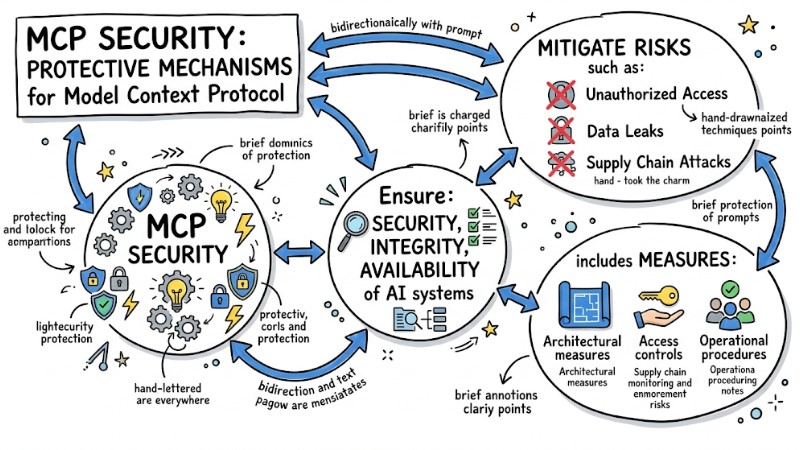
MCP Security is a set of protective mechanisms applied to the Model Context Protocol
MCP Architecture Model and Points Needing Protection
MCP Client–Server Architecture
The MCP architecture follows a client–server model with several key components that must be considered from a security perspective.
- MCP Client: The component running in an IDE, desktop application, or agent framework that establishes connections, sends JSON-RPC requests, and receives responses from the MCP server.
- MCP Server: The service implementing the MCP protocol, exposing and executing tools, and providing resources and system prompts according to standard schemas for the client to discover and use.
- Gateway, proxy, or broker (if any): An intermediate layer that aggregates multiple MCP servers, performs routing, applies centralized authentication, limits access, and observes traffic between the client and server.
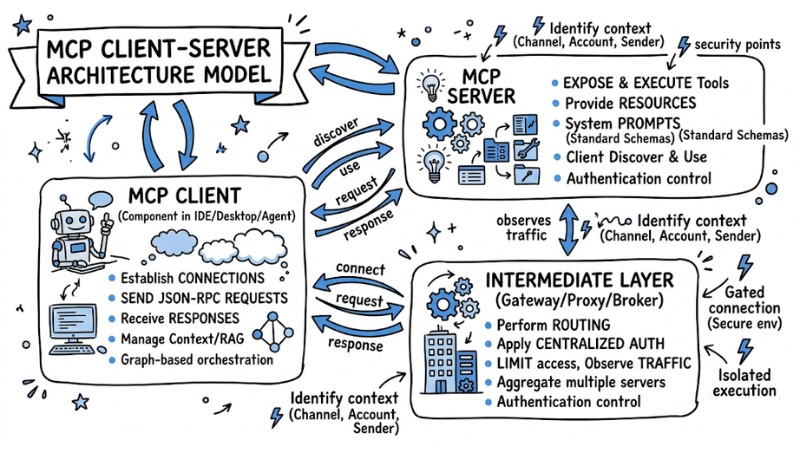
MCP Client–Server Architecture Model
Primary Security Flows in MCP
In a typical MCP implementation, the following communication flows are the focus of security design.
- Server, Metadata, and Manifest Discovery: The client downloads and reads the MCP server's manifest and metadata to retrieve the list of tools, resources, transport configurations, and access scopes; this point requires integrity and origin checks.
- Connection Establishment, Authentication, and Token Transmission: The client initializes a connection via transports like STDIO or HTTP, performs appropriate authentication mechanisms, and transmits access tokens with defined scopes.
- Tool Execution and Resource Access: The client sends JSON-RPC requests to call tools or access resources and receives results; this requires applying permission controls, limiting data scope, and auditing input and output data.
Core Security Risks in MCP
1. Supply Chain Attacks
In the MCP ecosystem, supply chain attacks occur when an MCP server or its dependencies are maliciously altered before deployment. Common risks include using unverified third-party servers, malware-injected binaries or container images, typosquatting on package names, unsigned builds, and modified images on registries.
2. Prompt Injection and Tool Poisoning
Prompt injection and tool poisoning directly impact how the AI processes context and selects tools. Risk scenarios include malicious content embedded in data, repositories, files, or user messages, as well as fake tools, vague tool descriptions, or modified metadata designed to mislead the model into selecting and using unsafe tools.
3. Privilege Abuse and Confused Deputy
Privilege abuse occurs when an MCP server or proxy is granted permissions exceeding actual needs, facilitating access to sensitive data. The Confused Deputy model in the MCP context often appears when an MCP proxy uses OAuth with a broad scope, and an agent uses this server to perform actions the user did not intend, because the server is considered a privileged principal.
4. Token Passthrough and Authorization Violations
Errors in token handling lead to many authorization issues in MCP. Common mistakes include the token passthrough anti-pattern (forwarding tokens as-is between services), using tokens for the wrong audience, and skipping checks for claims, scopes, or audiences, thereby allowing requests to cross trust boundaries.
5. SSRF and Attacks via Metadata or OAuth Discovery
When an MCP server processes a client-provided URL, the risk of SSRF (Server Side Request Forgery) and abuse of metadata mechanisms increases. Attackers can exploit metadata endpoints, discovery URLs, or redirect chains to access internal networks, cloud metadata services, or internal IP addresses through DNS rebinding and redirection to private IPs.
6. Session Hijacking and MCP Session Takeover
Loose session management in MCP can lead to session hijacking. Risks include reusing session IDs across multiple servers or event queues and failing to bind sessions to a specific user identity or client, leading to potential impersonation and state confusion between agents.
7. Misconfigurations and Weak Default Settings
Misconfiguration is a common source of risk in MCP server deployments. Examples include running an MCP server directly on the host with high privileges, failing to limit server egress, not enabling appropriate logging or auditing, and using catalogs or registries without control, allowing unapproved tools to appear in production environments.
8. Secret Management Failures
Improper secret management directly affects MCP safety. Typical errors include exposing secrets in environment variables, embedding access keys in prompts or tool configurations, and putting tokens or passwords into outputs or logs, making sensitive information accessible to agents, users, or logging systems.
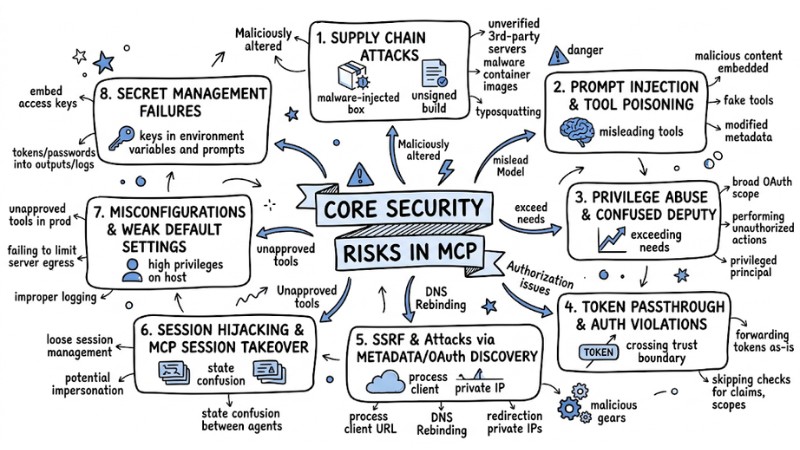
Several security risks in MCP
Overall Design Principles for MCP Security
1. Zero-trust with MCP Servers and Tool Calls
In an MCP environment, every server and every tool call must be handled with a zero-trust mindset, meaning no component is trusted by default without being authenticated and audited. This includes verifying server identities, checking signatures, limiting which tools the client is permitted to call, and fully logging every action for traceability in the event of an incident.
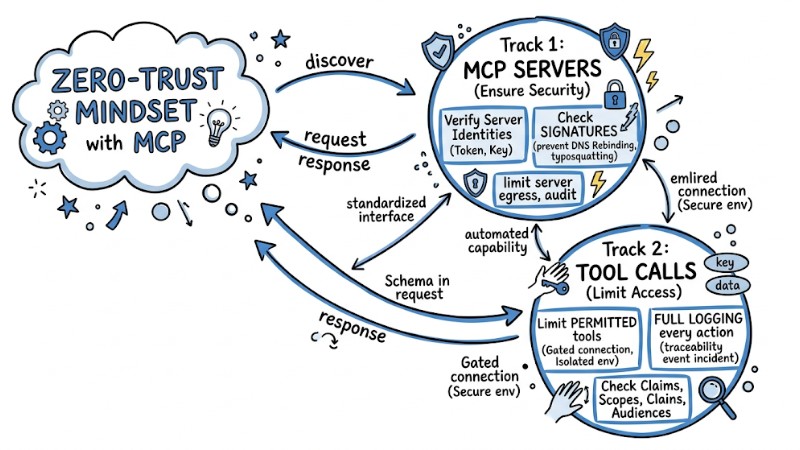
In MCP, every server and every tool call must be handled with a zero-trust mindset
2. Least Privilege for Scope, System Permissions, and Network Egress
The principle of least privilege requires every access right in MCP to be narrowed to the minimum level necessary for each task. Specifically, the scope within tokens, the system permissions of the MCP server process, and network egress rights must be configured so each server can only access resources, APIs, and network addresses matching the defined use case.
3. Defense-in-depth on Client, Server, Gateway, and Infrastructure
Defense-in-depth in MCP means arranging multiple security control layers from the client to the server, gateway, and network infrastructure tier. Each layer handles a portion of the task - such as connection authentication, token-based permission control, tool capability limitation, execution sandboxing, log monitoring, and anomaly detection - to minimize impact if one layer is compromised.
4. View MCP as a Governed Toolchain, Not Just an SDK
From an operational standpoint, MCP must be treated as a governed toolchain with policies, approval processes, and centralized observability, not just a set of programming SDKs. This approach includes using gateways or brokers to enforce policies, maintaining allowed server lists, controlling versions and signatures, and managing secrets and audits across the entire MCP chain.
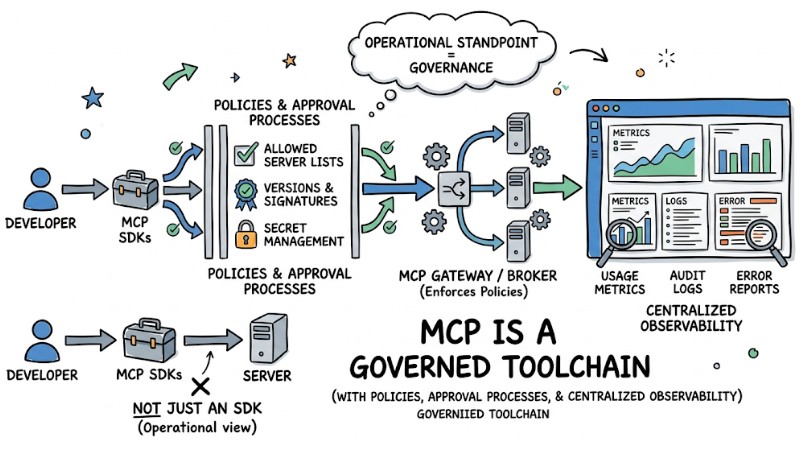
MCP is a governed toolchain with policies, approval processes, and centralized observability
5-Step Secure MCP System Process
To safely implement MCP in a real-world environment, a five-step control process can be applied, from the supply phase to monitoring.
- Supply Control: Only install MCP servers from trusted registries or catalogs and audit configuration file contents like
package.jsonorrequirements.txtto detect abnormal dependencies before launch. - Implement Human in the Loop (HITL): Configure the MCP client to require manual user confirmation for sensitive tasks like deleting files, writing critical data, or performing API calls to the internet.
- Sandboxing and Environment Isolation: Run MCP servers in containers or isolated environments to limit system and data access scope, while using user namespaces to reduce host hijacking risks.
# Example: Secure Docker configuration for MCP Server
docker run --read-only \
           --cap-drop=ALL \
           --network=none \
           --user=1001:1001 \
           -v /path/to/data:/data:ro \
           mcp-server-image
- Apply Least Privilege: Avoid running MCP servers with root privileges and create a dedicated system user with access only to the specific directories or resources required for each server.
- Logging and Monitoring: Establish logging via stdout or a centralized log system to record every tool call request and use monitoring platforms like Datadog or ELK to configure alerts upon detecting abnormal frequencies or suspicious API destinations.
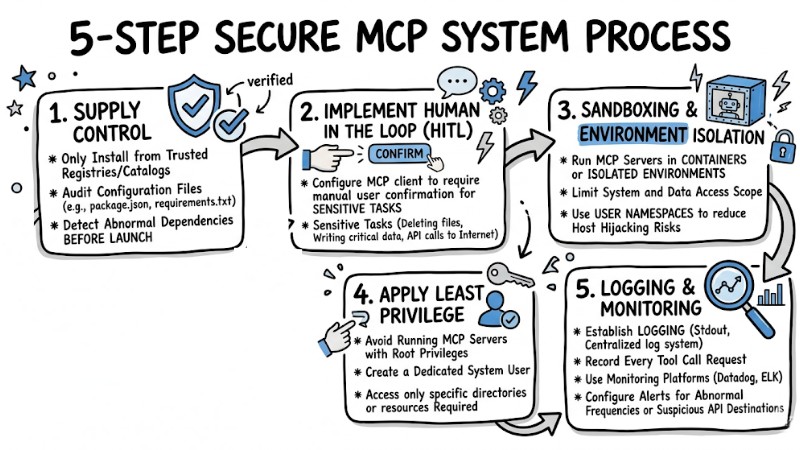
Secure MCP system process
Supply Chain Security Control
1. Supply Source Control and MCP Server Registries
MCP supply chain control begins with selecting MCP server sources and registries used in the deployment environment. Organizations should prioritize reputable registries or catalogs, apply a default-deny policy, require manifest digital signatures, and verify publishers before accepting an MCP server into the environment.
2. Digital Signatures, Version Pinning, and Integrity Checks
To reduce the risk of MCP server changes post-release, digital signatures and version pinning must be combined. Practices include signing containers or binaries, pinning digests instead of using the latest tag, checking checksums, and applying integrity verification mechanisms before deployment or upgrade.
3. Dependency, Manifest, and Startup Command Audit
An MCP supply chain protection strategy also requires auditing dependencies and startup configurations. Dependency files like package.json or requirements.txt must be reviewed, MCP server manifests evaluated, and startup scripts checked to detect risky libraries or unwanted launch commands.
4. Using MCP Catalog, Toolkit, or Curated Catalogs
Using audited MCP Catalogs and Toolkits reduces risks from untrusted servers. Selected catalogs provide lists of MCP servers evaluated for security and quality, assisting development teams in reusing secure configurations and limiting the risk of introducing malicious servers into the system.
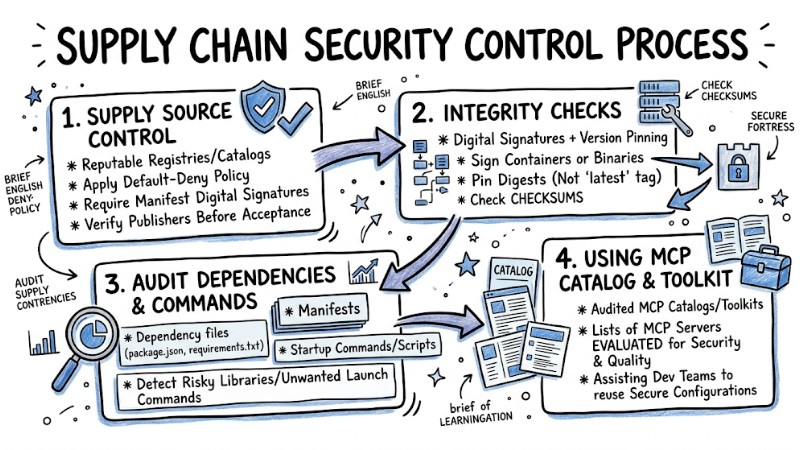
Supply Chain Security Control Process
Identity Management, OAuth, and Permissions in MCP
1. MCP Authorization Overview
Authorization in MCP defines how the MCP client sends tokens and how the MCP server authenticates and authorizes each tool call or resource access. For HTTP transport, the MCP specification builds on OAuth 2.1 and related standards to support metadata discovery, client registration, and resource-specific access token control.
2. OAuth 2.1 for MCP HTTP and Recommended Flows
In the context of MCP HTTP, OAuth 2.1 is the recommended authorization mechanism for both end-users and server-to-server scenarios. Implementations typically use Authorization Code with PKCE for end-users accessing an MCP server via clients like IDEs or desktop apps, while Client Credentials flows are used for MCP servers or background services calling other MCP servers or internal APIs.
3. Avoiding Token Passthrough and Correct Audience Design
The MCP specification mandates avoiding the token passthrough model where an MCP server merely receives and forwards the original token to downstream systems. The MCP server must verify the audience and related claims, accepting only tokens issued specifically for that server and using separate tokens when calling other services to avoid breaking authorization boundaries.
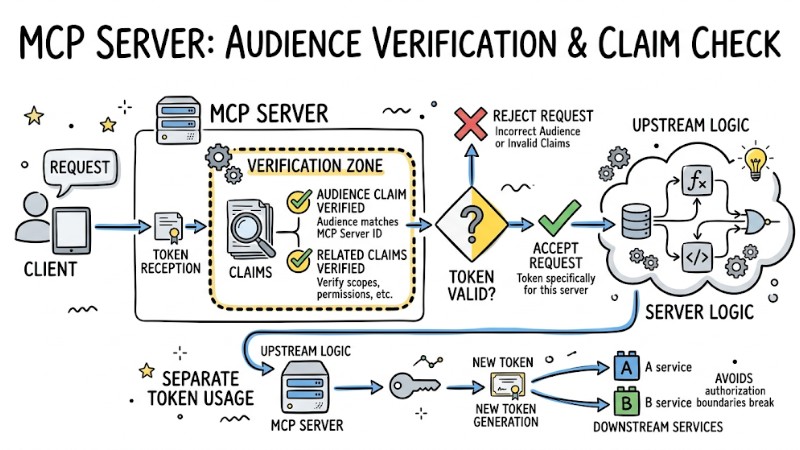
The MCP server must verify the audience and related claims
4. Scope Narrowing and On-demand Privilege Escalation
Permission design in MCP should start with the minimum privilege scope and only expand upon clear need. A common implementation pattern is granting initial scopes at a read-only or low-sensitivity level; when a sensitive operation is encountered, the MCP server returns a response with a WWW-Authenticate header to guide the client through an escalation step with a higher scope.
5. Client-specific Consent and Reducing Confused Deputy Risks
To avoid Confused Deputy states, each MCP client must be clearly identified and tied to a unique consent process. Measures include registering client IDs per user or application, using dedicated consent interfaces with CSRF protection and state parameters, and strictly validating redirect URIs along with secure cookies for user sessions.
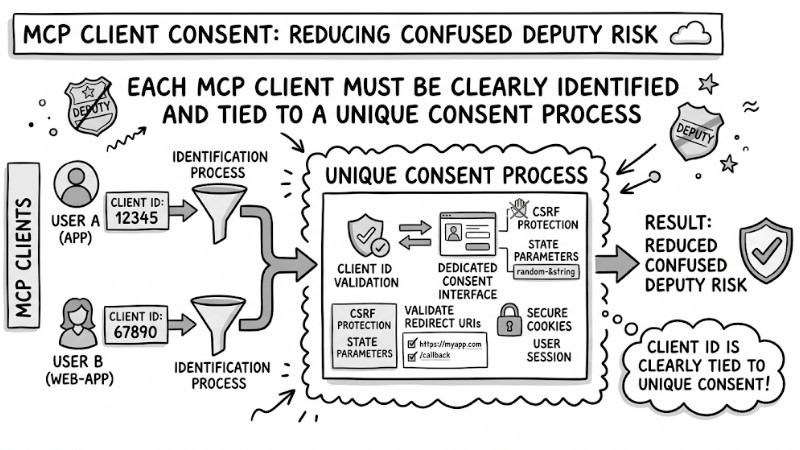
Each MCP client must be clearly identified and tied to a unique consent process
FAQ
How do Local and Remote MCP servers differ regarding security?
Local servers have direct write/delete permissions on the host machine, leading to higher risks. Remote servers isolate infrastructure but require strict connection authentication to prevent spoofing.
How do I detect Tool Poisoning early?
Check the definitions in the server's manifest.json file. Ensure that tool names and descriptions do not duplicate other critical functional calls within your system.
Is OAuth enough to protect an MCP server?
OAuth only identifies the user; it does not prevent the AI from unilaterally using that token for the wrong purpose. You need to combine it with additional access control policies (Policy-based Access Control).
Read more:
- AI Agent Prompt Injection: Signs and Prevention for AI Infrastructure
- AI Agent Secrets Management: 7 Optimal Security Solutions
- GoClaw's 5-Layer Security Architecture Explained
MCP Security requires combining multiple control layers such as zero trust, least privilege, supply chain protection, identity management, and continuous monitoring to mitigate risks when AI Agents interact with real infrastructure. By building and operating systems according to these MCP Security practices, organizations can leverage MCP for AI Agents at production scale while maintaining an acceptable level of safety for data and internal systems.