What is MCP? The Breakthrough AI Connection Standard for Enterprises

Integrating AI into enterprise data is often expensive and complex because unique code must be written for every application. The Model Context Protocol (MCP) was created to solve this problem at its root, making AI connections to systems unified and scalable. This article will help business owners and project managers understand what MCP is, how it operates, and how to apply this new connection standard to automate workflows immediately.
Key Takeaways
- MCP Definition: Understand MCP as the "USB-C port" that standardizes how AI connects to data, freeing businesses from complex manual integration programming.
- Importance of MCP: Grasp the advantages regarding cost, deployment speed, and absolute data security when connecting AI to internal systems.
- Basic Operational Structure: Visualize the simple Host - Client - Server operational flow to confidently deploy technology without advanced programming expertise.
- Comparing MCP and Traditional APIs: Clearly distinguish between the two technologies to choose the optimal solution and save resources for specific projects.
- Practical Applications of MCP at Work: Exploit real-world scenarios from data analysis to process automation to accelerate work performance immediately.
- Answering Questions about MCP: Quickly resolve concerns regarding cost, security, and feasibility when applying MCP in business practice.
What is MCP? An Overview of the New AI Connection Standard
Basic Model Context Protocol Concept
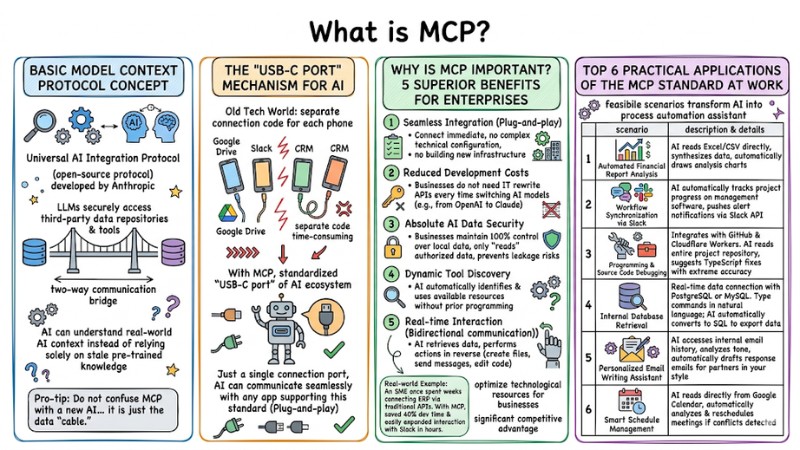
MCP (Model Context Protocol) is a Universal AI Integration Protocol (open-source protocol) developed by Anthropic. It acts as a two-way communication bridge, allowing Large Language Models (LLMs) to securely access third-party data repositories and tools. Thanks to MCP, AI can understand real-world AI context instead of relying solely on stale pre-trained knowledge.
The "USB-C Port" Mechanism for AI
Imagine the tech world previously was like every phone brand using a different charging cable. To connect AI with Google Drive, Slack or a CRM, developers had to write separate connection code for each, which was very time-consuming.
With MCP, everything is standardized. It is the "USB-C port" of the AI ecosystem. With just a single connection port, AI can communicate seamlessly with any application supporting this standard (Plug-and-play).
Pro-tip: Do not confuse MCP with a new AI (like ChatGPT or Claude). MCP is just the data "cable." It helps existing AI assistants become smarter by providing them with additional information from your own computer.
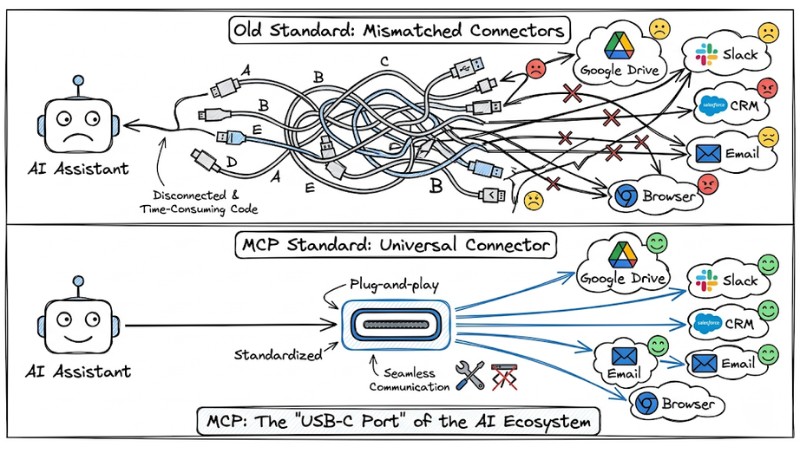
MCP is considered the USB-C port of the AI ecosystem
Why is MCP Important? 5 Superior Benefits for Enterprises
Implementing MCP brings a significant competitive advantage, especially in optimizing technological resources for businesses.
- Seamless Integration (Plug-and-play): Connect AI to internal data repositories immediately without complex technical configuration or building new infrastructure.
- Reduced Development Costs: Businesses do not need an IT team to rewrite APIs (Hard-coded API) every time they want to switch from OpenAI to Claude or other AI models.
- Absolute AI Data Security: This is a survival factor. Businesses maintain 100% control over local data. AI only "reads" what you authorize through the protocol, completely preventing leakage risks.
- Dynamic Tool Discovery: AI automatically identifies and uses available resources on the system to solve problems without prior programming.
- Real-time Interaction (Bidirectional communication): AI does not just retrieve data; it can also perform actions in reverse (e.g., creating new files, sending messages, editing code).
Real-world Example: An SME once spent weeks with their dev team connecting AI to an internal ERP system via traditional APIs. When switching to an MCP architecture, they saved 40% of development time and easily expanded cross-platform interactivity with Slack in just a few hours.
MCP Evaluation Summary Table:
| Criteria | Detailed Content |
|---|---|
| Pros | Fast, cost-effective, high security, flexible AI model switching. |
| Cons | Ecosystem is still in the expansion phase; does not yet support 100% of niche apps. |
| Best For | SMEs, developers, individual users wanting to automate work. |
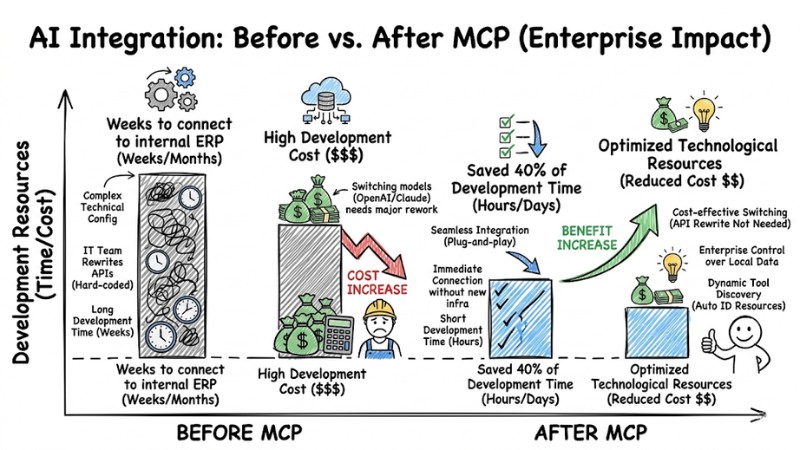
Comparing the time and cost of developing internal AI integration before and after implementing the MCP protocol
Basic Operational Structure of the Model Context Protocol
MCP operates based on a minimalist Client-Host-Server architecture. You can imagine it like the ordering process at a restaurant:
- MCP Host (Diner): The AI application you are using (e.g., Claude Desktop, Windsurf). This is where you ask questions and receive results.
- MCP Client (Server): A component hidden inside the Host. It receives requests from you and carries the message to find data, adhering to common architectural standards.
- MCP Server (Kitchen): Lightweight programs installed to connect directly to resources (Local Drive, GitHub, Database). It processes requests and returns data to the Host.
Technical Note: As an end-user, you do not need to worry about how the Client works. The only thing you need to do is install MCP Servers (available for free) into the Host software, and everything will operate automatically.
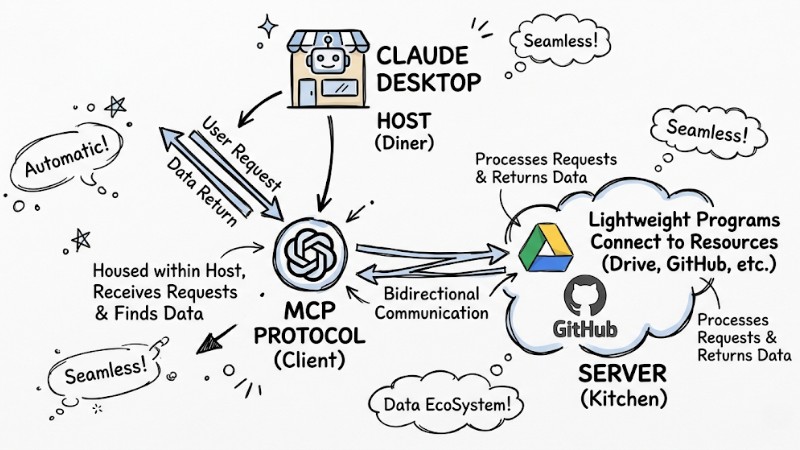
The basic operational structure of the Model Context Protocol
Comparing Model Context Protocol (MCP) and Traditional APIs
| Criteria | Model Context Protocol (MCP) | Traditional API |
|---|---|---|
| Connection Method | One single port for all services | Each service needs unique code |
| Awareness | Capable of dynamic tool discovery | Requires hard-coding |
| Deployment Speed | Fast, "Plug-and-play" configuration | Slow, requires developer intervention |
| Data Communication | Two-way, optimized for real-time context | Usually one-way request-response |
Traditional APIs are like strict legal contracts, perfect for financial transactions needing absolute precision. Meanwhile, MCP communication standardization was born to solve context optimization, helping AI read and understand documents flexibly and naturally like a human.
Top 6 Practical Applications of the MCP Standard at Work
MCP transforms AI from a pure conversation chatbot into a true process automation assistant. Here are 6 feasible application scenarios right now:
- Automated Financial Report Analysis: AI reads Excel/CSV report files directly in computer folders, synthesizes data, and automatically draws analysis charts.
- Workflow Synchronization via Slack: MCP allows AI to automatically track project progress on management software and push alert notifications directly via the Slack API.
- Programming and Source Code Debugging: Integrates with GitHub and Cloudflare Workers. AI reads the entire project repository (deeply understanding context) and suggests TypeScript fixes with extreme accuracy.
- Internal Database Retrieval: Real-time data connection with PostgreSQL or MySQL. You type commands in natural language; AI automatically converts them into SQL commands to export data.
- Personalized Email Writing Assistant: AI accesses internal email history, analyzes tone of voice, and automatically drafts response emails for partners accurately in your style.
- Smart Schedule Management: AI reads data directly from Google Calendar, automatically analyzing and rescheduling meetings if time conflicts are detected.
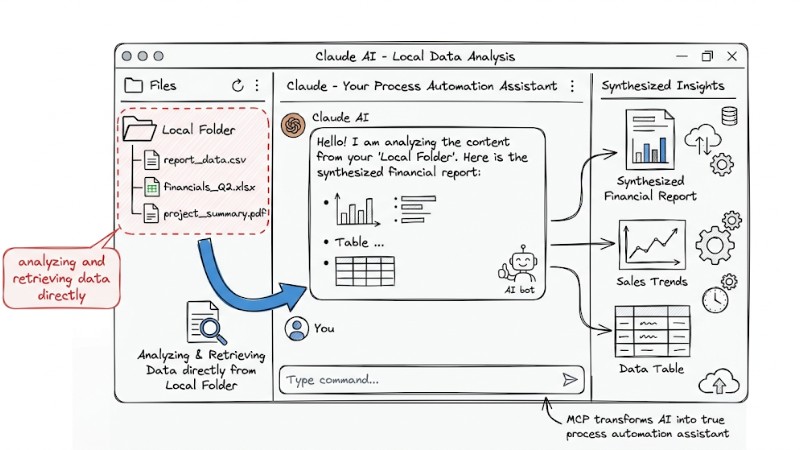
Claude AI is analyzing and retrieving data directly from a Local Folder on a personal computer
Answering Frequently Asked Questions about MCP
Is MCP free?
Yes. The Model Context Protocol standard itself is open-source released by Anthropic and is completely free. You only incur costs if using a third-party AI infrastructure platform that charges fees.
Does using the MCP protocol leak internal data?
No, if you grant permissions correctly. MCP allows AI to process data directly on local servers. You have total control over which folders AI is allowed to "see," completely blocking data leakage risks.
Can I use MCP if I don't know how to program?
Absolutely. The community has already built a series of MCP Servers (like Google Drive, Slack). You only need to copy-paste a few lines of configuration into the AI software to use it immediately.
Does the MCP protocol completely replace APIs?
No. MCP is the foundation for AI to understand context. For systems requiring strict transaction security (like bank payment gateways), traditional APIs remain the mandatory choice.
What is the Model Context Protocol?
MCP is an open-source standard developed by Anthropic that helps AI models easily access and interact with many data sources and external tools in a unified way.
Why is the Model Context Protocol important?
MCP is important because it simplifies AI integration, increases flexibility, secures data, and saves costs, helping AI understand context better instead of relying only on initial training data.
How does MCP work?
MCP operates on a client-host-server architecture, allowing AI applications (Hosts) to connect via a Client to specialized Servers to access data, tools, or perform actions.
Is MCP a new type of AI?
No, MCP is not a new AI model. It is a protocol, like USB-C, that helps existing AIs like Claude or ChatGPT connect more effectively to other systems.
When should one use MCP instead of traditional APIs?
MCP is ideal for processes requiring multi-source connections, dynamic discovery, and two-way communication with AI. Traditional APIs are still suitable for tasks requiring tight control and absolute precision.
Is there a data leakage risk when using MCP?
Data leakage risk is significantly reduced thanks to MCP's design, which allows for local operation and tight access control, but secure configuration remains the key factor.
Read more:
- What is Agent Swarm? How Agent Swarm Automates Workflows
- What is Multi-Agent Workflow? Architecture, Models and Applications
- How AI Agents work: Autonomy and Functional Mechanisms
In summary, MCP is the "USB-C port" of the AI world, a unified connection standard that helps artificial intelligence access enterprise data securely, quickly, and cost-effectively. It ends the era of having to write complex manual data integration code. Today, you can download the Claude Desktop app and install available open-source MCP Servers to experience this amazing automation power for yourself!