OpenClaw Architecture: OS Solution for AI Agents

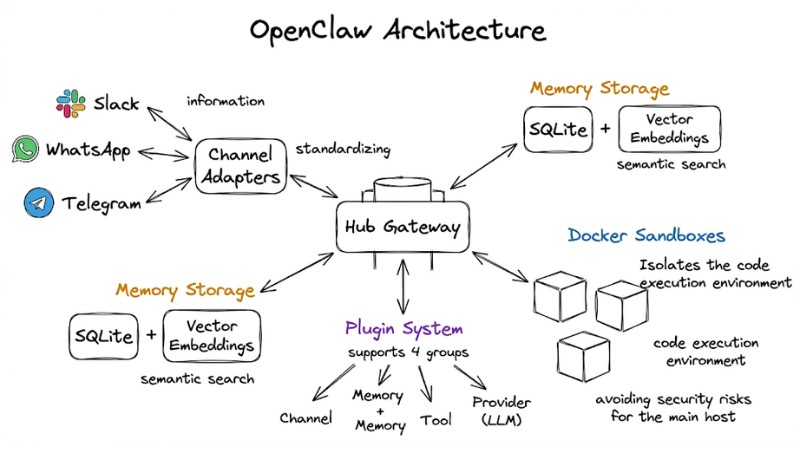
OpenClaw is an infrastructure solution that allows you to build and operate personal AI Agents directly on your own hardware (personal computers, VPS, Mac Mini). Rather than being just a typical chatbot, OpenClaw acts as a specialized operating system (OS), managing data flows, memory, and AI tasks within a strictly controlled environment. This article will help you understand the operational architecture and how to deploy this AI Agent platform to optimize personal productivity.
Key Takeaways
- OpenClaw Definition: Explore the concept of an "Operating System for AI Agents" - an intermediate infrastructure platform that manages data, memory, and real-world task execution.
- Understand the advantages that make OpenClaw superior to traditional chatbots: Grasp the benefits of data ownership, extensibility through plugins, and unified multi-channel connectivity.
- Learn about OpenClaw architecture: Understand the operational mechanism of the central coordination Gateway and the execution Agent Runtimes, ensuring low latency.
- Core technical components: Understand the roles of Channel Adapters, Plugin System, Storage, and Docker Sandbox in ensuring stable system operation.
- Advanced coordination and interaction workflows: Explore the power of direct interface customization (A2UI) and coordination between multiple Agents with distinct personas.
- Practical OpenClaw deployment strategies: Choose the right path from personal computers and VPS to Cloud-Native to optimize 24/7 performance.
- Ensuring security and privacy: Understand protection layers such as cryptographic authentication, Sandbox isolation, and security attack prevention mechanisms for AI.
- Frequently Asked Questions (FAQ): Answers to technical issues, data safety, and integration capabilities for beginners.
What is OpenClaw? Definition of an Operating System for AI Agents
OpenClaw redefines how we interact with LLMs through the concept of Infrastructure-as-Software. Instead of relying on simple chatbot interfaces, OpenClaw builds an intermediate infrastructure layer that enables Agents to execute real-world tasks rather than just returning text. It solves session management, memory storage, and task isolation - core elements that typical chatbots overlook.
Let's compare traditional Chatbots and OpenClaw through the following key information:
- Traditional Chatbots: Rely on prompts to try and remember context; often limited by the provider's web interface and carry high data privacy risks.
- OpenClaw: An AI operating system that allows multi-channel operation (Slack, Telegram, WhatsApp, etc.); integrates vector memory; executes computer tasks (file processing, browser automation) in a secure environment.
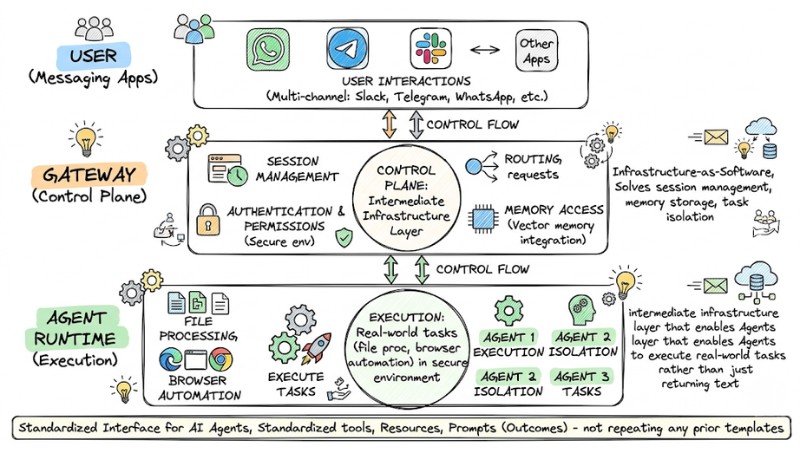
OpenClaw builds an middleware infrastructure that enables agents to perform real-world tasks
Why is OpenClaw superior to traditional chatbots?
Specifically, compared to traditional chatbots, OpenClaw stands out in three key areas:
- Local-first: All data resides on your infrastructure, ensuring absolute ownership.
- Extensibility: Supports a flexible Plugin system, making it easy to integrate new tools or platforms without touching the core source code.
- Unified connectivity: Consolidates interaction flows from multiple messaging apps into a single central point.
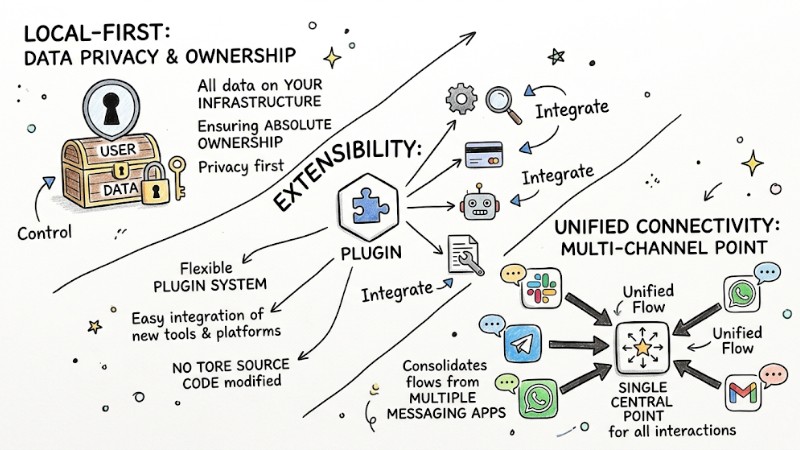
OpenClaw is superior to traditional chatbots
OpenClaw's Hub-and-Spoke Architecture
OpenClaw's architecture operates on a Hub-and-Spoke model, where the Gateway acts as the central "Hub," coordinating all interactions between users and Agents.
- Gateway (Hub): A WebSocket server that handles requests from messaging channels (Spokes). It authenticates, controls access, and routes notifications to the correct Agent Runtime.
- Agent Runtime (Spoke): This is the AI execution environment. It is responsible for decoding intent, querying memory, calling tools, and storing state after each session.
This data flow is designed to be event-driven, ensuring low latency and instantaneous response even when processing complex tasks.
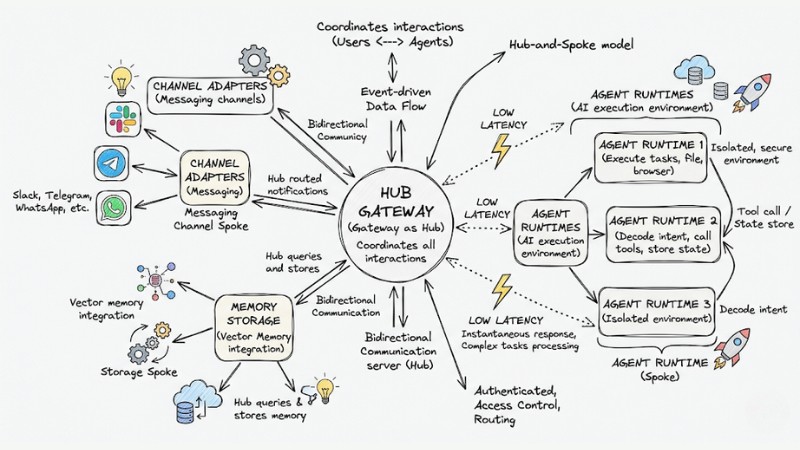
OpenClaw's Hub-and-Spoke architecture
Core Technical Components in OpenClaw
OpenClaw is comprised of modular components that keep the system stable and secure:
| Component | Function |
|---|---|
| Channel Adapters | Standardize information from Telegram, WhatsApp, Slack into a single format. |
| Plugin System | Supports 4 groups: Channel, Memory, Tool, and Provider (LLM). |
| Storage | Uses SQLite combined with Vector Embeddings for semantic search. |
| Docker Sandbox | Isolates the code execution environment, avoiding security risks for the main host. |
Example Plugin Configuration (JSON):
{
  "plugin": "browser-automation",
  "enabled": true,
  "sandbox": "docker",
  "limits": { "memory": "512mb" }
}
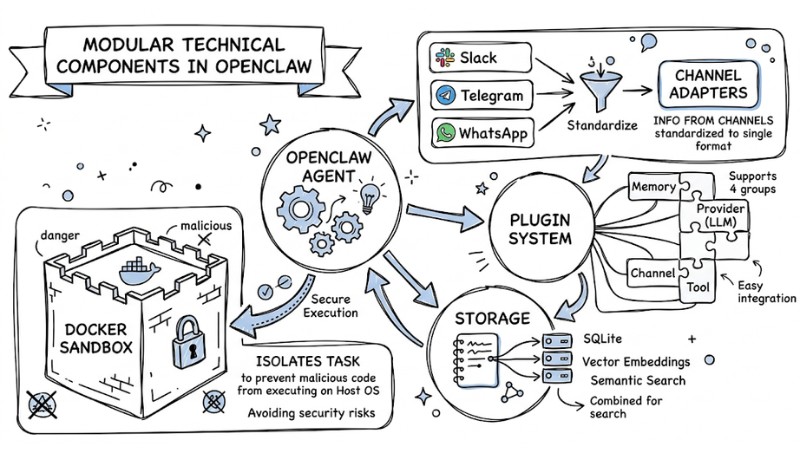
Docker Sandbox model isolating tasks to prevent malicious code from executing on the host OS
Advanced Coordination and Interactivity
In the OpenClaw architecture, coordination and interactivity are pushed to a new level thanks to two important mechanisms:
- A2UI (Agent-to-UI): OpenClaw allows the agent to generate interactive HTML components directly within the chat, changing the workspace interface in real-time based on your needs.
- Multi-Agent Coordination: OpenClaw supports users in setting up Agents with different Personas and permissions. You can switch flexibly between Agents depending on the work context.
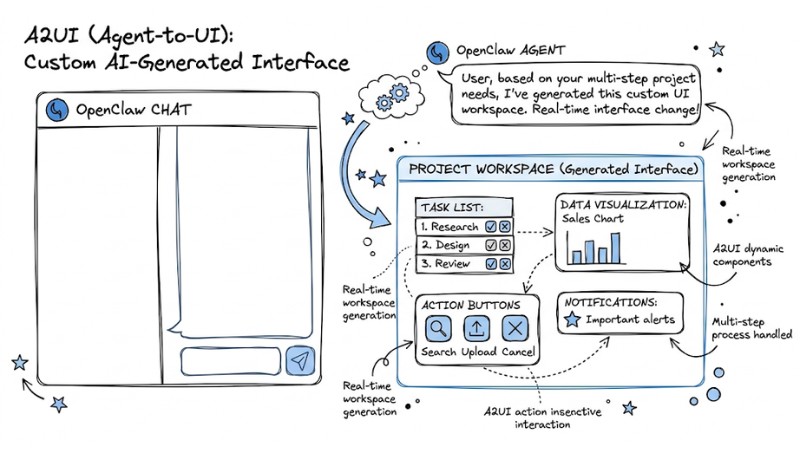
Customizable UI generated by AI through the A2UI feature
Practical OpenClaw Deployment Strategies
In practice, you can deploy OpenClaw via 3 different paths depending on your needs and system complexity:
- Local Development: You run OpenClaw directly on your personal computer to test, fine-tune configurations, and develop plugins in a secure, easy-to-debug environment.
- Remote Production (VPS): You install OpenClaw as a Systemd service on a private VPS so the agent can operate stably 24/7 and serve multiple devices simultaneously.
- Cloud-Native (Fly.io): Deploying OpenClaw on container platforms like Fly.io allows you to easily scale resources as traffic increases without having to manually manage complex infrastructure.
Note: Regardless of the deployment method, you should use Tailscale to create a virtual private network (VPN), encrypting all connections between devices and the OpenClaw infrastructure to ensure maximum data safety.
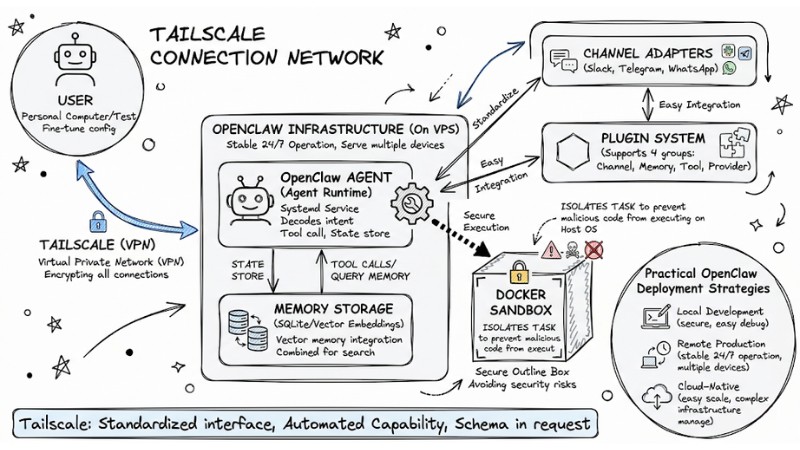
Tailscale network connectivity between users and OpenClaw infrastructure on VPS
Ensuring Security and Privacy in the System
OpenClaw places security and privacy as the top priority by building multiple layers of protection around the agent and your infrastructure:
- Cryptographic Handshake: The system uses a cryptographic handshake mechanism to authenticate devices, ensuring only clients issued with valid keys can connect, thereby blocking unauthorized access.
- Tool Sandboxing: Every tool called by the AI is run inside a Docker sandbox, limiting the blast radius if an incident occurs.
- Prompt Injection Defense: OpenClaw applies strict filters and context rules, reducing the risk of the AI being tricked into performing actions outside the scope of the tasks you defined.
| Threat | Protection Mechanism |
|---|---|
| Unauthorized access. | Cryptographic WebSocket authentication. |
| Malicious code execution. | Docker Container isolation. |
| Data leakage. | Self-hosted local storage. |
FAQ about OpenClaw Architecture
How does OpenClaw's Hub-and-Spoke architecture work?
OpenClaw's Hub-and-Spoke architecture centers on the Gateway as the control hub, connecting messaging platforms and coordinating messages to the Agent Runtime. The Gateway and Agent Runtime work together to handle the AI loop, manage context, and execute tool calls efficiently.
What are the core technical components of OpenClaw?
The primary components include Channel Adapters for message standardization, a Plugin System for feature expansion, a Storage mechanism (SQLite + Vector) for smart searching, and Docker Sandbox for secure isolation of tool execution tasks.
How do I deploy OpenClaw securely and privately?
OpenClaw prioritizes security with layers such as connection encryption, network isolation, and protection against prompt injection attacks. Self-hosting ensures your personal data is not shared with third parties.
Does OpenClaw require high programming skills?
Not necessarily. You can use default configurations, but if you want to customize Tools or Plugins, basic knowledge of JSON and Docker will be very helpful.
Which AI models can I use with OpenClaw?
The system supports most popular Providers like OpenAI, Anthropic, or open-source models running locally via Ollama.
How do I keep the AI running 24/7?
The optimal way is to deploy on cloud platforms like Fly.io or a personal VPS server accompanied by an automatic data backup mechanism.
Is my chat data collected?
Chat data is not collected. With a self-hosted architecture, your entire chat history is stored in files on your personal server and is not sent to any third party.
Does OpenClaw support chat apps in Vietnam?
OpenClaw supports expansion via Plugins; you can easily write additional Adapters for popular platforms in Vietnam through the system's open programming interface.
Read more:
- What is AI Code Interpreter? Its Importance and How It Works
- OpenClaw Use Case: Effective Work Automation Methods
- What is Tool Calling? How to turn AI into a true action-taking assistant
OpenClaw is a major step forward for those who want full control over their personal AI system. You can access the project repository on GitHub to start installing today. Build your own digital "brain" and experience the difference of a true AI platform.