OpenClaw Use Case: Effective Work Automation Methods

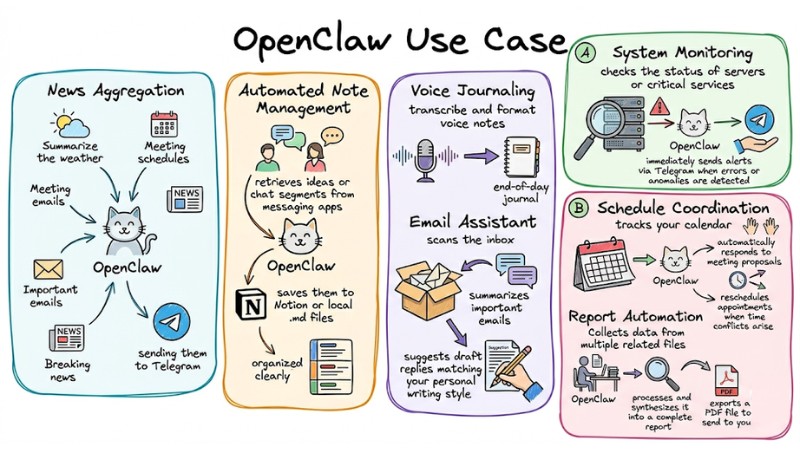
OpenClaw is an automated AI Agent that allows you to execute commands on your computer from sending emails and managing schedules to controlling software via chat platforms with many practical OpenClaw use cases in daily work. This article will help you understand how to set up, operate safely, and leverage the power of OpenClaw to optimize personal productivity.
Key Takeaways
- Important Security Note: Master defensive rules, environment isolation using Docker, and strict permissioning to operate OpenClaw safely.
- How OpenClaw Works: Understand the operational structure of an AI Agent through the combination of an LLM "brain," skill "hands," and the "soul" rules (SOUL.md).
- Basic OpenClaw Setup Process: Specific steps from VPS deployment and AI connection to Telegram Bot configuration for automation readiness.
- Practical OpenClaw Use Cases: Explore typical applications that save time, from managing emails and schedules to automating reports.
- OpenClaw Use Case FAQ: Answers to questions about safety, operating costs, and how beginners can get started.
Important Security Notes Before Starting
OpenClaw has deep access to the system, so security is the top priority. You must follow "remote defense" rules to avoid risks from vulnerabilities like prompt injection (a technique of inserting malicious commands to deceive the AI).
- Isolate the Environment: First, you need to ensure OpenClaw always runs in Docker to limit its impact on the host server.
docker run -d --name openclaw-agent -v /path/to/data:/app/data openclaw/core
- Human-in-the-loop: You should set up a Human-in-the-loop mechanism to require the AI to wait for confirmation before executing sensitive commands related to money, deleting files, or sending important emails.
- Low Privilege Account: You absolutely must not run OpenClaw with root privileges; instead, create a separate, non-root user account.
- Limit Access Rights: Additionally, only install essential skills and use individual service accounts for each purpose.
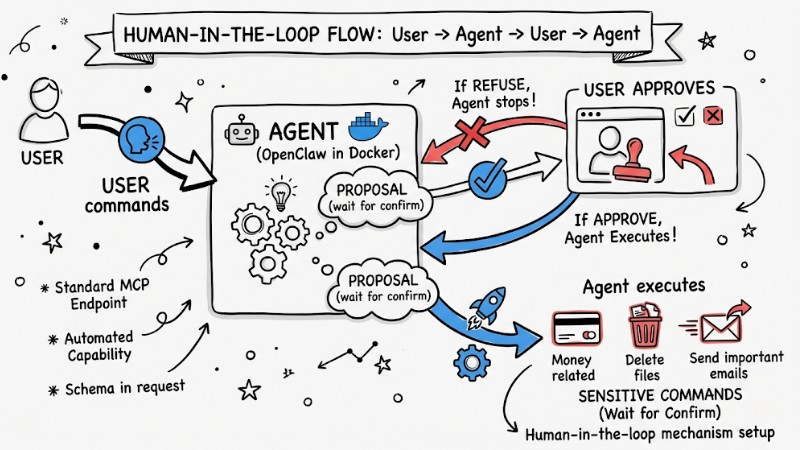
Set up a Human-in-the-loop mechanism to require the AI to wait for confirmation
How Does OpenClaw Work?
OpenClaw acts as an "intermediate assistant" standing between you, the AI model, and external tools:
- The Brain (LLM): Uses models like Claude or GPT to process logic, understand requests, and make execution decisions.
- The Hands (Skills): These are modules/connectors that help the AI manipulate the real world, such as working with Notion, GitHub, Gmail, Stripe, or running system commands.
- SOUL.md: Acts as the "soul" of the agent, where you define rules, tone, limits, and working principles that OpenClaw must always follow.
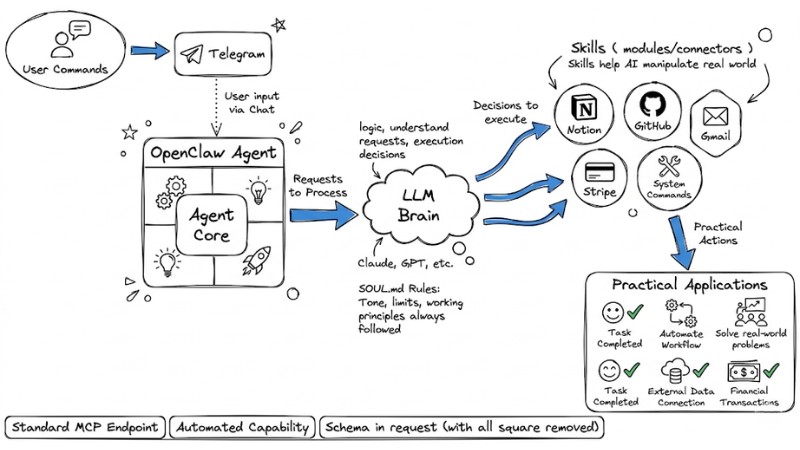
How OpenClaw works
Basic OpenClaw Setup Process for Beginners
Deployment and Hosting
To run stably 24/7, rent a VPS (such as DigitalOcean or Vultr), then connect via SSH and install the execution environment (Docker) as instructed in the project's official GitHub.
Connecting the Brain
You need to configure the Claude or GPT API Key in the configuration file and absolutely never reveal this key in chat history.
Setting Up the Control Interface
Using a Telegram Bot is the optimal choice for you:
Step 1: First, access @BotFather on Telegram to create a new bot.
Step 2: Then, obtain the Token and enter it into the OpenClaw config.yaml file.
Installing Skills from Clawhub
Visit clawhub.ai to find suitable skills. Then use the installation command below to integrate new features into your agent:
clawhub install [skill-name]
Refining SOUL.md
Finally, create a SOUL.md file in the root directory with example content:
Role: Personal Assistant
- Always confirm before sending emails.
- Prioritize tasks within the 'Urgent' list.
- Use a professional and concise tone.
- Never delete files without explicit user consent.
Top 7 Practical and Typical OpenClaw Use Cases in Work
Below are several typical OpenClaw use cases in daily work that you can apply immediately to see the value of AI Agent automation:
- News Aggregation: OpenClaw can summarize the weather, meeting schedules, important emails, and breaking news, sending them to Telegram before you start work.
- Automated Note Management: OpenClaw automatically retrieves ideas or chat segments from messaging apps and saves them to Notion or local .md files, organized clearly for future reference.
- Voice Journaling: Automatically transcribe and format voice notes into an end-of-day journal.
- Email Assistant: OpenClaw automatically scans the inbox, summarizes important emails, and suggests draft replies matching your personal writing style.
- System Monitoring: This tool regularly checks the status of servers or critical services and immediately sends alerts via Telegram when errors or anomalies are detected.
- Schedule Coordination: OpenClaw tracks your calendar, automatically responds to meeting proposals, and reschedules appointments when time conflicts arise, keeping the schedule optimized.
- Report Automation: Collects data from multiple related files, processes and synthesizes it into a complete report, then exports a PDF file to send to you at a fixed time each week.
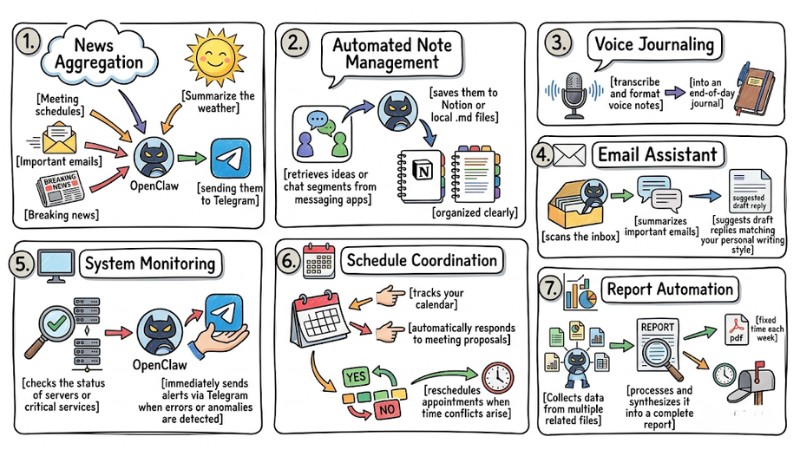
7 Practical and Typical OpenClaw Use Cases in Work
Frequently Asked Questions About OpenClaw
What is OpenClaw and what is it used for?
OpenClaw is an automated AI agent capable of executing tasks rather than just answering questions. It connects to LLMs, skills, and communication apps to automate personal and business tasks.
Is OpenClaw safe to use?
OpenClaw can pose security risks if not configured correctly. Therefore, be very careful with prompt injection and only grant necessary access, while using protections like Docker and manual approval mechanisms.
How do I set up OpenClaw on my computer?
To set up OpenClaw, you need to install it on your machine or VPS, connect to an AI model (like Claude or GPT), set up a communication interface (like Telegram), install necessary skills, and configure the SOUL.md file to define the agent's role and rules.
How does OpenClaw work?
OpenClaw operates as a persistent agent on your machine, using a "brain" (LLM) to understand commands and "skills" to execute actions like sending emails, running system commands, or interacting with APIs.
How can OpenClaw be used to automate daily tasks?
You can use OpenClaw to receive customized morning newsletters, turn voice notes into daily journals, or store and retrieve personal information efficiently through a memory system.
What security risks should be noted with OpenClaw?
Key risks include prompt injection, risks from granting broad access, and vulnerabilities from default settings. Always create a separate user, use dedicated accounts for risky tasks, and add manual approval mechanisms.
Which skills should I start with when using OpenClaw?
It is recommended to start with read-only skills first, such as reading a calendar instead of writing to it. This helps you get familiar with OpenClaw and minimizes risk during the learning process.
How does OpenClaw help save time at work?
OpenClaw automates repetitive and time-consuming tasks, freeing you to focus on more strategic and creative work, thereby increasing efficiency and reducing processing time.
Is OpenClaw expensive?
OpenClaw itself is an open-source project, so you don't pay license fees, but you will incur costs for the infrastructure to run the agent (usually a VPS) and for the LLM APIs like Claude or GPT depending on usage levels. For personal/small group needs, these costs are typically moderate and can be seen as "hiring" a low-cost virtual employee to automate repetitive work.
Do I need to know how to program to use OpenClaw?
You are not required to know how to program, but if you have a little basic knowledge of the terminal and how to edit configuration files (like YAML or Markdown), installing and customizing OpenClaw will be much easier and more effective.
Is personal data safe when using OpenClaw?
Because OpenClaw runs locally on your machine (or a VPS you manage), data is not sent to third-party servers except for the data you send to the AI model for processing.
Read more:
- What is AI Code Interpreter? Its Importance and How It Works
- What is Tool Calling? How to turn AI into a true action-taking assistant
- What is Claude Code? Installation Guide and 15 Practical Use Cases
OpenClaw is clear evidence that by choosing the right OpenClaw use case, you can completely turn repetitive processes into automated workflows running in the background 24/7. This is the right time to try applying a few simple OpenClaw use cases to your daily work, gradually optimizing configurations and skills, and step-by-step building yourself a true "AI assistant."