AI Agents for Enterprise: An A-Z Practical Deployment Roadmap

An AI Agent is an autonomous software system capable of planning, reasoning, and executing to automate enterprise operational workflows. This article helps you correctly understand the nature of AI Agents, differentiate them from other automation technologies, and build a practical and safe deployment roadmap for various enterprise scales.
Key Takeaways
- AI Agent Concept: Understand that an AI Agent is an autonomous system capable of perception, planning, and independent decision-making, helping enterprises automate complex tasks instead of just passively responding.
- Core Differences: Clearly distinguish the flexibility and autonomy of AI Agents from the rigid scripts of Chatbots and the UI dependencies of RPA, helping you pick the right tool for your automation problem.
- Versatile Applications: Identify the 5 sectors reaping the biggest benefits, including CS, Finance, Marketing, HR, and Supply Chain, helping you easily spot bottlenecks that need optimization within the organization.
- Deployment Roadmap: Master the 5 battle-tested steps from selecting a Pilot workflow and cleansing data to training personnel, helping enterprises adopt AI safely and cost-effectively.
- Risk Management: Know how to handle "AI hallucinations", secure data, and control costs using a Human-in-the-loop model coupled with strict Role-Based Access Control (RBAC).
- Suitability: Clearly determine that AI Agents are for all enterprise sizes; especially SMEs can fully access this tech via packaged SaaS solutions.
- FAQ: Get answers to questions regarding deployment timelines, safety levels when hooking into internal systems, and fears of AI entirely replacing human staff.
What is an AI Agent? Identifying AI Agents in Enterprise Environments
AI Agent Concept
An AI Agent is an intelligent software system capable of perceiving its environment, reasoning/planning, and making independent decisions (Decision-making) to achieve assigned goals. Unlike traditional software requiring humans to execute every operation, an AI Agent operates autonomously based on its internal information processing and decision-making mechanics. The core value foundation of this technology lies in its Autonomy.
The Connection Between Generative AI and AI Agents
Generative AI like ChatGPT is a language processing and reasoning technology. However, when operating independently, Generative AI can only respond to queries and generate content.
An AI Agent is the integration of Generative AI's processing power and the execution capabilities of tools or APIs (Application Programming Interfaces). This combination enables the system to not only understand and plan but also directly deploy actions in the real world.
- Generative AI: Ingests requests, parses them, and determines the course of action.
- Tools/APIs: Interacts with ERP systems, dispatches emails, and crunches data in Excel files.
Equipping staff with ChatGPT Plus accounts is not enough for an enterprise to be considered operating AI Agents. A true AI Agent requires configured access rights and the ability to execute actions directly within operational workflows to automate tasks and optimize enterprise performance.
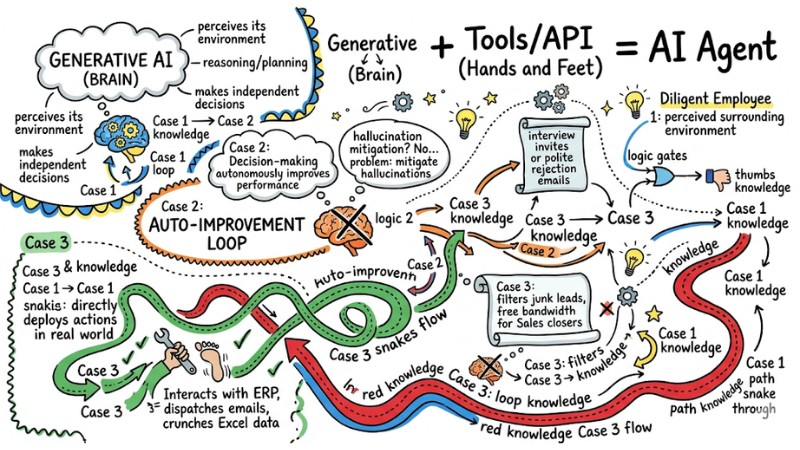
AI Agents seamlessly combine reasoning with effective execution
The Difference Between AI Agents, Chatbots, and RPA
Many managers still confuse AI Agents with legacy automation technologies. To invest and deploy in the right direction, enterprises need to accurately identify the nature and application scope of these three technologies.
Traditional Chatbots
Chatbots are automated communication tools relying on hard-coded rules (Rule-based scripts). When a user asks a question outside the script's scope, the system usually throws an error or escalates the ticket to a human rep. Chatbots are suited for repetitive communication scenarios with strictly structured content.
RPA - Robotic Process Automation
RPA is a technology that simulates human interactions on software UIs, such as mouse clicks or data copying. This system operates accurately under stable data conditions and static interfaces. However, if there are changes to the data structure or the user interface, the RPA pipeline can break.
AI Agent
An AI Agent is an automation system capable of planning and logical reasoning to achieve assigned goals. Upon receiving a complex task, an AI Agent can decompose it into micro-steps, select the appropriate tools, handle edge cases, and complete the workflow autonomously.
Overview Comparison Table:
| Criteria | Chatbot | RPA | AI Agent |
|---|---|---|---|
| Nature | Script-based communication | Simulates manual computer operations | Autonomy and logical reasoning |
| Flexibility | Low | Very Low (highly prone to breaking upon UI changes) | High |
| Error Handling | Throws errors or escalates to human reps | Halts execution | Autonomously figures out alternative workarounds |
Real-World Scenario Illustration: Processing a Customer Refund Request
- Chatbot: Sends the customer the refund policy and instructions to fill out a form manually.
- RPA: Downloads the customer's submitted form and copies the data into the financial system. If the form format is corrupted, the pipeline crashes.
- AI Agent: Parses the email content, identifies the reason for the refund, queries the purchase history in the CRM, cross-references company policies, and, if valid, executes the refund via the payment gateway's API. Finally, the system dynamically generates and sends an automated reply to the customer.
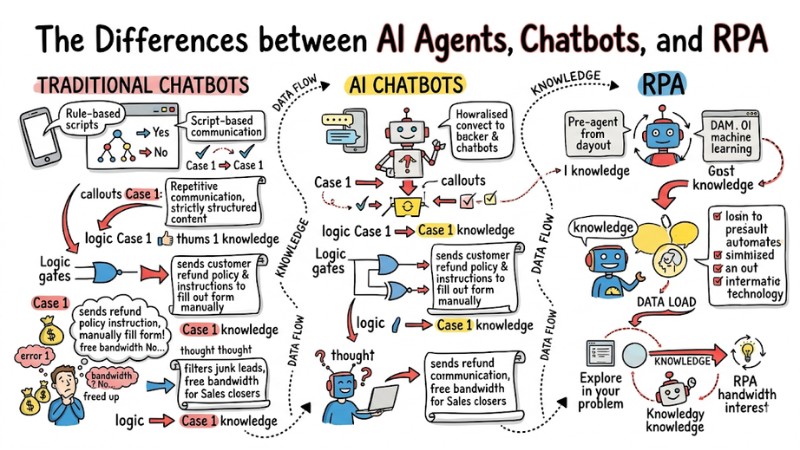
The Difference Between AI Agents, Chatbots, and RPA
Practical Applications of AI Agents in Optimizing Enterprise Operations
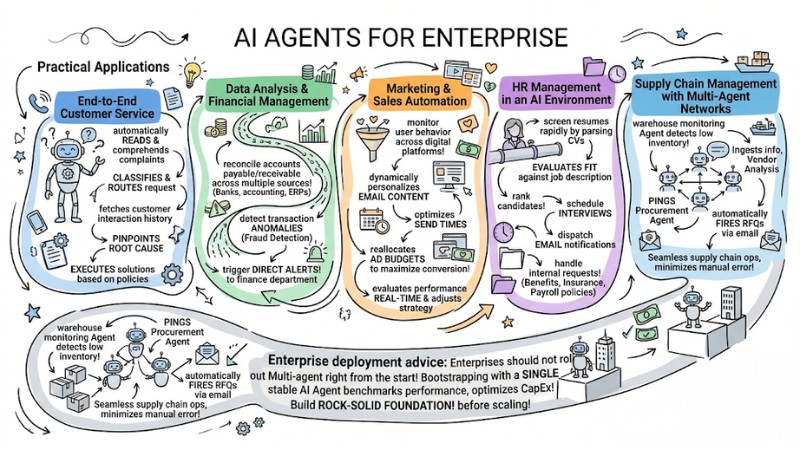
End-to-End Customer Service
AI Agents can handle the entire lifecycle of a customer support ticket. The system automatically reads and comprehends the complaint, classifies it, and routes the request to the correct department. Furthermore, an AI Agent can fetch customer interaction history, pinpoint the root cause, and execute workarounds or recommend solutions aligned with company policies.
Data Analysis and Financial Management
AI Agents replace manual operations in the financial reporting pipeline. The system can automatically reconcile daily accounts payable/receivable across multiple data sources like banks, accounting software, and ERPs. Simultaneously, AI Agents can detect transaction anomalies (fraud detection) and trigger direct alerts to the finance department or relevant stakeholders.
Marketing and Sales Automation
In Marketing and Sales, AI Agents monitor user behavior across digital platforms. Upon detecting buying signals, the system dynamically personalizes email content, optimizes send times, and reallocates ad budgets across channels to maximize conversion rates. AI Agents can also evaluate campaign performance in real-time and dynamically adjust content distribution strategies.
HR Management in an AI Environment
AI Agents assist HR departments in rapidly screening resumes by parsing CVs, evaluating fit against job descriptions, and ranking candidates. The system can autonomously schedule interviews, dispatch email notifications, and handle internal requests regarding benefits, insurance, or payroll policies. Consequently, the HR team can pivot to strategic initiatives instead of drowning in administrative grunt work.
Supply Chain Management with Multi-Agent Networks
At an advanced tier, multiple AI Agents can orchestrate to form a multi-agent collaboration network. For instance, a warehouse monitoring Agent detects low inventory and pings the Procurement Agent. The Procurement Agent ingests this info, runs vendor analysis, and automatically fires off RFQs via email. This model ensures seamless supply chain operations and minimizes manual errors.
Enterprise deployment advice: Enterprises should not roll out Multi-agent models right from the start. Bootstrapping with a single, stable AI Agent within a specific departmental workflow helps benchmark performance, optimize CapEx, and build a rock-solid foundation before scaling the application scope.
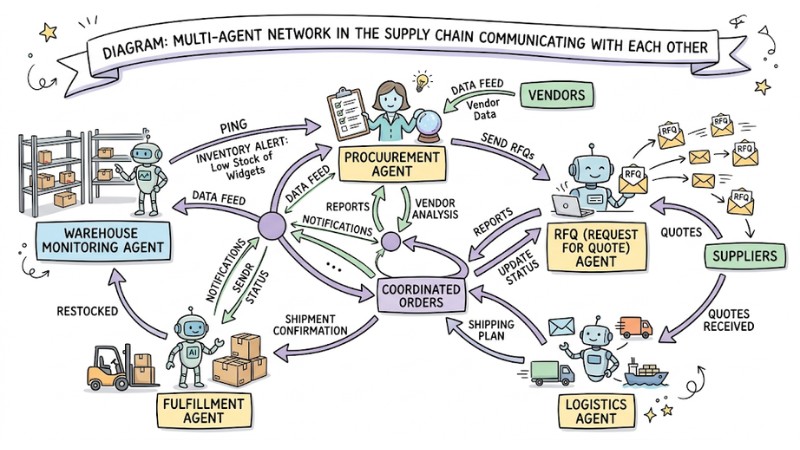
Multi-agent network communicating within a supply chain
Safe and Efficient AI Agent Deployment Roadmap for Vietnamese Enterprises
This is a battle-tested framework helping enterprises deploy AI Agents to optimize costs and mitigate resource waste:
Step 1: Needs Assessment and Pilot Workflow Selection
The enterprise identifies a workflow burning excessive manual hours, possessing clear rules but still requiring a degree of flexibility, such as lead scoring in Sales operations. Initially, prioritize small, low-risk pipelines over workflows involving legal or high-value transactions to easily validate performance before scaling.
Step 2: Enterprise Data Standardization and Cleansing
The enterprise aggregates, digitizes, and categorizes internal documents, workflows, and policies into standardized, structured text formats, establishing clear access controls across departments. Standardizing data and processes right out of the gate mitigates the "Garbage in, garbage out" risk and heavily boosts the stability of outputs generated by the AI Agent.
Step 3: Solution Selection and Legacy System Integration
The enterprise benchmarks available AI Agent platforms based on features, pricing, security, and integration capabilities, then hooks them into systems like ERPs, CRMs, or internal collaboration tools via APIs. For SMBs, opting for monthly SaaS solutions is usually more viable than building the entire architecture from scratch, as it slashes initial CapEx and accelerates time-to-market.
Step 4: Benchmarking, Testing, and Enforcing Supervised Autonomy
The enterprise runs the AI Agent in parallel with human staff during the testing phase; personnel monitor the outputs, tweak instructions, and update operational rules while configuring logging, monitoring, and reporting pipelines. For high-impact operations like payment approvals, contract signing, or critical data mutations, enforce human-approval gates before the system executes to guarantee safety and compliance.
Step 5: Training Staff to Adapt to the New Working Model
The enterprise hosts training sessions and workshops to guide staff on how to interface with AI Agents, engineer prompts, monitor, and provide feedback on outputs, while standardizing internal user documentation. Concurrently, the enterprise supports staff transitioning from execution roles to AI supervision and management roles, allowing them to focus heavily on activities driving strategic value for the organization.
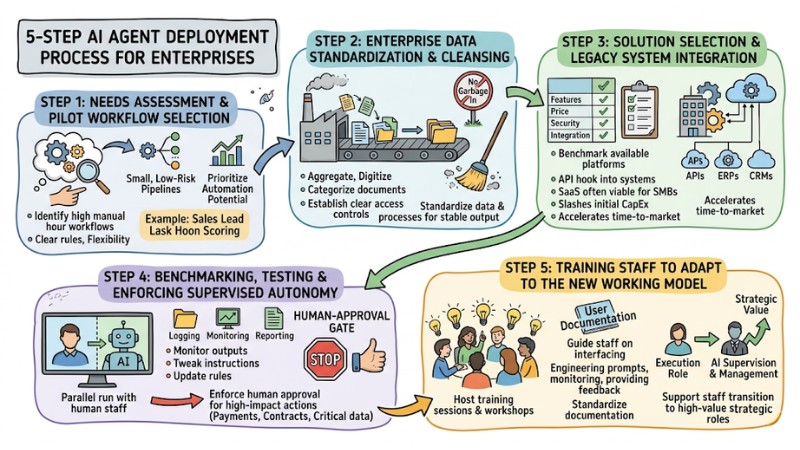
5 Steps to Successfully Deploying AI Agents in Your Business
Challenges in Adopting AI Agents and How to Resolve Them
AI Hallucination Risks and Reliability
- The Problem: AI can hallucinate false, baseless, or inaccurately interpreted content yet present it highly convincingly, jeopardizing business decisions if left unchecked.
- The Solution: Enforce a Human-in-the-loop model, meaning human verification is always required at critical decision nodes. Force the AI Agent to explicitly cite internal data sources or reference systems before making recommendations or executing actions in high-risk pipelines.
Data Security and Privacy
- The Problem: AI Agents typically require access to massive troves of internal data to operate effectively, spawning risks of leaking sensitive information or accessing out-of-scope environments.
- The Solution: Configure strict Role-Based Access Control (RBAC) and the "least privilege" principle for every user group and individual AI Agent. For example, a Marketing AI is only granted access to campaign-related customer behavior data, explicitly barring it from accessing payroll data or HR records.
CapEx and Operational Capabilities
- The Problem: Deployment costs can encompass LLM API call fees, cloud compute infrastructure costs, data storage, and expenses for operating and monitoring the system.
- The Solution: Build an ROI calculation framework based on man-hours saved, error reduction rates, and added value, rather than purely looking at software licensing costs. Enterprises can deploy open-source AI models or small language models for basic tasks to slash operational burn rates while still fulfilling job requirements.
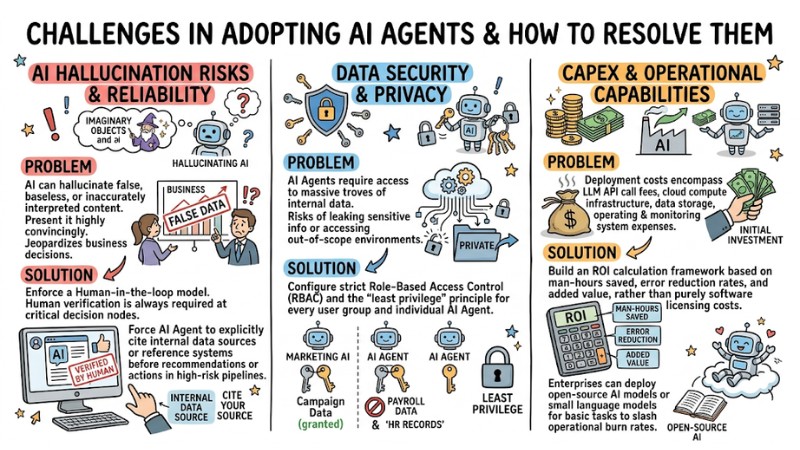
Challenges in Adopting AI Agents and How to Resolve Them
Frequently Asked Questions about AI Agents
Should SMEs use AI Agents?
Yes. SMEs are primed to leverage AI Agents to optimize costs and boost efficiency because they can utilize packaged SaaS solutions without needing a massive IT squad or complex infrastructure. Enterprises can bootstrap with small, repetitive workflows like customer support, data entry, or reporting to benchmark performance before scaling.
Will deploying AI Agents completely replace human staff?
No. AI Agents primarily replace repetitive, procedural tasks, offloading the operational grunt work from your staff. Human personnel still retain roles in strategic planning, critical decision-making, and building relationships with clients and partners.
How long does it take for an enterprise to successfully integrate an AI Agent?
For a simple pilot workflow utilizing a SaaS solution, the typical deployment timeline ranges from 2 to 4 weeks, encompassing initial configuration, API hooking, and fine-tuning. Complex systems with deep customization hooked into multiple enterprise platforms typically require 3 to 6 months to reach a stable production state.
Are AI Agents safe when hooked directly into ERP/CRM systems?
AI Agents can operate safely if properly architected and strictly permissioned, especially with robust access controls and telemetry in place. Best practice is to bootstrap with read-only permissions in the early stages, allowing the system to propose actions, and only consider granting write permissions to specific data fields once acceptable accuracy and risk mitigation levels are achieved.
Read more:
- When to Use an AI Agent? 7 Signs You Need Automation
- Popular Types of AI Agents: How to choose and Real-World Applications
- How AI Agents work: Autonomy and Functional Mechanisms
AI Agents are rapidly becoming a critical component of operational strategy, helping enterprises automate repetitive tasks, optimize CapEx, and supercharge performance across multiple functional departments. Enterprises can start with a micro-pilot workflow, validate the ROI, and incrementally scale across other departments to build a proactive operational foundation in the digital era.
Tags