Optimizing Coding Agent Codebases: 7 Best Practices for Developers

Have you ever wondered why, despite a meticulously crafted prompt, AI tools (like GitHub Copilot or Cursor) still generate buggy code or get stuck in endless debugging loops? The root cause usually isn't the AI, but your project's structure itself. A messy, inconsistent codebase forces the AI to burn tokens and constantly make blind guesses. This article will guide you on how to set up a standard AI-ready codebase. By doing so, you won't just optimize tokens efficiently; you'll also significantly elevate your developer experience.
Key Takeaways
- The Importance of an AI-ready Codebase: Understand why a transparent data structure is the decisive factor in helping LLM models avoid hallucinations and guesswork.
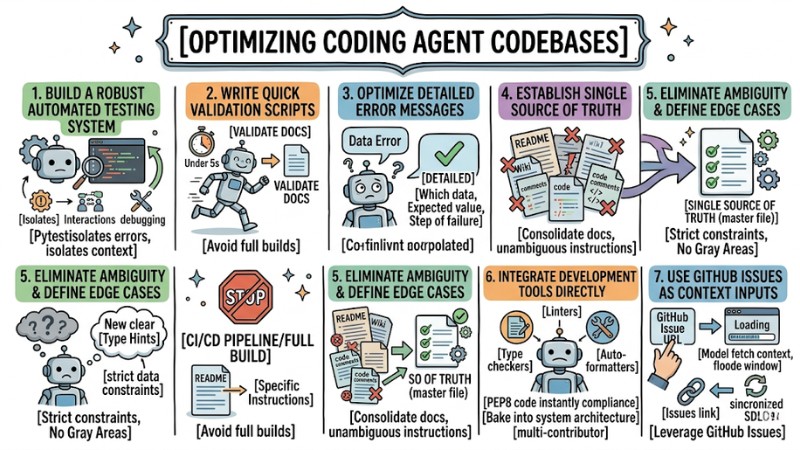
- The 7-Step Optimization Process: Master techniques ranging from building automated testing systems and writing fast validation scripts to consolidating documentation (Single Source of Truth).
- Context Management: Learn how to use GitHub Issues and specific configuration files to provide "just enough" context for the AI, rather than dumping the entire project into its memory.
- Prompting Techniques for Code: Grasp how to establish "hard boundaries" using Type Hints and defining Edge Cases so the AI isn't allowed to guess.
- Strategic Benefits: Compare a traditional codebase against an AI-ready one to see clear improvements in performance, token costs, and source code accuracy.
- Frequently Asked Questions (FAQ): Get answers to practical issues regarding operational costs, troubleshooting, and the roadmap for transitioning legacy projects to AI-ready standards.
Why Optimize Your Codebase for AI Coding Agents?
An AI-ready codebase is a project structured with transparency, stripping away ambiguity so Large Language Models (LLMs) like GitHub Copilot or Claude Code can read and comprehend it smoothly.
AI models operate based on context windows. If your codebase is littered with outdated docs, garbage code, or overlapping logic, the AI loads this entire mess into its memory. The consequence is the AI wasting tokens, generating skewed code, and eating up processing time.
Optimizing a project for AI is essentially cleaning up technical debt. Whatever clarifies your codebase for the AI is exactly what makes the project easier for you to maintain.
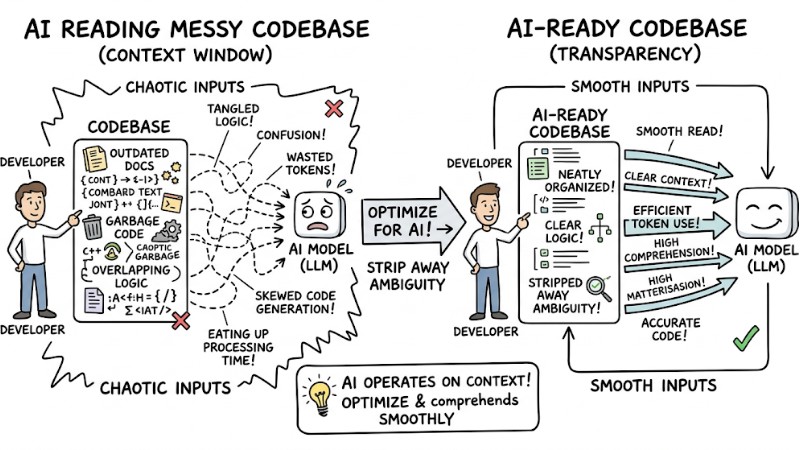
The difference between an AI reading a messy codebase vs an AI-ready codebase
7 Methods to Effectively Set Up a Coding Agent Codebase
1. Build a Robust Automated Testing System
AI lacks human intuition, but it is exceptionally good at parsing text and self-correcting if provided with instant feedback. Therefore, an Automated Testing system acts as a vital feedback loop for the agent.
In real-world projects, I prioritize using Pytest because it isolates errors exceptionally well, helping the AI focus solely on the exact file being edited rather than the whole codebase. You must also prepare interactive testing environments for the AI, enabling it to run tests and loop through debugging phases without your intervention.
When assigning a task to an agent, attach explicit directives:
AI Prompt Example:
"Write a user login function. Once finished, automatically run pytest tests/test_auth.py. If it fails, analyze the logs and fix the code until all tests pass 100%."
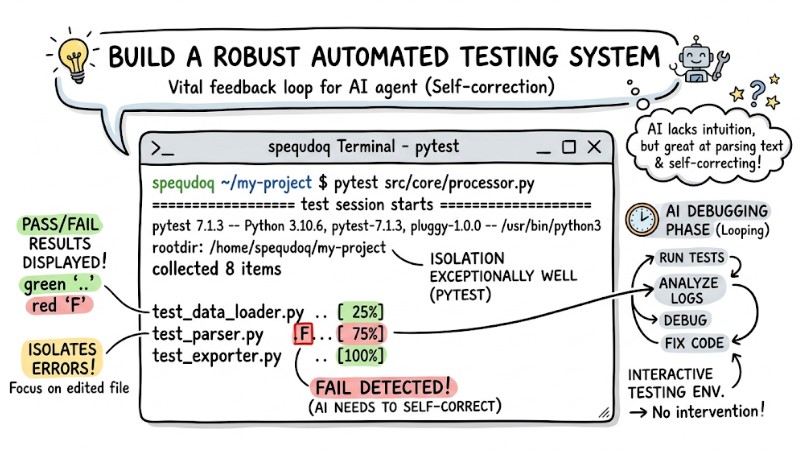
Terminal where the AI runs Pytest and displays the pass/fail results
2. Write Quick Validation Scripts Instead of Full Builds
The Problem: A major issue when working with AI is forcing the agent to run the entire CI/CD pipeline or a full build just to check the formatting of a single file. This wastes minutes of processing time, devours a massive amount of tokens, and completely severs the agent's train of thought.
The Solution: You should design micro-validation scripts focused on a single, isolated task.
- Ensure the script executes in under 5 seconds (e.g.,
npm run validate-docs). - Write explicit instructions in the README so the AI knows exactly when to call which command.
- Command the AI to prioritize using these local tools rather than building the entire site.
3. Optimize Detailed Error Messages
Large Language Models (LLMs) are completely blind to the "feel" of software execution flows because they only "see" text. Therefore, error message diagnostic strategies need to be as informative/verbose as possible.
When a test fails, a generic message like "Data Error" is nearly meaningless to the AI. You must output exactly which data was wrong, what the expected value was, and at what step the failure occurred.
Bad Error Message (Confuses the AI):
assert user.is_active, "User validation failed"
Good Error Message (Provides sufficient context):
assert user.is_active, f"User validation failed: Expected active status for user_id={user.id}, but got status='{user.status}'. Check activation flow."
4. Establish a "Single Source of Truth" for Documentation
Root Cause: Documentation debt occurs when you scatter 5 different guide files across the README, a Wiki, and code comments. When these documents contradict one another, the AI falls into hallucinations and generates incorrect logic.
Consequence and Solution: Consolidate all documentation into a Single Source of Truth:
- Create one unambiguous instruction document.
- Delete old guide files, or redirect them to the master file.
- Explicitly point the AI to the root documentation path right within your system prompt.
5. Eliminate Ambiguity and Clearly Define Edge Cases
Developers often carry a ton of implicit knowledge: you inherently know what to do when input data is null, but the AI lacks that intuition completely. If edge cases aren't explicitly and unambiguously defined, the model is highly prone to "creatively" generating garbage code to fill in the blanks.
To eradicate ambiguity, you should heavily use Type Hints and strict data constraints to set "hard boundaries" for the system, thereby boosting its interpretability for machines. Once you eliminate the gray areas in inputs and outputs, the AI won't have to guess and will naturally generate more stable, consistent code.
# Define clear data boundaries to prevent AI guesswork
def process_payment(amount: float, currency: str = "USD") -> bool:
  if amount <= 0:
    raise ValueError(f"Invalid amount: {amount}. Must be > 0")
# Next logic processing
6. Integrate Development Tools Directly into the Workflow
Instead of wasting tokens prompting phrases like "Please write standard PEP8 code", bake Linters, Type checkers, and Auto-formatters directly into your automated system architecture. This optimizes token-optimized verbosity when conversing with the AI.
- Pros: Forces the AI to comply with project coding standards instantly.
- Cons: Requires initial setup time to configure the automated pipelines.
- Best for: Multi-contributor projects requiring absolute consistency.
7. Use GitHub Issues as Context Inputs
An incredibly effective prompt engineering technique for code is leveraging GitHub Issues directly as context feeds for the AI. Instead of copy-pasting lengthy requirements documents into the chat window, just maintain clear, transparent issues right on GitHub.
When you need the AI to handle it, simply paste the issue's URL into Claude Code or Cursor, letting the model fetch and comprehend the request itself. This method protects the context window from being flooded with unnecessary text, while ensuring the flow of information across the entire software development lifecycle (SDLC) remains synchronized between humans, the AI, and the repository.
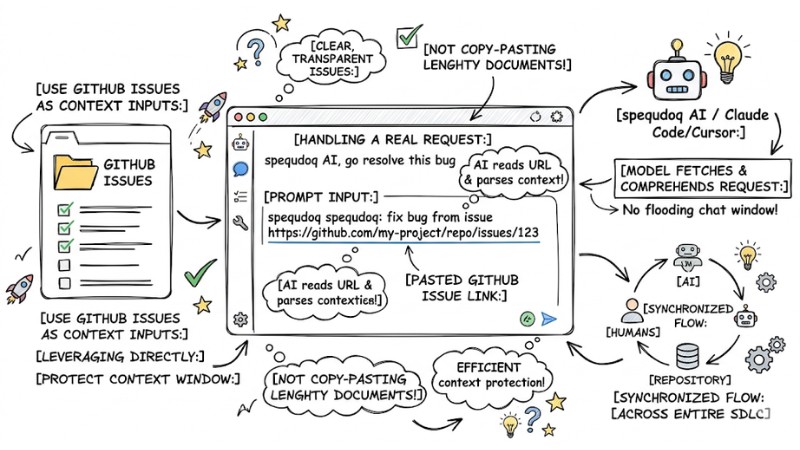
An AI prompt containing a pasted GitHub Issue link handling a real request
Benefits Achieved from an AI-Augmented Development Environment
| Criteria | Traditional Codebase | AI-Ready Codebase |
| Documentation | Scattered, multiple outdated versions. | Centralized (Single source of truth). |
| Testing | Human-dependent, sluggish. | Automated, instant bug isolation. |
| Error Messages | Generic ("System Error"). | Granular, clearly detailing specific variables. |
| Token Consumption | High (due to reading garbage code). | Low (only loads strictly necessary info). |
| AI Feedback Loop | Waits for the entire CI/CD to run. | Validation scripts under 5 seconds. |
An AI-augmented development environment isn't simply about buying a few extra support tools. It is a proactive strategy for cleaning up, reducing technical debt, and standardizing the codebase so both humans and AI can "read each other's minds" almost instantly when collaborating on a project.
Frequently Asked Questions (FAQ) About Coding Agent Codebases
How long does it take to set up an AI-ready codebase?
You don't need to tear down and rebuild the entire project; tackle it module by module. Consolidating old documentation and writing a few basic automated validation scripts only takes a few hours, but it will save you hundreds of debugging hours down the line.
How do I stop the AI from wrecking the project's current architectural structure?
To stop the AI from wrecking the current architecture, the solution lies in Type Hints and Automated Tests. When you set strict data boundaries and force the AI to pass 100% of local test cases before finishing a task, the AI is compelled to stay within the architectural framework you defined.
What are the best testing tools when working with AI Coding Agents?
From battle-tested experience, I find Pytest (for Python) and Vitest (for JavaScript/TypeScript) to be the ultimate choices. They run blazing fast and print out incredibly detailed error messages, making it easy for the AI to auto-correct without you having to step in.
How can I reduce token consumption when the project is too massive?
Follow the principle of word count optimization by: Deleting garbage comments, consolidating documentation into a single file, and using quick validation scripts. Additionally, never force the AI to read an entire CI/CD build log spanning thousands of lines.
What is a codebase for AI coding agents?
A codebase for AI coding agents (AI-ready codebase) is a project code structure optimized so AI agents like GitHub Copilot or Claude Code can read, understand, and work more efficiently, minimizing bugs and token waste.
Why optimize the codebase for AI coding agents?
Optimization helps the AI clearly grasp context, reduces time spent reading garbage code, and prevents errors caused by missing or conflicting info, thereby saving tokens and boosting productivity.
How do I set up a codebase for AI coding agents?
Setup involves building robust automated testing systems, writing quick validation scripts, optimizing detailed error messages, establishing a "Single Source of Truth" for documentation, stripping away ambiguity, and integrating development tools.
Should I use Automated Tests or Validation Scripts for the AI?
You should combine both. Automated tests help the AI auto-correct bugs, while validation scripts rapidly verify outputs without having to run a costly full build process.
What does a "Single Source of Truth" for documentation mean?
A "Single Source of Truth" for documentation means there is only one centralized place hosting the official and most up-to-date documentation for the project, preventing the AI from misreading or trusting outdated info from multiple divergent sources.
How do I eliminate ambiguity in the codebase for the AI?
You can eliminate ambiguity by explicitly defining edge cases, heavily using type hints, and providing unambiguous instructions rather than relying on a developer's implicit knowledge.
Should I use GitHub Issues as inputs for AI coding agents?
Yes, using GitHub Issue links instead of copy-pasting requirements helps protect the AI's context window, supplies crystal-clear context, and saves tokens much more efficiently.
Read more:
- Claude Code MCP Setup Guide: Optimizing AI Coding Agents
- Operating an AI Agent Teams: Risk Management for the Digital Workforce
- Tasks for Coding Agents: How to Assign Work Effectively so AI Codes Accurately
Start optimizing your Coding Agent Codebase today; stop letting your AI flounder in a "dumpster" of code. Just opening your IDE and consolidating all scattered guide files into a single README, or setting up a basic Pytest suite for your current module, makes a massive difference for both you and your AI.