What is AI Code Interpreter? Its Importance and How It Works

Are you dealing with thousands of rows of Excel data every day? Does filtering, creating pivot tables, or cleaning up garbage data take hours, especially when you don't know how to code? AI Code Interpreter is the exact solution to free you from this burden. This isn't just a conversational chatbot. It acts as a diligent data analyst, ready to parse CSV files, plot visual charts, and crunch complex numbers in seconds. This article will help you understand what an AI Code Interpreter is and how to leverage it to fully optimize your office workflow.
Key Takeaways
- Tech essence: Understand that the Code Interpreter (Advanced Data Analysis) is not a word-guessing chatbot, but a real Python Sandbox environment.
- Mechanism: Master the 3-step workflow: Natural Language Understanding (NLU) -> Writing & Executing code in a Sandbox -> Self-debugging.
- Practical applications: 7 use cases ranging from Excel analysis and data visualization to Marketing and SEO automation.
- Prompt optimization: Master 3 standard prompt templates to get perfectly accurate results on the first try.
- Risk management: Grasp the tool's limitations, from securing sensitive data to avoiding "AI hallucination" traps during calculations.
- FAQ Answers: Clarify the differences between the free and paid versions, as well as practical limitations when deploying it in enterprises.
What is AI Code Interpreter?
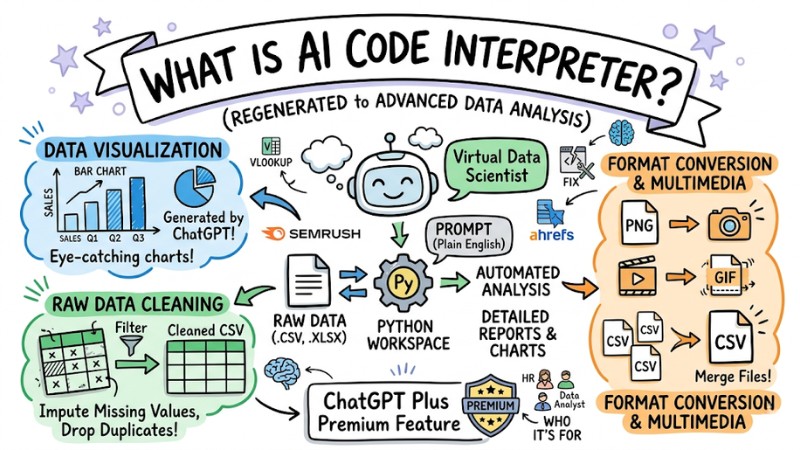
AI Code Interpreter (now renamed by OpenAI to Advanced Data Analysis) is a premium feature exclusively for ChatGPT Plus and Enterprise users. This feature provides the AI with a pre-configured workspace supporting Python (Python scripting).
Instead of just guessing words and generating standard text, AI Code Interpreter allows the system to automatically write code, run it, and return the results right in the chat window.
You can think of this tool as a "Virtual Data Scientist" (Data Science). When you upload a raw data file and prompt it in plain English, the AI automatically analyzes, calculates, and outputs detailed reports or visual charts.
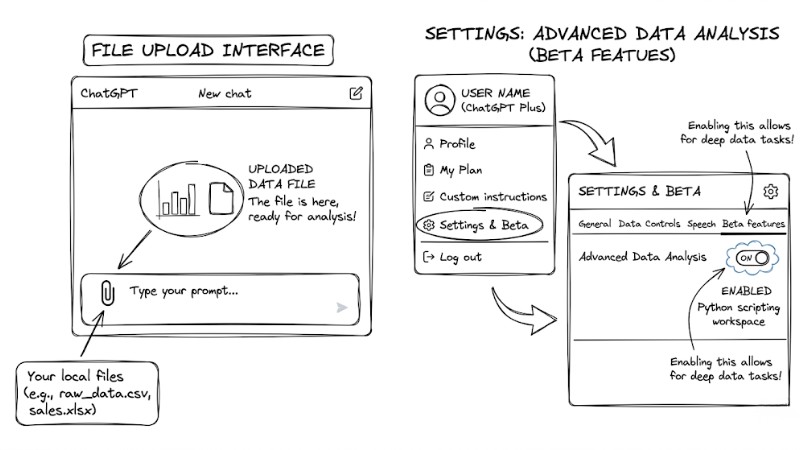
OpenAI has rebranded AI Code Interpreter as Advanced Data Analysis
The Difference Between AI Code Interpreter and Standard AI Chatbots
Standard AI chatbots operate by predicting the next word. When you request complex calculations, they often guess the outcome, leading to severe miscalculations.
Conversely, the difference between standard ChatGPT and Advanced Data Analysis lies in execution capability. Code Interpreter solves problems by writing actual Python code and executing it. The result you get is an absolutely accurate mathematical answer computed by the machine.
Quick comparison table:
| Criteria | Standard ChatGPT | ChatGPT Code Interpreter |
|---|---|---|
| Calculation handling | Predicts results (prone to errors) | Runs Python code to compute (100% accurate) |
| File handling | Only reads directly pasted text | Uploads and exports Excel, CSV, PDF, Images |
| Visualization | Not supported | Draws various charts (Bar, Pie, Line, Heatmap) |
| Limits | Free | Paid (Plus/Team/Enterprise plans) |
Battle-tested tip: When working on financial reports, I always use Code Interpreter to crunch large datasets. Letting the AI run its own code completely eliminates the risk of statistical errors that standard text-reading AIs often make.
How ChatGPT Code Interpreter Works
With just a simple prompt, the system executes a series of background operations. This process spans 3 core steps.
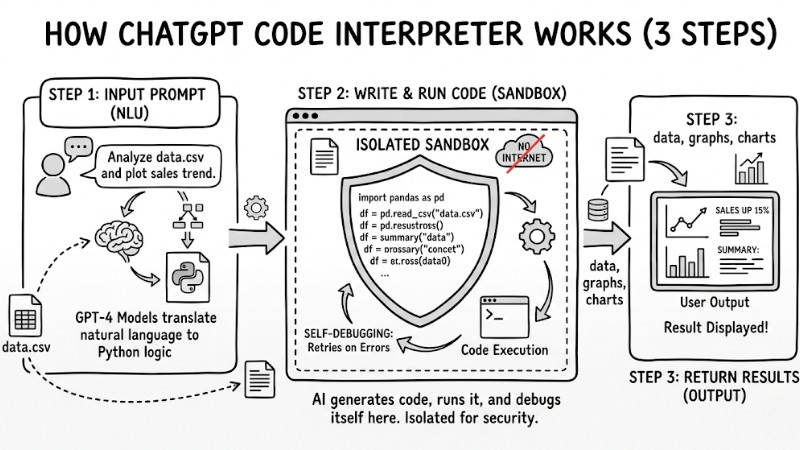
Operational Mechanism of ChatGPT Code Interprete
Natural Language Understanding (NLU) via the GPT-4 Model
When you input a request, GPT-4's Large Language Models (LLMs) translate this everyday text into mathematical logic. Then, it automatically scripts the corresponding Python code to correctly solve that specific problem.
Secure Sandbox Execution Environment
The newly generated code is injected into a Sandbox. This is a completely isolated virtual machine with no internet connection (Offline execution). This architecture guarantees absolute safety, prevents malware, and protects your privacy and data security.
Note: Even though it runs in a closed Sandbox, you should still strip out sensitive information (Customer names, credit card numbers) before uploading files to the system to ensure maximum safety.
Python Execution and Self-debugging
The system starts running the code (Code execution) inside the Sandbox. Its most outstanding feature is the Self-debugging capability. If the executed code throws an error, the AI automatically reads the error traceback, tweaks the code, and silently retries until it yields the correct result before finally displaying it to you.
Top 7 Features and Practical Applications of AI Code Interpreter
1. How to use Code Interpreter to analyze CSV and Excel files
Instead of wrestling with VLOOKUP functions or Pivot Tables, just upload your file. The AI automatically parses rows and columns to summarize trends. Thanks to the Excel file analysis feature, you can easily pinpoint best-selling products or spot anomalies in revenue reports with a single, simple prompt.
2. Data Visualization
Dry data tables often fail to impress bosses or stakeholders. With just a prompt requesting a chart, the AI can use Python libraries to generate visual and eye-catching charts like a Pie chart, Bar chart, or Scatter plot, which you can then download and drop straight into your presentation slides.
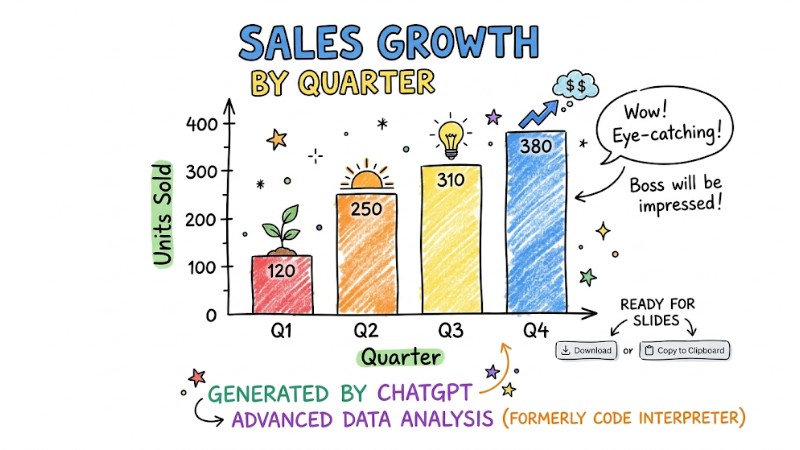
A visually appealing bar chart generated by ChatGPT
3. Cleaning and Normalizing Raw Data
Data exported from software often suffers from font encoding issues, missing fields, or duplicate formatting. Just hand the file over to the AI and ask it to clean up. This Data cleaning feature will scan the entire file, impute missing values, drop duplicate rows, and return a sanitized CSV file.
4. SEO and Digital Marketing Optimization Support
Marketers often have to process keyword lists spanning thousands of rows. Instead of doing it manually, you can upload an export from Ahrefs or Semrush and ask the AI to cluster keywords by search intent; this automates office tasks, helping you group terms, strip out junk keywords, and rapidly calculate the total search volume for each cluster.
5. Multimedia File Format Conversion
You no longer need ad-ridden format conversion websites. Code Interpreter can resize images, convert PNGs to JPEGs, generate GIFs from short video clips, or merge multiple isolated CSV files into a master file.
6. Solving Complex Data Science and Math Problems
Even if you aren't technically savvy, you can still run basic Machine learning models. Based on a purchase history file, you can prompt the AI to forecast next month's shopping trends. The algorithm will analyze the data and output highly accurate predictions.
7.Writing, Testing, and Explaining Source Code
If you're a junior developer or QA engineer, you can paste broken code into the chat. The AI will review it, pinpoint the bugs, automatically rewrite the correct code, and provide a detailed explanation of why it made those fixes.
Overall Review:
- Pros: Saves hours building reports, requires zero coding knowledge, and offers an intuitive chat interface.
- Cons: Loses session data if idle for too long, cannot query live data directly from the internet.
- Best for: HR Admins, Accountants, Marketers, Junior Data Analysts, and anyone working heavily with numbers.
3 Optimized Prompt Templates for Office Workers
For the AI to function optimally, you need to assign tasks clearly, define its role, and specify the output format. Below are 3 prompt templates you can copy and use immediately.
Prompt to Summarize and Analyze a Report File
This prompt helps you quickly grasp the big picture from a large dataset:
"Act as an expert Data Analyst. Read the CSV file I just uploaded. Summarize the 5 most critical insights from this dataset. Clearly highlight standout upward/downward trends and explain their probable causes. Present this as concise bullet points."
Prompt to Request Data Visualization
Use this prompt when you need to instruct ChatGPT Code Interpreter to plot charts for insertion into a report:
"Based on columns [Column Name A] and [Column Name B] in the dataset, plot a Bar chart. Requirements: Use a professional color palette, include a clear chart title, and annotate the X and Y axes. Once drawn, save the image as a .PNG file for me to download."
Prompt for Data Cleaning
Apply this for CSV file processing when dealing with broken formats downloaded from a CRM:
"Inspect this data file and execute the following cleaning steps: 1. Drop all rows containing empty (Null) values. 2. Convert the [Date Column Name] column to a DD/MM/YYYY format. 3. Remove duplicate rows. Once completed, export a new data file for me to download."
Battle-tested tip: Always ask the AI to export the returned file as a .CSV instead of .XLSX. The CSV format is lighter, faster for the AI to process, and less prone to browser out-of-memory errors.
Evaluating the Pros and Cons of AI Code Interpreter
Outstanding Strengths
- Data-driven without coding: Transforms everyday users into data crunching experts using only natural language prompts.
- Blazing fast processing speed: Operations like joining thousands of data rows or plotting complex charts take under 30 seconds.
- Absolute accuracy: Calculates via Python code instead of text prediction, thoroughly eliminating instances where the AI fabricates fake numbers.
Current Limitations to Note
- Language limits: This tool operates as a Python Interpreter; it doesn't currently support running other languages like R, C++, or JavaScript.
- Stateless nature: The Sandbox environment is strictly temporary. If you close the tab or idle your machine too long, the session terminates. You'll have to re-upload files from scratch.
- Hardware limits: Massively large data files (several Gigabytes) or complex graphic rendering requests can cause Timeout errors.
Frequently Asked Questions (FAQ) About AI Code Interpreter
Is ChatGPT Code Interpreter free?
No. It's a premium feature (Advanced Data Analysis) strictly reserved for users on OpenAI's paid subscription tiers (Organization) like Plus, Team, or Enterprise. The current free version cannot execute runnable Python code.
Is uploaded data kept secure and safe?
Code Interpreter runs in a sealed environment with no internet access. However, by default, OpenAI can still use your data to train their models.
Battle-tested tip: Go to Settings -> Data controls -> Disable "Chat history & training" before uploading internal report files to ensure absolute privacy.
What file formats are best to upload for the AI to process?
The AI parses plain text files or lightweight spreadsheets like .CSV, .TXT, .JSON the smoothest. Excel files (.XLSX) containing multiple complex sheets or cross-linked formulas will sometimes cause the AI to misread data.
Can Code Interpreter replace Developers?
No. This tool is an assistant meant to accelerate workflows, specializing in handling repetitive tasks or analyzing small to mid-scale data. It lacks the capability to design software architectures or build complex applications.
How is AI Code Interpreter different from standard ChatGPT?
Standard ChatGPT is only capable of Natural Language Processing. AI Code Interpreter adds the ability to execute Python code, allowing for data analysis, file handling, and actual computation, going far beyond standard word prediction.
How does ChatGPT Code Interpreter work?
It works by translating your natural language requests into Python code, then executing that code in a secure sandbox environment. The result is returned as text, charts, or processed files.
How do I use AI Code Interpreter to analyze CSV files?
You can upload a CSV file and prompt the AI Code Interpreter in natural language to analyze, summarize the data, or search for specific info within the file.
Can AI Code Interpreter visualize data?
Yes, AI Code Interpreter can generate various chart types such as bar charts, line graphs, and pie charts from the data you provide or upload.
Can I use AI Code Interpreter to clean raw data?
Absolutely. You can request AI Code Interpreter to handle missing values, incorrect formatting, or duplicate data to normalize your dataset before doing a deep-dive analysis.
What are the limitations of AI Code Interpreter?
It only supports Python, has execution timeout limits for complex tasks, and does not persist the code state after the chat session ends.
Read more:
- What is Claude Code? Installation Guide and 15 Practical Use Cases
- What is OpenClaw? Definition and Features of the Next-Gen AI Agent
- What is Tool Calling? How to turn AI into a true action-taking assistant
AI Code Interpreter is truly a game-changer, turning complex, time-consuming data crunching tasks into simple chat commands. Regardless of whether you're a marketer, HR admin, or accountant, this tool will optimize hours of your daily workload. Upgrade to ChatGPT Plus today, copy the 3 prompt templates above, and start experiencing the power of a "Virtual Data Scientist" right at your fingertips!