What is Tool Calling? How to turn AI into a true action-taking assistant

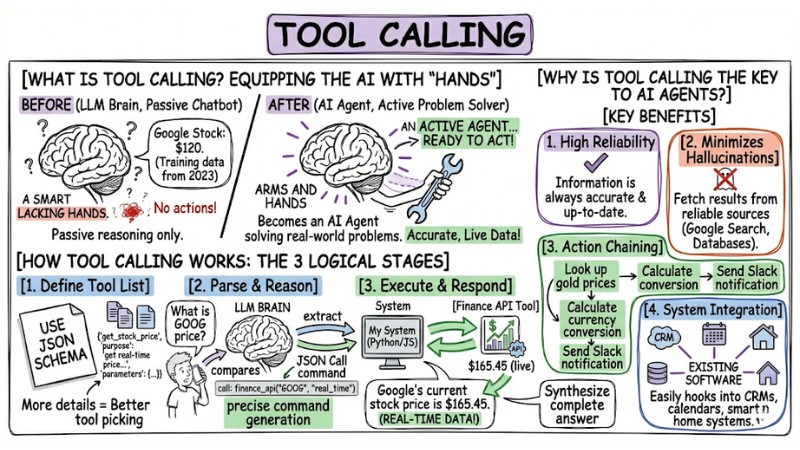
Have you ever wondered how an AI Chatbot can look up the weather, book an appointment, or control smart home devices instead of just spitting out theoretical answers? The answer lies in Tool Calling (also known as Function Calling). This is the core technique that helps large language models (LLMs) break out of the "locked room" of static data and connect directly with the real world through APIs and external tools. In this article, we'll dive deep into what tool calling is, how it works, and why it's the mandatory stepping stone to turn a chatbot into a true action-taking AI Agent.
Key Takeaways
- Tool Calling Definition: Understand the technology that helps AI connect to the real world via APIs, turning a chatbot into a proactive AI Agent.
- How it Works: Master the workflow where the AI parses, selects tools, and executes commands via JSON data structures.
- Why is Tool Calling crucial for AI Agents?: Recognize its ability to increase reliability, minimize hallucinations, and integrate AI systems.
- Practical Examples: See specific applications of Tool Calling in real-world control operations.
- Supporting concepts to master: Equip yourself with foundational technical knowledge (JSON Schema, Reasoning Loop,...) to deploy AI effectively.
- Frequently Asked Questions (FAQ): Get quick answers to technical, security, and practical application questions regarding Tool Calling.
What is Tool Calling?
Imagine an LLM (like GPT-4 or Gemini) as an incredibly smart "brain" that lacks "hands". It can reason, draft text, and analyze logic, but it cannot send an email or update real-time stock prices on its own.
Tool Calling is equipping the AI with those "hands". When it receives a request from you, instead of trying to answer based on outdated memory, the AI will "call" a Tool that developers have provisioned. It parses the question, determines the appropriate tool, and generates a specific call command to execute. At this point, the AI is no longer a passive chatbot, but becomes an AI Agent capable of solving real-world problems.
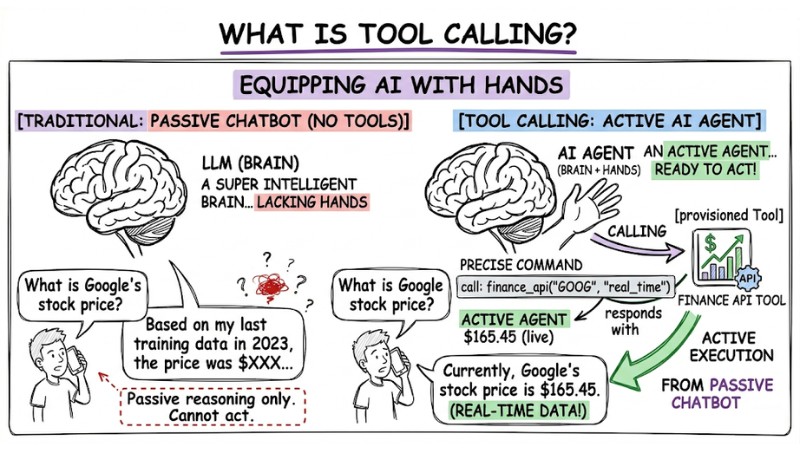
Tool calling is the ability of an AI model to interact with external tools to overcome its inherent limitations
How Tool Calling Works
This process happens in three logical stages to ensure the computer understands exactly what the AI wants:
- Define the tool list: You describe the available functions to the AI using JSON Schema (a standard data format). Specifically, you need to clearly describe the function name, its purpose, and required parameters. This is the most critical step: the more detailed the description, the better the AI is at picking the right tool.
- Parse and make decisions (Reasoning): When you send a prompt, the AI compares that request against the tool descriptions. If it deems it necessary, the AI stops generating text and returns a JSON object containing the function name and the parameters extracted from your input.
- Execute and respond: Your system (Python/JavaScript code) receives the JSON object from the AI, executes the corresponding function with that data, and sends the result back to the AI. The AI then reads this result and synthesizes a complete answer for the user.
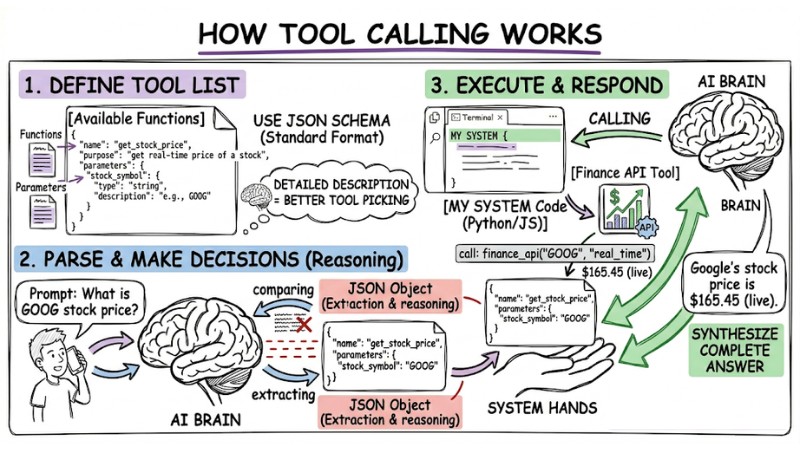
How Tool Calling works
Why is Tool Calling the "key" to AI Agents?
Tool Calling completely transforms how we interact with machines thanks to these outstanding benefits:
- High reliability: The AI no longer has to guess; by calling real data APIs, the information provided to users is always accurate and up-to-date.
- Minimizes hallucinations: Because the AI fetches results from reliable sources (like Google Search or company databases), it doesn't need to "hallucinate" information.
- Action chaining capability: The AI can execute multiple steps in sequence, for example: "Look up gold prices" -> "Calculate currency conversion" -> "Send Slack notification".
- System integration: Easily hooks into existing software like CRMs, calendars, or smart home systems without changing the underlying infrastructure architecture.
| Characteristics | Traditional Chatbot | AI Agent (with Tool Calling) |
|---|---|---|
| Knowledge Source | Training data only. | Real-time data + Tools. |
| Capabilities | Conversational only. | Takes action. |
| Accuracy | Prone to hallucinations. | High (due to real-world retrieval). |
Practical Example: From Prompt to Action
Let's look at a scenario where an AI controls smart lights:
- User: "Turn off the living room lights for me."
- AI: Parses the action "turn off", object "lights", location "living room".
- Tool Calling: AI outputs JSON:
{"function": "control_light", "args": {"location": "living_room", "status": "off"}}. - System: Your code catches the command and executes the API call to the light switch. The lights turn off.
- AI Response: "I've turned off the living room lights for you."
Supporting Concepts to Master
- JSON Schema: The format used to define the data structure the AI must follow when calling functions, ensuring consistency between natural language and machine commands.
- Reasoning Loop: The loop the AI executes: Think -> Select tool -> Review results -> Rethink -> Respond.
- State Management: Maintaining conversation history across multiple function calls, ensuring the AI remembers the context after executing a task.
Frequently Asked Questions (FAQ) About Tool Calling
What is Tool Calling (Function Calling)?
Tool Calling (or Function Calling) is the capability that allows large language models (LLMs) like AI Agents to parse user requests and output a data structure (usually JSON) to invoke an external function or tool. This breaks the AI out of its text-generation limits and lets it execute real-world tasks.
How does the Tool Calling mechanism work?
The workflow consists of 3 main steps:
- The LLM receives the request and a list of functions with descriptions.
- The LLM reasons, selects the right function, and returns a JSON structure with the function name and parameters.
- Your application catches the JSON, executes that function, and sends the result back to the LLM to formulate the final response for the user.
Why is Tool Calling important for AI Agents?
Tool Calling is the key that lets AI Agents interact with the real world. It enables real-time information retrieval, actions like sending emails or booking appointments, or connecting to specialized systems, thereby minimizing "hallucinations" and boosting reliability.
How do you integrate Tool Calling?
You need to define the functions (tools) the AI can use, alongside detailed descriptions and parameter structures (usually using JSON Schema). Then, you send this list along with the user's prompt to the LLM's API. Your application will process the LLM's response, execute the specified function, and pass the results back.
Can the AI automatically run code when using Tool Calling?
No, the AI only acts as the "orchestrator". It parses the request and issues a "command" in JSON format for your application to execute. Final control and execution still lie with the developer, ensuring system safety and security.
Can Tool Calling help reduce "hallucinations" in LLMs?
Yes, Tool Calling significantly reduces "hallucinations" by allowing the AI to pull information directly from external data sources or APIs instead of relying on its training knowledge, which might be outdated or inaccurate.
Is Tool Calling safe?
Yes. The final decision to execute a function rests with the developer. The AI only sends a "proposal" to call a function; you can fully implement security layers, moderation, or permission limits before the code actually executes that command.
Does using Tool Calling require advanced programming skills?
Not overly advanced; you just need to know how to define API functions and understand how to handle JSON responses to start integrating it into basic AI applications.
Which LLMs support Tool Calling best?
Currently, most powerful models like GPT-4o, Claude 3.5 Sonnet, and Gemini 1.5 Pro support Tool Calling exceptionally well. You can choose based on API cost and latency.
Can Tool Calling work offline?
Yes, if you run open-source language models (like Llama 3) locally on your personal server using frameworks like Ollama, you can still use the Tool Calling feature without an internet connection.
Read more:
- What is Claude Code? Installation Guide and 15 Practical Use Cases
- What is AI Code Interpreter? Its Importance and How It Works
- What is OpenClaw? Definition and Features of the Next-Gen AI Agent
Tool Calling is the "pipeline" connecting the LLM's intellect with the power of external systems, turning a passive chatbot into an AI Agent that can genuinely take action for the user. If you want to start today, try defining a simple tool using JSON Schema, integrate it into your LLM of choice, and watch how the AI autonomously decides when to invoke that tool.