What is OpenClaw? Definition and Features of the Next-Gen AI Agent

In the AI agent era, OpenClaw is emerging as a tool that lets you hire a virtual employee to work directly on your computer: opening apps, running commands, processing files, and automating workflows instead of manual operations. This article will help you understand what OpenClaw is, how it operates, and how to leverage the power of this open-source AI agent platform in your daily work.
Key Takeaways
- Definition of OpenClaw: Understand the open-source AI Agent platform capable of replacing humans to perform direct tasks on a computer.
- "Agentic Workflow" operating mechanism: Grasp the 4-step process that helps the AI autonomously plan, act, and intelligently self-debug.
- Why is OpenClaw attracting the tech community?: Explore the project's flexibility, multi-model connectivity, and outstanding autonomous power.
- Basic OpenClaw installation guide: Steps to set up the environment and configuration to start running your personal virtual assistant.
- Practical applications of OpenClaw: Leverage AI to optimize workflows, from the office to programming and data research.
- Risk warnings: Know how to protect your system using Docker, strict access control, and a "Human-in-the-loop" mechanism.
- Frequently Asked Questions (FAQ): Resolve doubts about security, Vietnamese language support, and differences among AI Agent technologies.
What is OpenClaw?
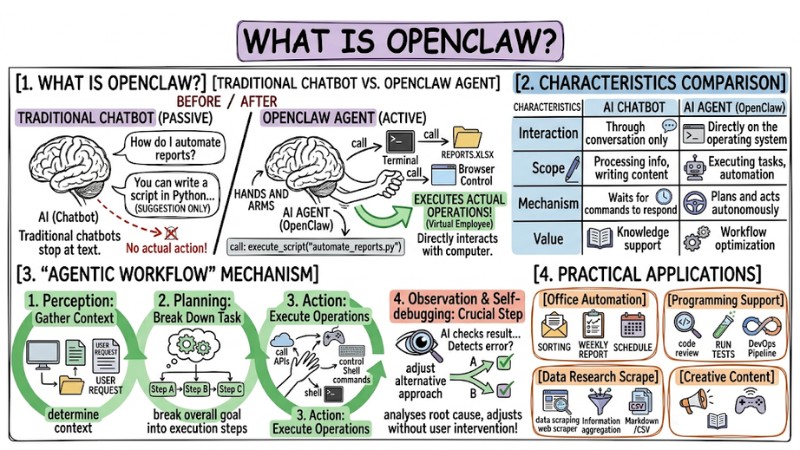
OpenClaw is an open-source AI agent platform that allows setting up autonomous assistants capable of interacting directly with a computer. While traditional chatbots stop at text responses, OpenClaw executes actual operations like running system commands, managing files, controlling browsers, and processing emails.
The core difference of OpenClaw lies in its capability to "take action". Instead of just giving suggestions, OpenClaw acts as a virtual employee with access to your working environment.
| Characteristics | AI Chatbot | AI Agent (OpenClaw) |
|---|---|---|
| Interaction | Through conversation only | Directly on the operating system |
| Scope | Processing info, writing content | Executing tasks, automation |
| Mechanism | Waits for commands to respond | Plans and acts autonomously |
| Value | Knowledge support | Workflow optimization |
The "Agentic Workflow" Operating Mechanism of OpenClaw
OpenClaw operates on a closed loop that helps the AI not only think but also know how to self-adjust its behavior. This process includes 4 main steps:
- Perception: The AI gathers input data via the screen, files, or user requests to determine the context.
- Planning: Based on the overall goal, the system breaks the task down into specific execution steps.
- Action: The AI starts executing operations like calling APIs, controlling the mouse/keyboard, or running Shell commands.
- Observation & Self-debugging: This is the crucial step. The AI checks the result after each action. If it detects an error, it autonomously analyzes the root cause and adjusts with an alternative approach without user intervention.
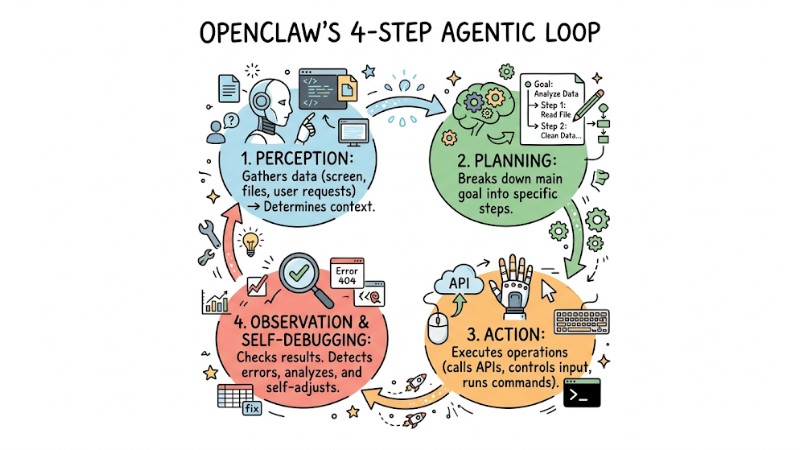
The Agentic Workflow Operational Mechanism of OpenClaw
Why is OpenClaw attracting the tech community?
OpenClaw's appeal comes from its "openness" and high flexibility, strongly supported by the global developer community:
- Open-source: The project allows users to fully customize it under the MIT license.
- Multi-model connectivity (LLMs): OpenClaw flexibly supports large language models like Claude, GPT-4o, DeepSeek, or Local LLMs.
- Project reputation: Developed by Peter Steinberger, OpenClaw quickly reached over 145,000 stars on GitHub, becoming a phenomenon in the personal AI space.
- Autonomy: OpenClaw can run tasks 24/7 without constant supervision.
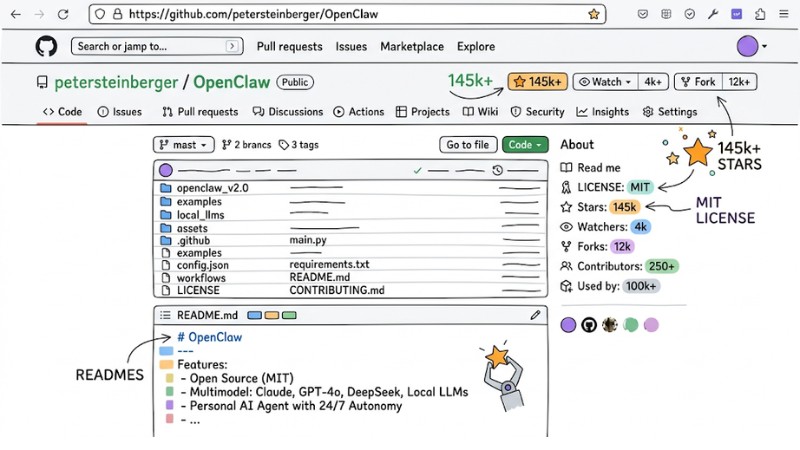
The OpenClaw project's GitHub repository interface
Basic OpenClaw Installation and Usage Guide
To get started, you need a stable working environment. Below are the basic setup steps:
- Prepare the environment: First, you need to install Docker Desktop and Node.js (version 20 or higher).
- Download source code: Next, open your Terminal and run the
git clonecommand from the project's repository. - Configuration: Access the project directory, edit the
.envfile, and paste the API Key of the AI model you're using (recommending Claude 3.5 Sonnet for the best computer control capabilities). - Launch: Finally, run the following command to activate the system:
npm install
npm start
Battle-tested tip: In my experience, you should start with simple commands before handing off critical tasks to get used to the AI's feedback mechanism.
Practical Applications of OpenClaw at Work
- Office: Automate email sorting, drafting weekly reports, and updating schedules.
- Programming: Support automated code reviews, execute test suites, and manage DevOps pipelines.
- Data research: Scrape information from multiple sources, aggregate, and reformat it into data files (Markdown/CSV).
- Creative: Post on social media and control smart connected devices.
Risk Warnings and Safe Usage
Allowing an AI to directly interact with your computer carries inherent security risks. You must strictly enforce protective measures:
- Use isolated environments: Always run OpenClaw inside a Docker container to isolate the AI's access permissions from the host operating system.
- Human-in-the-loop (HITL) principle: Always require the AI to pause for confirmation before performing sensitive actions like deleting files, sending emails, or making payments.
- Access Control: You must absolutely never grant administrative privileges (Root/Admin) to the AI agent.
| Do's | Don'ts |
|---|---|
| Run in a Docker container | Run directly on the host machine |
| Confirm before sending/deleting data | Allow the AI to send emails/pay autonomously |
| Update versions regularly | Store API Keys in public files |

Risk Warnings and Best Practices for Secure OpenClaw Usage
Frequently Asked Questions
What is OpenClaw?
OpenClaw is an open-source AI agent that allows users to create artificial intelligence assistants capable of automating tasks on a computer. Instead of just conversing, OpenClaw can plan, use software, run system commands, and complete assignments.
How does OpenClaw work?
OpenClaw operates on a loop of Perception, Planning, Action, and Observation. The AI receives a task, breaks it down into steps, executes them, and self-debugs if needed, delivering powerful autonomous capabilities.
Why is OpenClaw attracting the tech community?
OpenClaw attracts attention due to its open-source nature, flexibility in multi-model AI connections (like Claude, GPT-4o), and high customizability. The community highly values the automation potential and creativity it brings.
How do I install OpenClaw?
To install OpenClaw, you need to set up your environment with Docker Desktop and Node.js, then download the source code from GitHub, configure the API Key for your desired AI model, and run the install/launch commands.
What tasks can OpenClaw be applied to?
OpenClaw can be widely applied from office automation (summarizing emails, drafting reports) and programming support (code reviews, running tests) to data analysis and even managing personal schedules.
Are there security risks when using OpenClaw?
Yes, risks include the AI accidentally accessing sensitive data or executing malicious actions via prompt injection. Therefore, you should run OpenClaw in an isolated environment like Docker and always use the Human-in-the-loop feature to confirm critical actions.
Can OpenClaw be controlled via a phone?
Yes, OpenClaw supports over 20 communication channels, including WhatsApp, Telegram, and iMessage, allowing you to control and receive notifications from your AI agent right on your phone.
Does OpenClaw support Vietnamese?
Yes, OpenClaw's Vietnamese support depends on the AI model you integrate. Popular models like Claude and GPT-4o both process and respond in Vietnamese extremely well.
How does OpenClaw differ from Claude Computer Use?
Claude Computer Use is a direct built-in feature from Anthropic, whereas OpenClaw is an open-source framework that allows you to build and customize your own AI Agent on top of any model.
Does the AI understand Vietnamese?
Yes. Its language capability depends on the AI model you configure (Claude and GPT-4o both support Vietnamese very well).
Can I control OpenClaw via my phone?
Yes, the project supports integration via multiple channels like Telegram, Slack, and WhatsApp to receive remote commands.
Is OpenClaw for beginners?
This is not a "Plug-and-play" tool. It requires foundational knowledge of programming and system environment setup. OpenClaw is best suited for those wanting to master the technology and optimize work performance through automation.
Read more:
- What is Claude Code? Installation Guide and 15 Practical Use Cases
- What is AI Code Interpreter? Its Importance and How It Works
- What is Tool Calling? How to turn AI into a true action-taking assistant
OpenClaw is a massive leap forward that shifts you from "doing everything manually" to designing workflows and letting AI execute them for you. If you work heavily on a computer, now is the right time to test drive an open-source AI Agent like OpenClaw, starting with small tasks and gradually expanding to automate your entire daily workflow.