MCP Use Cases: Solutions for Connecting AI to All Enterprise Data

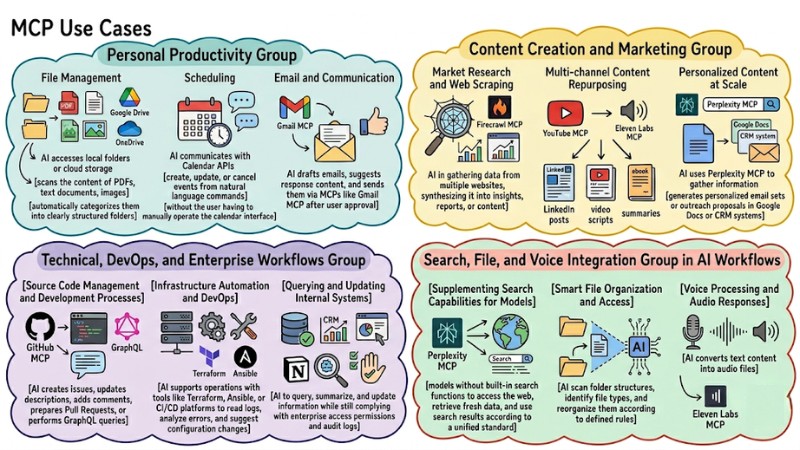
MCP Use Cases describe specific scenarios where the Model Context Protocol helps AI connect structurally to files, SaaS systems, and enterprise infrastructure instead of manual data copying. This article introduces the MCP concept, presents MCP Use Cases by application group, analyzes core benefits, guides configuration on Claude Desktop, and suggests safety considerations during deployment.
Key Takeaways
- MCP Concept: Understand that MCP is an open connection standard that helps AI communicate directly with data sources, applications, and internal files in a structured way without developers having to write individual integration code.
- Real-world Applications Across Fields: Explore how MCP solves data fragmentation through 4 core application groups, helping businesses fully automate from file management to internal system analysis.
- Benefit Comparison: Clearly distinguish the superiority of MCP over previous manual operations and fragmented data methods.
- Configuration Guide: Pocket the steps for setting up a basic MCP Server on the Claude Desktop application by editing the
claude_desktop_config.jsonfile. - Security Principles: Learn 3 considerations when deploying to minimize security risks when granting permissions to AI, helping you protect internal data and strictly control sensitive operations.
- FAQ: Get answers to questions about the relationship between MCP and traditional APIs, programming skill requirements for deployment, and why MCP is considered the future of AI Agents.
What is the Model Context Protocol (MCP)?
The Model Context Protocol (MCP) is an open standard that helps AI applications connect structurally to external data sources and tools via a client-server architecture using JSON-RPC 2.0. Instead of every system having to build multiple separate connectors, MCP provides a common protocol so that AI can discover tools, call functions, and receive results according to a unified standard.
Operationally, MCP allows AI models to query data, update files, or interact with databases in near-real-time through MCP servers without the user having to constantly re-provide the entire context manually. Once a connection is established, applications can integrate additional or change data sources and services by configuring the MCP server without having to directly edit the model's logic.
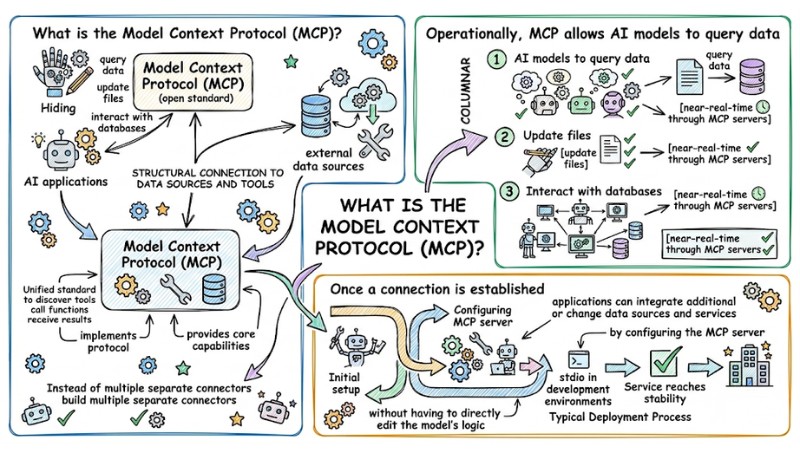
MCP allows AI models to query data in near real-time through the MCP server
MCP Use Cases in Practical Application Groups
MCP helps solve the problem of data fragmentation across different systems, allowing AI models to access and combine data from multiple sources structurally. Instead of integrating each API individually, MCP Use Cases focus on standardizing how AI interacts with files, SaaS applications, and enterprise infrastructure.
1. Personal Productivity Group
- File Management: AI accesses local folders or cloud storage like Google Drive and OneDrive, scans the content of PDFs, text documents, images, and automatically categorizes them into clearly structured folders.
- Scheduling: AI communicates with Calendar APIs to create, update, or cancel events from natural language commands without the user having to manually operate the calendar interface.
- Email and Communication: AI drafts emails, suggests response content, and sends them via MCPs like Gmail MCP after user approval, helping reduce time spent on repetitive email processing.
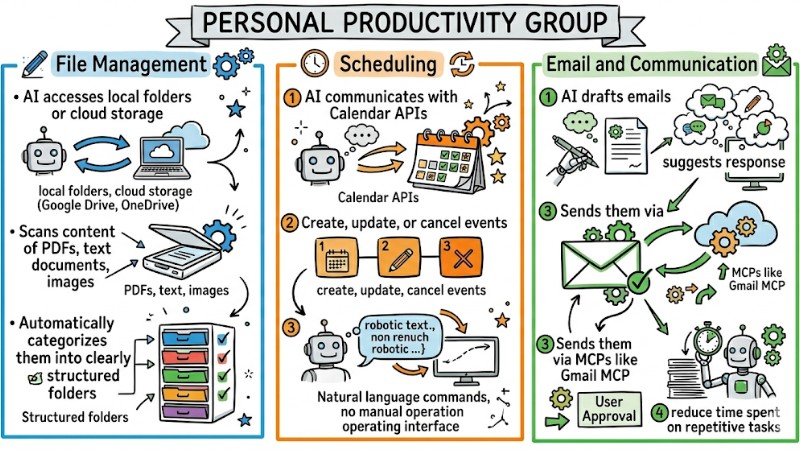
MCP Use Cases in the Personal Productivity Group
2. Content Creation and Marketing Group
- Market Research and Web Scraping: MCPs like Firecrawl MCP support AI in gathering data from multiple websites, synthesizing it into insights, reports, or content for social media posts and marketing newsletters.
- Multi-channel Content Repurposing: AI can transform content from YouTube videos, blog posts, or ebooks into LinkedIn posts, video scripts, or summaries suitable for each platform, often through a combination of YouTube MCP, Firecrawl MCP, and text-to-speech tools like Eleven Labs MCP.
- Personalized Content at Scale: AI uses Perplexity MCP or other search MCPs to gather information about target businesses, then generates personalized email sets or outreach proposals in Google Docs or CRM systems.
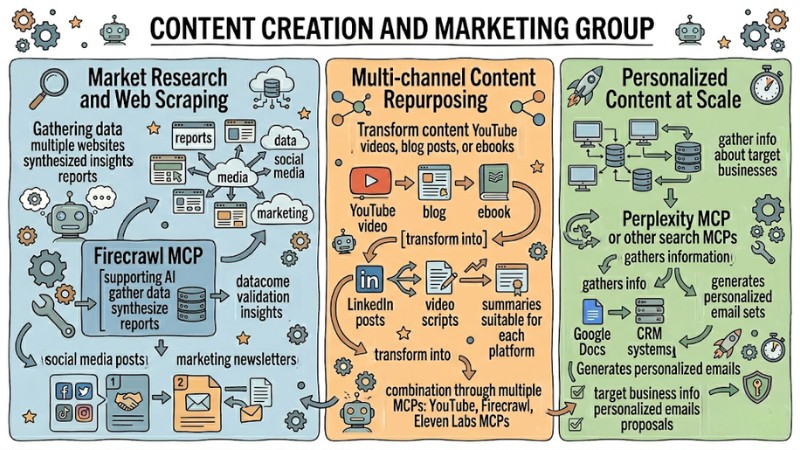
MCP Use Cases in the Content Creation and Marketing Team
3. Technical, DevOps, and Enterprise Workflows Group
- Source Code Management and Development Processes: Through GitHub MCP and other source code management system MCPs, AI creates issues, updates descriptions, adds comments, prepares Pull Requests, or performs GraphQL queries according to natural language instructions.
- Infrastructure Automation and DevOps: AI supports operations with tools like Terraform, Ansible, or CI/CD platforms to read logs, analyze errors, and suggest configuration changes, reducing manual effort in system administration.
- Querying and Updating Internal Systems: MCP servers connect to databases, CRM systems, monitoring tools, or project management platforms like Notion, allowing AI to query, summarize, and update information while still complying with enterprise access permissions and audit logs.
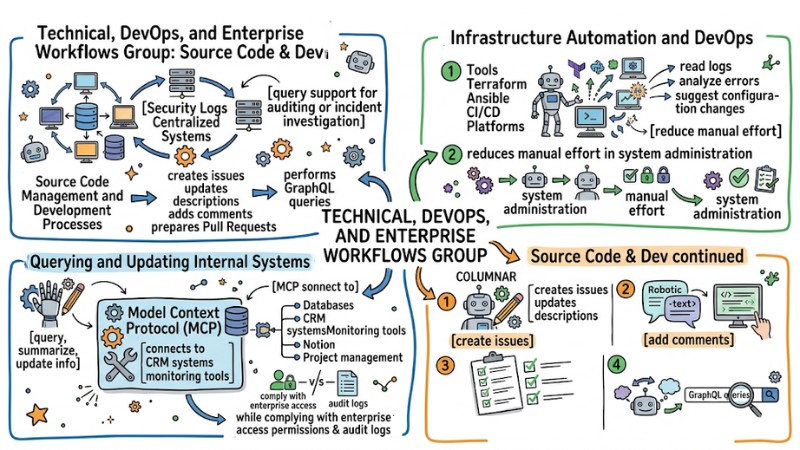
MCP Use Cases in DevOps teams and enterprise workflows
4. Search, File, and Voice Integration Group in AI Workflows
- Supplementing Search Capabilities for Models: MCPs like Perplexity MCP allow models without built-in search functions to access the web, retrieve fresh data, and use search results according to a unified standard within the same session.
- Smart File Organization and Access: MCP helps AI scan folder structures, identify file types, and reorganize them according to defined rules, while retrieving necessary content when requested by the user in conversation.
- Voice Processing and Audio Responses: With Eleven Labs MCP and other text-to-speech MCPs, AI converts text content like instructions, customer responses, or document summaries into audio files to send to users or other systems.
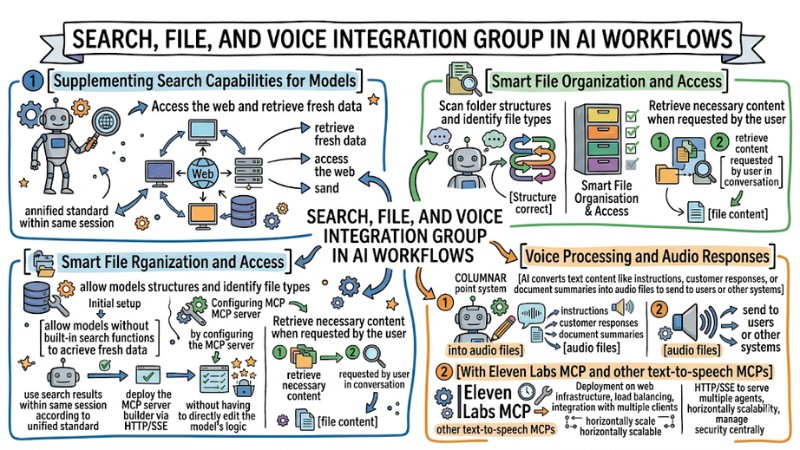
MCP Use Cases in the integrated search, file, and voice workflow group
Practical Experience: At the organizational level, MCP Use Cases help businesses reduce integration maintenance costs because when a platform API changes, the team only needs to update the MCP server layer, while the agent and conversation flows continue to use the same standardized MCP interface. This creates a shared connection layer for multiple AI applications, allowing expansion into new use cases without having to redesign the entire integration from scratch.
Core Benefits of Applying MCP
The table below summarizes the key benefits when moving from a traditional integration model to a standardized model with MCP:
| Feature | Before MCP | After MCP |
|---|---|---|
| Communication | Performed manually via copy-and-paste operations between multiple systems | Automated via standard protocol between AI and external data sources |
| Capabilities | Primarily responds in the form of conversational advice like a chatbot | Capable of executing actions as an agent with clearly described tools |
| Data | Fragmented across many systems and difficult to combine in a unified context | Accessed through a centralized MCP layer with consistent context for the model |
| Security | Access permissions and security configurations managed discretely for each integration | Controlled via scope and clear authorization at the MCP protocol layer |
Guide to Setting Up MCP on Claude Desktop
To begin, you need to install the Claude Desktop application on your computer:
- Install and Update Claude Desktop: Install the Claude Desktop app and update to the latest version that supports MCP configuration in the Developer or Settings section.
- Prepare Environment for MCP Server: Install Node.js to be able to run MCP servers via the
npxcommand in the Terminal or Command Prompt. - Locate the claude_desktop_config.json file: Identify the configuration file at the corresponding operating system path, for example
claude_desktop_config.json(usually located at%APPDATA%\Claudeon Windows or~/Library/Application Support/Claudeon macOS). - Update MCP Configuration File Content: Open
claude_desktop_config.jsonand add the MCP server configuration to themcpServerskey, for example for Filesystem MCP as shown below, then change the folder path as appropriate.
Example File Connection Configuration:
File Connection Configuration Example:
{
  "mcpServers": {
    "filesystem": {
      "command": "npx",
      "args": ["-y", "@modelcontextprotocol/server-filesystem", "/Users/yourname/Documents"]
    }
  }
}
- Save Configuration and Restart Application: Save changes in
claude_desktop_config.json, fully close Claude Desktop, and reopen it so the application loads the new MCP configuration. - Check if MCP Server is Recognized: Open a new chat session in Claude Desktop and check the interface to see if the filesystem MCP appears in the tool list or MCP configuration area.
- Confirm File Access Scope: Ask Claude to list or read the content of a file located in the configured folder to confirm the Filesystem MCP is working correctly and only accessing the allowed folder scope.
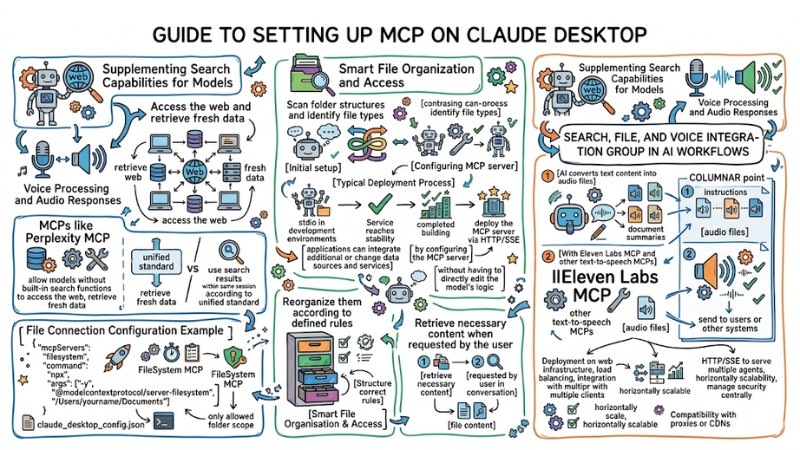
The process of setting up MCP on Claude Desktop
Safety Considerations During Use
Below are some basic principles to reduce security risks when allowing AI to access files, APIs, and internal systems via MCP:
- Principle of Least Privilege: Only grant read or write permissions to folders, databases, or APIs truly necessary for the use case, prioritizing read scope and limiting paths to specialized folders instead of the entire system.
- Select MCP Servers Carefully: Only install and use MCP servers from clear sources with documentation and community verification, avoiding running untrusted source code packages to reduce the risk of privilege escalation or unauthorized access.
- Monitor and Confirm Critical Actions: For destructive operations like deleting files, editing production data, or sending external emails, require the AI to clearly describe the action it is about to take and wait for user confirmation before allowing execution.
Answering Frequently Asked Questions
Does MCP replace traditional APIs?
MCP does not replace traditional APIs but operates as a communication layer on top, helping AI use existing APIs in a more contextual and consistent way.
Does implementing MCP require high programming skills?
Implementing MCP at the level of configuring available servers only requires basic JSON understanding, whereas building your own custom MCP server typically requires programming skills in languages like Python or TypeScript.
Why is MCP considered the future for AI Agents?
MCP is considered the future for AI Agents because it provides cross-interaction capabilities, allowing an agent to access many different data sources and tools without having to change the core architecture every time an API is added or replaced.
Read more:
- What is MCP Transport? Understanding the Transmission Mechanisms of the Model Context Protocol
- What is Multi-Agent Workflow? Architecture, Models and Applications
- 7 Practical Coding Agent Use Cases to Optimize Your Workflow
MCP Use Cases demonstrate that MCP is the standardized connection layer that helps AI access and combine multiple data sources within the same context, while reducing integration maintenance costs when underlying systems change. When applying MCP Use Cases to real-world processes, organizations can leverage AI as an agent capable of executing actions on existing data and services without redesigning the entire integration architecture.