OpenClaw Review: Evaluating a Self-Hosted Open-Source AI Agent

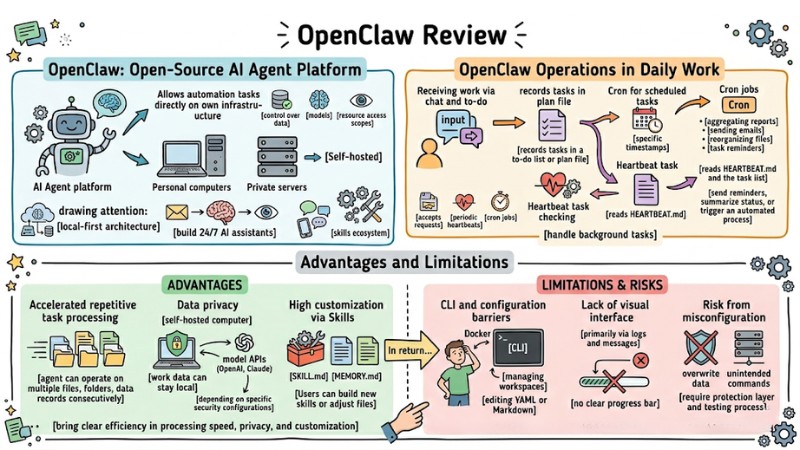
OpenClaw is an open-source, self-hosted AI Agent platform that allows you to deploy automation assistants running directly on your personal computer or private server. This article dives deep into its architecture, practical experience, pros, cons, and security risks to help you decide whether to bring this tool into your daily workflow.
Key Takeaways
- Concept and Appeal: Understand that OpenClaw is a local-first open-source AI Agent platform, giving you absolute infrastructure ownership and data control when deploying automated assistants.
- Distinguishing Chatbots and Agents: Grasp the difference between a standard chatbot and a true AI Agent, allowing you to exploit OpenClaw's multi-step execution capabilities rather than just simple Q&A.
- System Architecture: Clearly understand core components like the Gateway, Skills, and the Markdown file system (SOUL, MEMORY) to logically set up personas and long-term memory.
- Practical Experience: Visualize how OpenClaw operates via Heartbeat mechanisms and Cron Jobs, helping you automate workflows and process background tasks 24/7.
- Tool Comparison: Differentiate OpenClaw from ChatGPT Web and Claude Code to choose the right solution based on your need for infrastructure control or programming expertise.
- Installation Process: Master the setup steps via Node.js and npm to quickly deploy an AI Agent workspace on your local machine or private server.
- Feature Evaluation: Explore use cases ranging from file management to multi-channel chat integration (Telegram, Discord), expanding your Agent's capabilities through the rich Skills ecosystem.
- Safety Principles: Apply Best Practices regarding isolated environments and least privilege to operate AI Agents safely, avoiding data leaks and unintended executions.
- Target Audience: Determine your suitability for the tool, saving time and effort before deciding to invest in a self-hosted AI solution.
- FAQ: Clarify issues regarding cost, hardware requirements, and data privacy to feel more confident when deploying a local AI Agent.
What is OpenClaw and why is it drawing attention?
OpenClaw is an open-source AI Agent platform, self-hosted on personal computers or private servers, allowing for the deployment of automation tasks directly on your own infrastructure with control over data, models, and resource access scopes. This tool is drawing attention because it combines local-first architecture with the ability to run background loops (Input → Reasoning → Action → Observation), multi-channel chat integration, and a skills ecosystem to build 24/7 AI assistants for both personal and business processes.
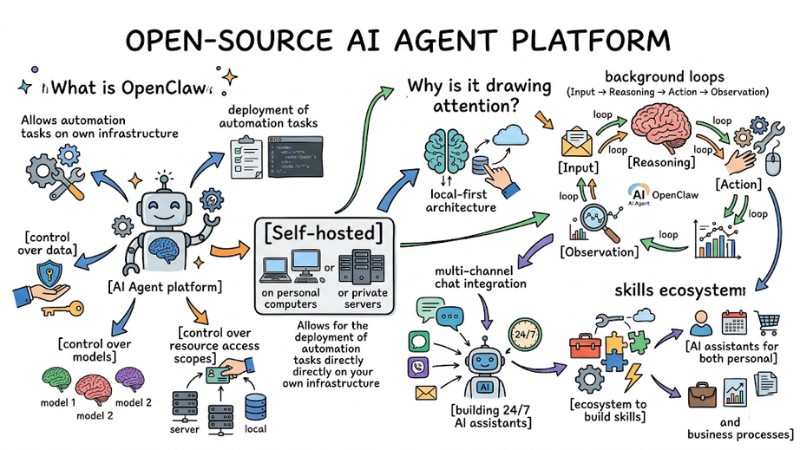
OpenClaw is an open-source AI Agent platform integrating multi-channel chat and a skills ecosystem
Chatbot vs AI Agent: Understanding OpenClaw's true nature
Traditional chatbot models operate on an Input → Output chain, primarily receiving questions and returning text responses per turn without maintaining scheduled runs or direct system manipulation. OpenClaw applies the Agent model (Input → Reasoning → Action → Observation), allowing for operations on the file system, browsers, and apps like Notion, email, calendar, and terminal through skills or plugins within a local-first architecture, where SOUL, MEMORY, and USER data are stored locally as a long-term context layer.
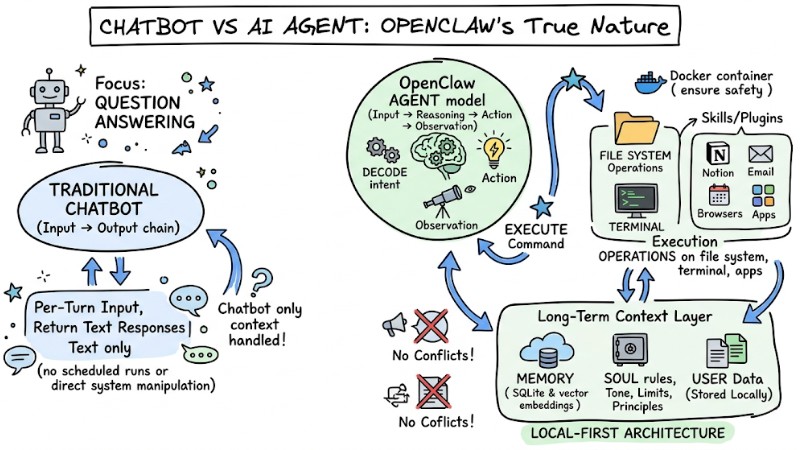
Workflow processing for chatbots and OpenClaw
OpenClaw Architecture
Core components in OpenClaw
At the system level, OpenClaw is organized around a central gateway, agents, and a skill integration layer to handle automation tasks.
- Main Gateway or daemon: Acts as the intermediate server receiving requests from chat channels, APIs, or CLI and distributes them to the corresponding agent or workflow.
- Agent, workspace, and sessions: Each agent has a separate workspace with its own configuration, knowledge files, and session history, where sessions store conversation context and task states.
- Skills, plugins, and MCP connectors: A collection of extension modules allowing the agent to call tools, access external services, and integrate using the MCP standard to connect with internal apps or systems.
Personal knowledge system via Markdown files
OpenClaw uses a set of Markdown files within each workspace to model personas, long-term context, and user information as structured text.
- SOUL.md: Describes the persona, operating principles, and boundaries of the agent, serving as the primary reference source for generating responses and deciding actions.
- MEMORY.md and memory files: Stores long-term context, important events, and usage habits, helping the agent maintain continuous understanding of work and interaction history.
- USER.md: Records the user profile, preferences, and communication style to adjust language and presentation accordingly.
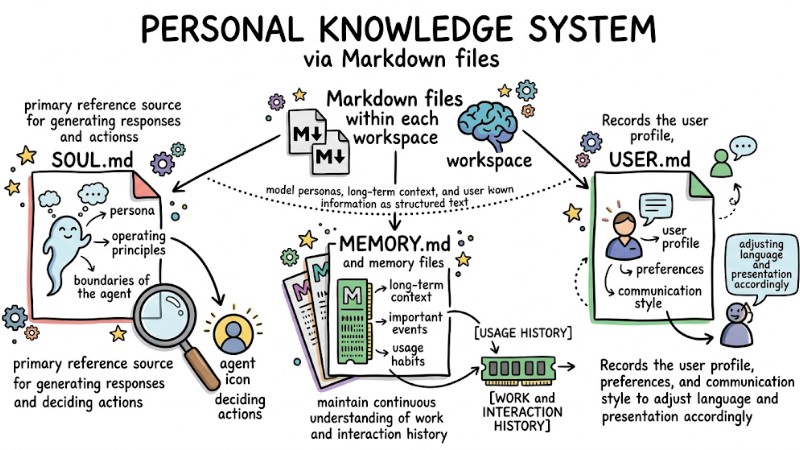
OpenClaw uses a set of Markdown files in each workspace to model personas
Heartbeat mechanism and Cron Jobs
To maintain continuous automation capabilities, OpenClaw combines periodic heartbeats with scheduled cron jobs.
- Periodic Heartbeat: Runs background cycles based on configuration, reading HEARTBEAT.md, the to-do list, and related context to decide if alerts need to be created or new tasks started.
- Scheduled Cron Jobs: Allows for the definition of repetitive tasks like sending reports, backing up data, or task reminders based on cron expressions, triggering commands or workflows in the gateway at specific times.
Multi-platform connectivity and Skill ecosystem
OpenClaw is designed to work across multiple channels and is extensible through a skills ecosystem built by the community and developers.
- Multi-channel integration: Supports connections to Telegram, Discord, WhatsApp, Slack, email, and other platforms, providing access to the same agent and memory from various working environments.
- Skills and plugins ecosystem: Provides dozens of published skills for tasks like browser control, GitHub interaction, file system manipulation, or database querying, creating a foundation to expand agent capabilities as needed.
Practical experience: OpenClaw in daily work
How OpenClaw operates during work
In real-world usage scenarios, OpenClaw typically combines chat interaction, periodic heartbeats, and cron jobs to handle background tasks.
- Receiving work via chat and to-do: The agent accepts requests via chat, records tasks in a to-do list or plan file, and uses heartbeats for periodic review.
- Heartbeat task checking: Following the configured cycle, the heartbeat reads HEARTBEAT.md and the task list to decide whether to send reminders, summarize status, or trigger an automated process.
- Cron for scheduled tasks: Cron jobs are used for fixed activities like aggregating reports, sending emails, reorganizing files, or task reminders at specific timestamps.
Advantages of bringing OpenClaw into workflows
In many repetitive processes, OpenClaw can bring clear efficiency in terms of processing speed, privacy, and customization.
- Accelerated repetitive task processing: The agent can operate on multiple files, folders, or data records consecutively without being limited by manual data entry speeds.
- Data privacy: When self-hosted, work data can stay local; only content sent to model APIs like OpenAI or Claude leaves the machine, depending on specific security configurations.
- High customization via Skills: Users can build new skills or adjust SKILL.md, SOUL, and MEMORY files to expand functions for specific project workflows.
Technical limitations and risks when using OpenClaw
In return, operating OpenClaw requires a certain level of technical understanding and careful configuration to avoid incidents.
- CLI and configuration barriers: Installing via Docker, managing workspaces, and editing YAML or Markdown can be difficult for those unfamiliar with the terminal.
- Lack of visual interface: In many setups, feedback on progress or task status is primarily via logs and messages; there is no clear progress bar, making it hard to observe the execution process.
- Risk from misconfiguration: If sandboxing, access rights, and paths are not configured carefully, the agent could overwrite data or execute unintended commands, requiring a protection layer and testing process before applying it to critical systems.
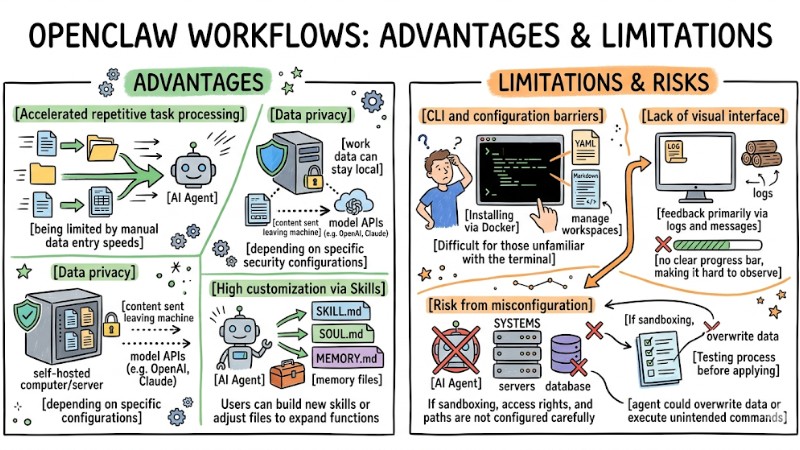
Pros and cons of bringing OpenClaw into workflows
Comparing OpenClaw with ChatGPT Web and Claude Code
In the context of choosing AI tools for daily work, OpenClaw, ChatGPT Web, and Claude Code serve different needs regarding automation levels, infrastructure control, and system interaction scope. The table below summarizes the main differences between these three choices from a deployment, data privacy, and task execution perspective:
| Criteria | OpenClaw | ChatGPT Web | Claude Code |
|---|---|---|---|
| Operating model | Automated Agent; supports Heartbeat and cron for background runs; handles multi-step workflows unattended | SaaS Chatbot; responds on-demand, primarily a request-response model in the browser | Programming Agent; focuses on coding in the terminal or IDE; follows step-by-step user requests |
| Deployment environment | Self-hosted on personal machines or private servers; local-first | Cloud service; accessed via web or app; does not run on internal infrastructure | Combined CLI and IDE; runs on user machine but relies on Anthropic's cloud for model processing |
| System access rights | Can access file system, shell, browser, and integrate apps via skills/MCP, depending on security config | Limited to browser sandbox; primarily receives file uploads and calls integrated service APIs; no local system access | Focuses on code repos, terminal, and project files in the IDE; less focused on email, calendar, or personal apps |
| Memory and context | Long-term local memory via Markdown; easy to edit manually and audit | Memory and context stored in the cloud; depends on plan policies; not in local files by default | Memory is typically per-session or project scope; does not maintain multi-context long-term profiles like OpenClaw |
| Primary use case | Automating life and work; orchestrating many tools and chat channels in one agent runtime | General assistant for knowledge, writing, analysis, and supporting knowledge work in the browser | Specialized programming assistant; reads repos, generates code, runs commands, and manages coding workflows |
Looking at the table above, OpenClaw is suitable for multi-step automation on self-managed infrastructure, while ChatGPT Web is effective for quick knowledge interaction and Claude Code focuses on supporting deep programming workflows. The choice or combination of each tool should therefore be based on your need for automation, data control, and the scope of the system you want the AI to handle in your daily work.
Installation and basic setup process
System requirements and supported environments
To run OpenClaw stably, prepare an OS and Node.js environment meeting these minimum requirements:
- Node.js version: Use Node.js 22.14 or higher; Node 24 is recommended for the gateway and new deployments.
- Operating system: Well-supported on macOS, Linux, and Windows via WSL2 for Unix compatibility.
- Internet connection: Requires a stable connection to call model APIs like OpenAI, Anthropic, or similar providers if not using entirely local models.
Installing OpenClaw via npm
Once system requirements are met, install OpenClaw via npm and initialize your first workspace.
# Install OpenClaw globally
npm install -g openclaw@latest

# Initialize the workspace and run the setup wizard
mkdir my-agent && cd my-agent
openclaw init
Then, follow the on-screen instructions to connect API Keys and select your desired model.
Initial setup wizard
On the first initialization, the wizard guides you through configuring the model provider and basic context files.
- Connect API keys: Enter the API key for OpenAI, Anthropic, or other providers as instructed and save them in the config file like
openclaw.json. - Select default model: Set the default model for the primary agent; this can be adjusted later in the configuration.
- Create SOUL.md, MEMORY.md, USER.md: The wizard creates foundational Markdown files in the workspace to describe the persona, long-term memory, and user information.
Next steps after finishing installation
After completing the installation, verify basic operations and try connecting a communication channel.
- Verify with basic commands: Run a few OpenClaw commands in the terminal to confirm the gateway starts successfully and the agent responds correctly.
- Test chat channel connection: Configure a channel like Telegram or Discord following multi-channel instructions to start interacting with the agent via chat if needed.
Detailed evaluation: Features and typical use cases
Automation on personal machines
For personal use, OpenClaw supports many repetitive tasks on files and data to reduce manual effort.
- File management and processing: Automatically organize folders, bulk rename files according to rules, summarize document contents or work logs based on interaction history.
- Scheduled backups and reminders: Set up scenarios for backing up the workspace or important folders, create deadline reminders, and generate periodic work logs via cron jobs or heartbeats.
Interaction via chat channels
OpenClaw can be controlled directly from familiar chat channels, suitable for individuals, small groups, or families.
- Control agent via chat: Connect the gateway to Telegram or Discord to send commands, receive reports, and update status within daily conversation flows.
- Multi-channel support: Configure multiple channels running simultaneously from one gateway, separating usage space for individuals, small workgroups, or family spaces while sharing memory and context when needed.
Expanding with Skills and plugins
The skills and plugins ecosystem allows for expanding OpenClaw's capabilities based on specific project or process needs.
- Add existing skills: Install skills to control browsers, take screenshots, work with Git, or query databases without building from scratch.
- Write new skills: Define
SKILL.mdwith metadata, inputs, and outputs, then implement logic in the source code and register hooks with the gateway to create custom workflows.
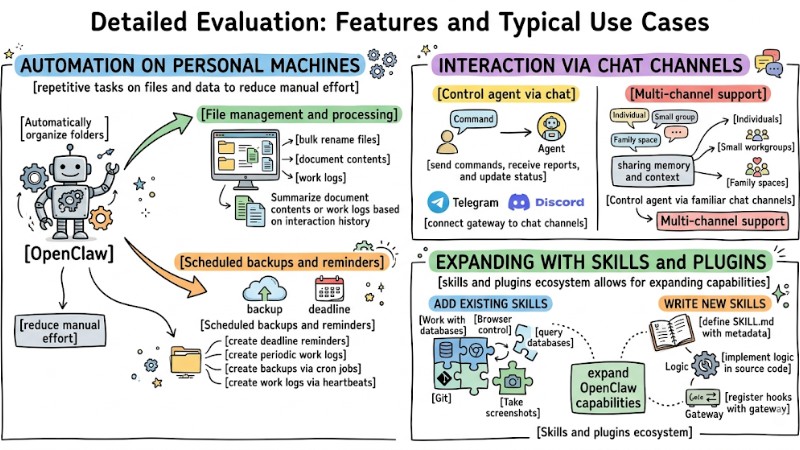
Detailed evaluation of OpenClaw features and typical use cases
Best Practices: How to use OpenClaw more safely
When OpenClaw is granted permissions to read/write files, run shell commands, and call APIs from a local machine, uncontrolled configurations can lead to risks like prompt injection, credential leaks, and remote code execution; therefore, an infrastructure protection layer is needed from the deployment phase.
- Always use a sandbox: Run the agent in an isolated environment like a Docker container or dedicated VM to limit system and data access scope.
- Limit privileges: Do not run OpenClaw with admin or root accounts; apply the principle of least privilege for users and containers.
- Playground directory: Only mount or grant OpenClaw permission to access a specific working directory, avoiding sharing the entire home directory or system drive with the agent's workspace.
Suitable and unsuitable audiences for OpenClaw
Who should consider using OpenClaw?
OpenClaw is suitable for users with basic technical backgrounds and a need for personal automation in a self-hosted environment:
- Power users comfortable with CLI and Docker: Able to read logs, manage containers, edit config files, and handle installation or upgrade errors.
- Developers or analysts needing automation: Wanting to use an agent to process files, generate reports, and run data workflows directly on a personal machine or private server.
- Privacy-conscious individuals: Wanting to keep data, work history, and AI context within internal infrastructure rather than relying entirely on cloud services.
Who should not use OpenClaw?
Certain user groups and environments should consider other solutions if they cannot manage the risks of operating OpenClaw:
- Non-technical users: Uncomfortable with terminals, Docker, or network configuration, making it difficult to maintain a safe and stable system.
- Environments with extremely sensitive data: Organizations without a dedicated security team and clear risk management processes for an agent with file and system command access.
- Enterprises not ready for self-hosted agents: Lacking sandboxing, monitoring, and permission separation strategies, meaning an OpenClaw deployment could create an additional attack surface.
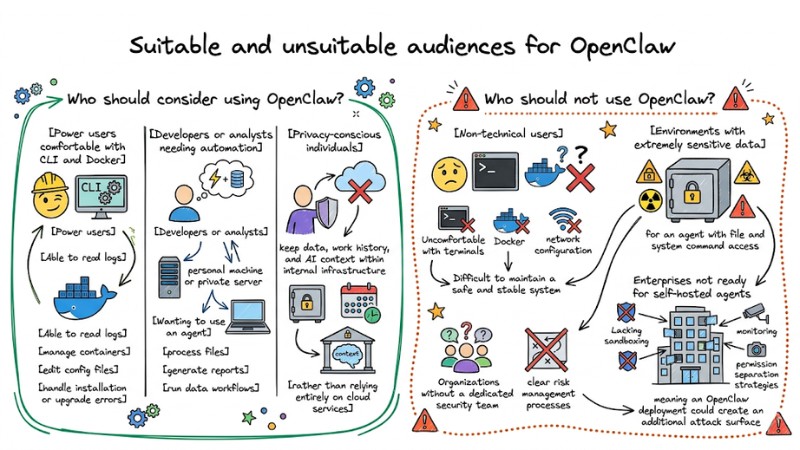
Suitable and unsuitable audiences for OpenClaw
Should you install OpenClaw right now?
Before deciding, evaluate your technical readiness, automation needs, and personal data security requirements.
- Technical checklist: Are you comfortable with CLI, Docker, and basic Linux/WSL configuration? Do you understand the concepts of sandboxing, file permissions, and minimum network configuration?
- Need checklist: Do you have enough repetitive tasks to warrant automation on a personal machine? Are you willing to invest time in "teaching" the agent via Markdown files and configuration to achieve the desired results?
- Security & data checklist: Does your machine contain extremely sensitive data? Have you prepared a strategy for backups, sandboxing, and secret management (API keys, tokens) before allowing the agent access?
FAQ
Is OpenClaw free?
OpenClaw is open-source software under the MIT License, which is free of licensing fees, but you must pay API usage costs for models like OpenAI or Anthropic if you use these services.
Do I need to install powerful hardware?
Not necessarily, as the heavy tasks occur at the model API end. A standard laptop or a basic VPS is sufficient for most use cases.
Can OpenClaw run on Windows?
Yes, OpenClaw supports Windows, with WSL2 being recommended for a stable experience and full compatibility with the Linux file system and toolchain.
Is my data sent to the developer's server?
When deploying a self-hosted version, OpenClaw's state data and conversation history are stored in the .openclaw directory and workspace on your machine. It is not automatically sent to the developer's server, except for traffic you actively configure to go through third-party model APIs.
Read more:
- Guide to Installing OpenClaw and Simple Configuration for Beginners
- Guide to Integrating OpenClaw MCP for Advanced AI Agent Optimization
- OpenClaw Architecture: OS Solution for AI Agents
OpenClaw is suitable for users with technical backgrounds and deep automation needs on self-managed infrastructure; it is not for the general public. If you prioritize privacy and are willing to invest effort in safe configuration, the benefits in speed and customization offered by OpenClaw make it a choice worth considering in this OpenClaw Review.