How to Write Expert-Level Prompts for AI Agents Handling Complex Tasks

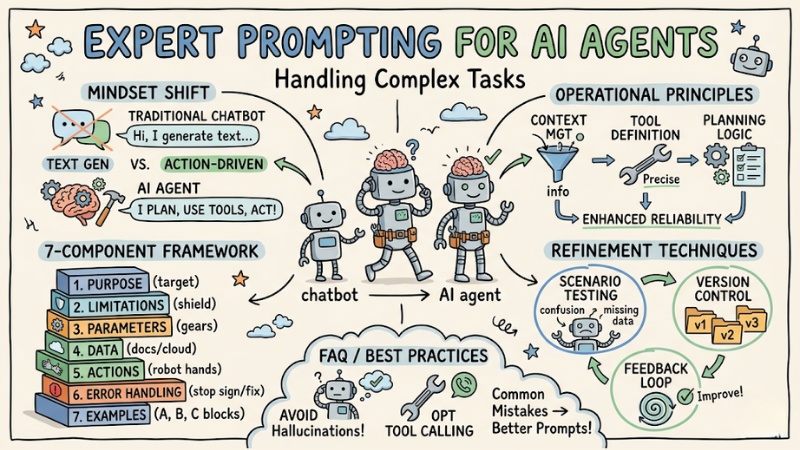
Building AI Agents requires a different mindset compared to regular chatbots. Instead of just generating text responses, you are designing an agent capable of planning, using tools, and making autonomous decisions. This article provides a technical framework to help you write expert-level AI agent prompts, optimizing the accuracy and execution capabilities of your AI Agent.
Key Points
- Prompt design mindset: Master the differences in prompt design between AI Agents (action-oriented and decision-driven) compared to traditional chatbots.
- 7-component structural framework: Apply a standard formula including purpose, limitations, parameters, data, actions, error handling, and examples to optimize execution capability.
- Operational principles: Know how to manage context intelligently, define tools accurately, and promote planning logic to enhance reliability.
- Refinement techniques: Leverage scenario testing, version control, and feedback loops to continuously improve Agent performance.
- FAQ: Understand common prompt errors and mitigation strategies (such as reducing "hallucinations" and optimizing tool calling) to help you build stable, accurate systems.
Why are AI Agent prompts different from standard AI prompts?
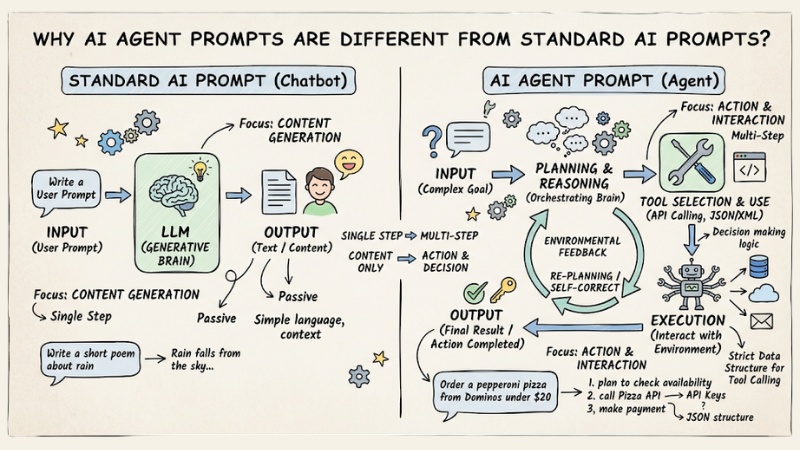
The core difference between AI Agent prompts and standard AI prompts lies in the "action" capability. While chatbots focus solely on content generation, AI Agents need to understand the environment, their limits, and how to interact with external systems. Specifically:
- Action-oriented:Agent doesn't just answer questions; it also performs changes in the environment (e.g., Reading files, querying SQL).
- Decision making: Agents need logic to plan instead of just following a fixed script.
- Environmental constraints: You must clearly define what the Agent is and is not allowed to do.
- Machine-to-machine communication: Prompts must use strict data structures (like JSON or XML) so the Agent understands function calls (tool calling).
AI Agent prompts differ from standard AI
7-component structural framework for AI Agent prompts
An effective prompt for an Agent needs transparency and detail. Apply the following formula:
| Component | Meaning |
|---|---|
| Purpose | A statement of the Agent's ultimate goal. |
| Limitations | Establishes operational boundaries (e.g., do not access data older than 7 days). |
| Parameters | Input variables that the Agent needs to manage or control. |
| Data Sources | Valid and authorized data sources for retrieval. |
| Actions | A list of actions or tools that the Agent is permitted to use. |
| Error Handling | Procedures for when a task fails (to prevent the Agent from hallucinating or making up information). |
| Sample Questions | Examples of user interactions to guide the Agent's reasoning and logic. |
3 golden rules to optimize AI Agent performance
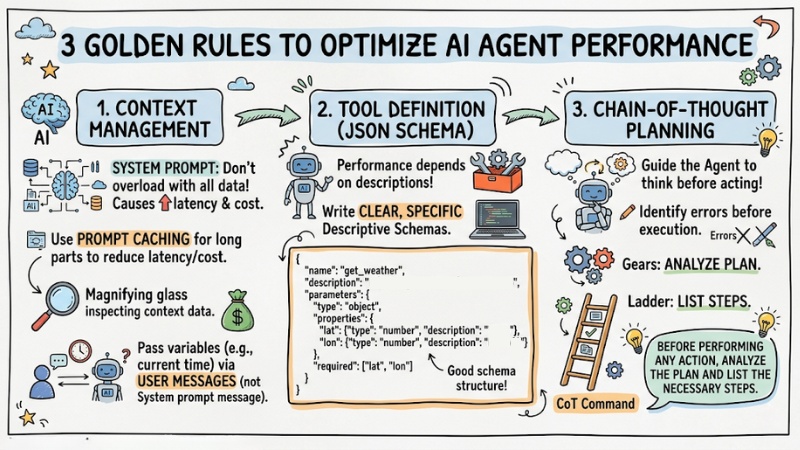
1. Context Management
You should not load all data into the system prompt; use prompt caching techniques for long prompt segments to reduce latency and costs (Prompt Caching). Additionally, pass variable information (such as the current time) through user messages instead of the system message.
2. Tool Definition (JSON Schema)
The Agent's ability to use tools depends entirely on how you describe them. Therefore, write clear, specific descriptive schemas:
{
  "name": "get_weather",
  "description": "Get weather information by coordinates",
  "parameters": {
    "type": "object",
    "properties": {
      "lat": {"type": "number", "description": "Latitude"},
      "lon": {"type": "number", "description": "Longitude"}
    },
    "required": ["lat", "lon"]
  }
}
3. Chain-of-Thought Planning
Guide the Agent to think before acting with the command: “Before performing any action, analyze the plan and list the necessary steps.” This helps the Agent identify errors before executing the next step.
3 golden rules to optimize AI Agent performance
Sample Prompt Template for AI Agent
Using XML structures helps the Agent separate contexts more easily:
<system_prompt>
  <purpose> [Describe the agent's mission] </purpose>
  <limitations>
   <item>Do not execute command X.</item>
   <item>Only access data within scope Y.</item>
  </limitations>
  <tools_guidance>[Instructions on how to call functions when needed]</tools_guidance>
  <error_handling>If an error occurs, report it in detail and do not make assumptions.
</error_handling>
</system_prompt>
Prompt Refinement Techniques
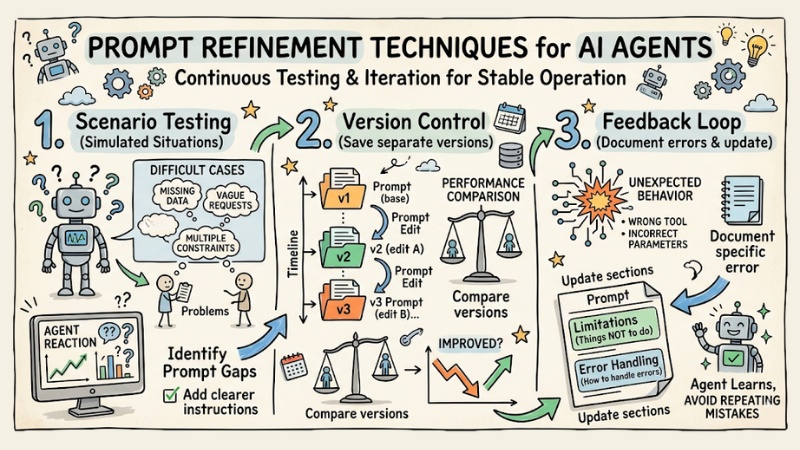
For an AI Agent to operate stably, you cannot just write a prompt once and use it forever; it requires continuous testing and refinement through multiple iterations.
- Scenario Testing: Proactively create simulated situations, especially difficult cases or those prone to confusion, to see how the Agent reacts. For example, provide missing data, vague requests, multiple constraints at once, etc. From there, you will identify gaps in the prompt and add clearer instructions.
- Version Control: Every time you edit a prompt, save it as a separate version (v1, v2, v3…) instead of overwriting the old one. This allows you to compare performance between versions, see which changes improved the Agent, and avoid cases where an edit makes it perform worse without knowing why.
- Feedback Loop: When the Agent calls the wrong tool, uses incorrect parameters, or behaves unexpectedly, don't just fix it in the code. Document the specific error and then update the prompt – adding to the Limitations (things not to do) or Error Handling (how to handle errors) sections so the Agent learns and avoids repeating similar mistakes in the future.
Prompt Refinement Techniques
Frequently Asked Questions when writing AI agent prompts
What is prompt engineering for AI Agents?
Prompt engineering for AI Agents is the art and science of designing detailed, structured commands to guide AI Agents in performing tasks effectively. It differs from regular prompts by requiring clarity on purpose, limits, tools, and error handling.
Why are prompts for AI Agents different from regular prompts?
AI Agents need detailed prompts to be able to plan, use tools (tool calling), and handle unexpected situations, rather than simply answering questions like a standard chatbot.
What components make up a standard prompt structure for an AI Agent?
A standard framework usually consists of 7 components: Purpose, Limitations, Parameters, Data Sources, Actions, Error Handling, and Sample Questions.
How do you define limitations for an AI Agent?
Clearly define the Agent's scope of operation, what it should and should not do, and what information should be included or excluded to avoid bias and hallucination.
Why is error handling important in AI Agent prompts?
Error handling helps the Agent know how to cope when encountering bad data or unexpected situations, instead of making up information or stopping abruptly, ensuring reliability.
How should data sources be provided to an AI Agent?
You clearly list the information sources that the Agent can access and use for analysis or task execution, helping it operate more effectively and accurately.
How do you write effective prompts for AI Agents using tool calling?
Clearly define the tools using JSON schema, describing the functions, parameters, and usage of each tool so the Agent can select and call them accurately.
How should the order of sections in an AI Agent prompt be arranged?
The priority order for AI is usually the User message, then the beginning of the prompt and the middle of the prompt. Place the most important information at the beginning or the end so the Agent can easily notice it.
How do you refine prompts for AI Agents?
To refine prompts for an AI Agent, frequently test the prompts with different scenarios, observe performance, and repeat the process of adjusting components to optimize results.
How can you minimize Agent hallucination?
Ask the Agent to cite data sources or 'self-reflect' on results before providing the final response.
Why isn't the Agent using the correct tool I provided?
You should check the description of the tool in the JSON Schema. If the description is vague, the Agent will struggle to make the decision to select the right tool.
When should you use multiple Agents instead of one large Agent?
When the task is too complex, split it into specialized Agents (Multi-agent) so that each Agent only focuses on a single group of tools.
See more:
- Optimal and effective transition from Single-Agent to Multi-Agent
- Guide to Building AI Agents for effective process automation
- AI Agent Observability: How to monitor AI Agent systems for enterprises
The success of an AI Agent does not lie in the intelligence of the model, but in the rigor of the prompt structure. Apply this 7-component framework to your AI agent prompt today to optimize the autonomy and accuracy of your system.
Tags