Guide to Building AI Agents for Efficient Workflow Automation

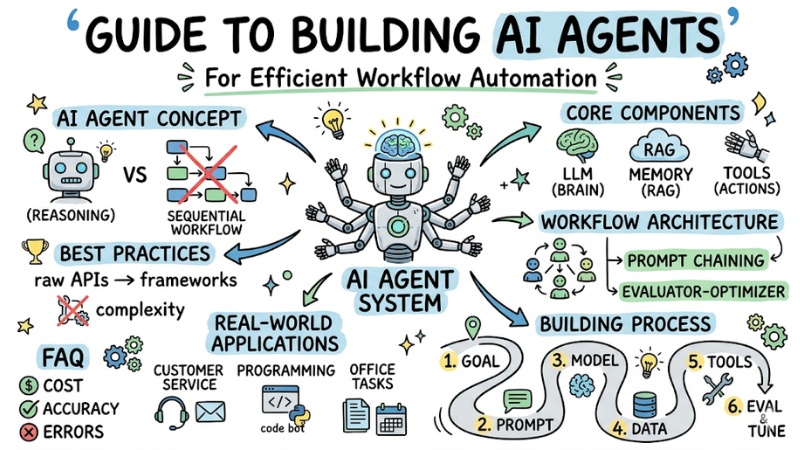
Looking to optimize your workflow with smart automation but don't know where to start? This guide provides a practical roadmap to build an AI Agent from the ground up, helping you shift from manual processes to efficient, cost-effective autonomous systems.
Key Points
- AI Agent Concept: Clearly understand the reasoning and decision-making capabilities of AI Agents versus traditional workflows to ensure the right application.
- Core Components: Master the roles of LLMs, memory (RAG), and tools to build a complete and accurate AI Agent system.
- Workflow Architecture: Choose the right architectural model (from Prompt Chaining to Evaluator-optimizer) to optimize performance for specific problems.
- Building Process: Apply a 6-step practical roadmap to set up, connect, and fine-tune your AI Agent methodically.
- Best Practices: Learn how to start with raw APIs to grasp the core before moving to frameworks, saving costs and avoiding unnecessary complexity.
- Real-world Applications: Leverage AI Agents in customer service, programming, and office tasks to break through productivity barriers.
- FAQ: Understand cost management strategies, accuracy optimization, and error handling to operate stable and reliable AI Agents.
What is an AI Agent? The Difference Between AI Agents and Workflows
An AI Agent is an LLM-based system capable of self-direction to complete a specific goal. It does more than just respond with text; it is capable of:
- Goal-oriented: Focuses on the end result rather than just executing sequential steps.
- Agentic reasoning: Capable of reasoning, planning, and self-correcting when encountering errors.
- Environmental interaction: Interacts with the external environment through tools (data retrieval, running code, sending emails).
Workflow vs. AI Agent Comparison:
| Features | Workflow | AI Agent |
|---|---|---|
| Structure | Linear, fixed. | Dynamic, self-directed. |
| Decision-making | Pre-defined by humans. | AI autonomous decision-making. |
| Flexibility | Low. | High. |
| Applications | Repetitive, fixed tasks. | Open-ended problem solving. |
When to use:
- Use a Workflow if your task has a clear, fixed process (e.g., sending a welcome email).
- Use an AI Agent when the task requires flexibility, handling many unexpected situations, or high autonomy.
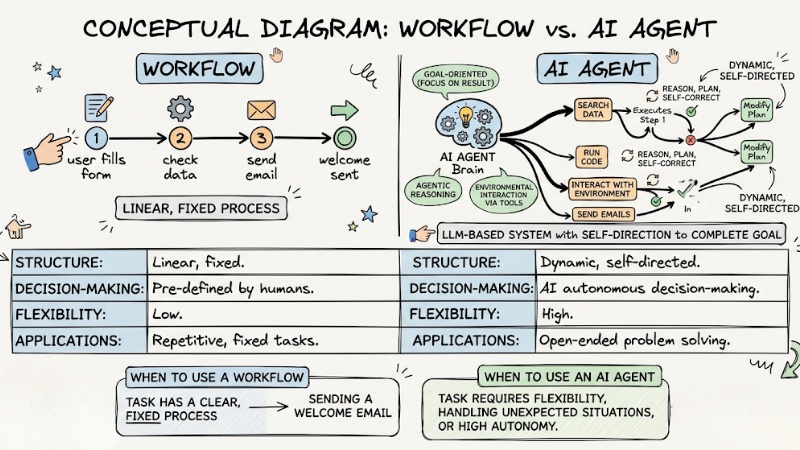
Comparing Workflow with AI Agent
3 Core Components of an AI Agent System
To build an effective Agent, you need to focus on three main building blocks:
1. LLM (The Orchestrating Brain)
The LLM is the central “brain” of the Agent. It doesn't just generate content; it handles reasoning, state-awareness, planning, and deciding the next move.
2. Memory and RAG (Supporting Knowledge)
An LLM on its own doesn't know your internal data. Therefore, RAG (Retrieval-Augmented Generation) helps the Agent retrieve information from private documents or business databases, leading to more accurate answers and reduced hallucinations.
3. Tools (Capability to Act)
Tools are the functions that the Agent is allowed to call to execute real work. Through tool-calling, the Agent selects the right tool, passes the appropriate parameters, and runs the task; here, prompt engineering skills determine the accuracy of tool selection and usage.
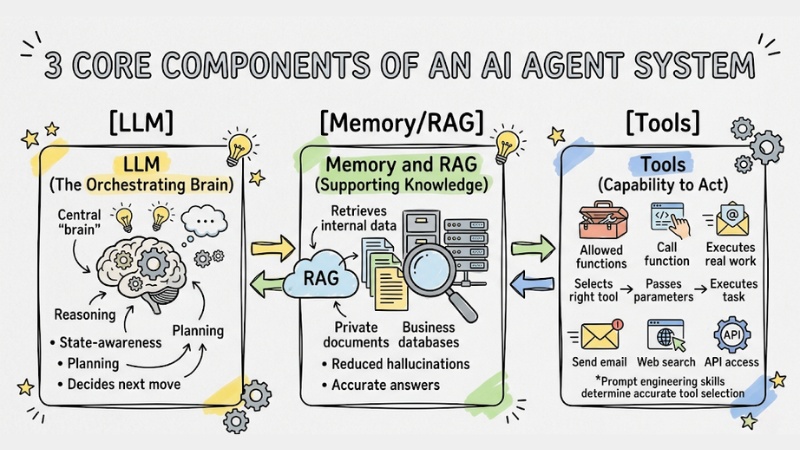
3 Core Components of an AI Agent System
Top 5 Workflow Architecture Models to Build AI Agents
Prompt Chaining: Breaks a large task into several small sequential steps, each step being a separate prompt.
- Pros: Easy to control, fewer errors.
Routing: First, the system classifies the user request, then automatically routes it to the appropriate processing branch (e.g., Q&A branch, summarization branch, email writing branch, etc.).
- Pros: Increases accuracy for each task type.
Parallelization: Instead of sequential processing, the Agent runs multiple independent tasks in parallel and then aggregates the results at the end.
- Pros: Optimizes waiting time.
Orchestrator-workers: One LLM acts as the “orchestrator,” responsible for analyzing tasks and assigning work to one or more “worker” LLMs specialized in specific sub-tasks.
- Pros: Solves complex, multi-step problems.
Evaluator-optimizer: An Agent generates a response, and then another step (or model) acts as an “evaluator” to check, score, and suggest edits; the response is then optimized through multiple iterations.
- Pros: Ensures the highest quality output.
6 Basic Steps to Build an AI Agent in Practice
- Define Goal: You should outline the process (SDLC - Software Development Life Cycle) for the Agent.
- Select Model: Next, you choose based on the balance between reasoning capability and latency.
- Tool Definition: Then, you use precise JSON Schema so the Agent understands how to use the API.
Example:
{
"name": "get_weather",
"description": "Get weather data for a specific location",
"parameters": { "type": "object", "properties": { "location": { "type": "string" } } }
}
- Set System Prompt: Shape the role and operational principles of the AI Agent to guide behavior and minimize unwanted outputs (acting as safety “guardrails”).
- Connect Vector Database: You deploy RAG so the Agent can retrieve real-world data.
- Logging & Debugging: Monitor the steps the Agent takes to fine-tune prompts if the Agent goes off track.
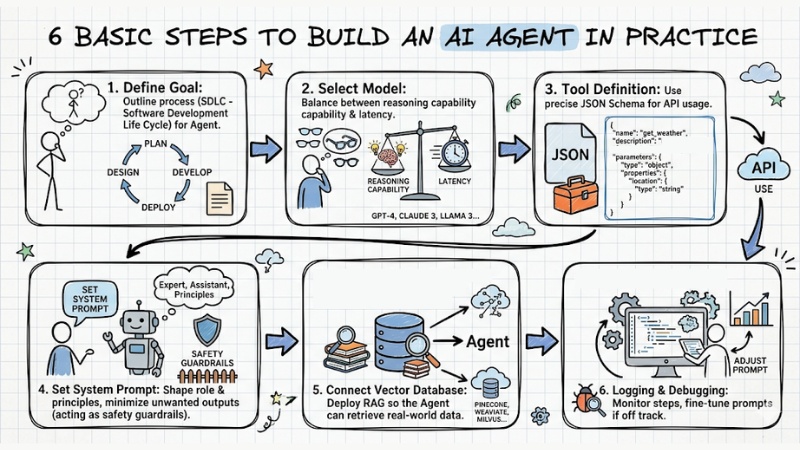
6 Basic Steps to Build an AI Agent in Practice
Best Practices: Should You Code API Directly or Use a Framework?
You should avoid applying complex frameworks right from the start. Instead, start by calling the LLM API directly. This helps you gain a thorough understanding of how the Agent operates, error handling, and message flows.
Once the system is stable and the need for scaling grows, consider frameworks like LangChain or CrewAI to minimize repetitive code. However, always ensure you clearly understand the underlying abstractions.
Top 3 Most Popular Real-world AI Agent Applications Today
AI Agents are currently being applied to many business problems; here are the 3 most typical application groups:
- Customer Support: Automatically resolving complaints, tracking orders, and processing refunds according to scenarios.
- Coding Agent: Automatically writing test cases, bug fixing, and suggesting source code optimizations.
- Intelligent Process Automation (IPA): Automating office tasks such as extracting data from invoices and entering data into accounting systems.
FAQ When Building AI Agents
How is the operating cost of an AI Agent calculated?
The operating cost of an AI Agent depends on the number of Tokens consumed. The more reasoning steps and data retrieval (RAG), the higher the cost will be. Therefore, you should optimize prompts to reduce unnecessary tokens.
Can I build an AI Agent if I'm not good at programming?
Yes. Current Low-code platforms allow you to drag and drop modules to build workflows without needing in-depth coding knowledge. However, logical thinking about the process remains the deciding factor for success.
How to minimize errors when building an AI Agent?
You should use RAG to provide standard knowledge while applying the Human-in-the-loop (HITL) mechanism – requiring human approval before the Agent performs important actions (like transferring money or deleting data).
What is an AI agent and how do they differ from workflows?
An AI agent is a self-directed system capable of reasoning and using tools to complete goals. Workflows are processes with pre-defined code paths and are less flexible than agents.
Why are AI agents important in modern automation?
AI agents bring flexibility and autonomous decision-making capabilities to complex tasks, allowing for the solution of open-ended problems without defining all sub-steps in advance.
What are the core components of an AI agent system?
An AI agent includes a Large Language Model (LLM) as the orchestrating center, memory for storing information and RAG for supplemental knowledge, along with tools that allow interaction with the external environment.
Which workflow architecture model should be used to build an AI agent?
Popular models include Prompt chaining, Routing, Parallelization, Orchestrator-workers, and Evaluator-optimizer, each suitable for different task types and complexity levels.
How to start building an AI agent effectively?
Start by clearly defining the goal, choosing the right LLM, designing detailed tools with standard structures (like JSON), writing effective system prompts, and setting up logging mechanisms to monitor and fine-tune agent activities.
Should I use a framework or code APIs directly when building an AI agent?
You should start with the raw LLM API to clearly understand the core, and then consider using a framework if necessary to avoid introducing unwanted complexity.
In which fields can AI agents be applied?
AI agents have wide applications in automated customer support, coding agents, and intelligent process automation (IPA), helping to enhance efficiency and save time.
Is the operating cost of an AI agent high and how can it be optimized?
Costs depend on token usage and task complexity. You can optimize by designing concise prompts, using tools efficiently, and limiting the number of unnecessary iterative steps.
How to minimize hallucination in AI agents?
To minimize hallucination in AI agents, you should combine RAG to provide accurate data, design smart tools, and consider using a Human-in-the-loop (HITL) mechanism for human supervision and intervention when needed.
See more:
- Detailed Guide for Implementing OpenClaw Multi-Agent System
- MCP Server Best Practices: Optimizing Performance for AI Agents
- Guide to Setting Up Claude Code MCP: Optimizing AI Coding Agent
AI Agents are no longer science fiction but have become one of the most effective ways to optimize productivity, and building an AI agent can now start from a very specific task in daily work. Instead of trying to change the entire system, you just need to set up a few small tools for the Agent to access data, call APIs, or perform repetitive tasks for you, and then step-by-step expand into a complete automation process where AI Agents and humans collaborate to handle work from start to finish.