AI Agent Fix Bugs: Operational Mechanisms and Safe Usage

Automated debugging with AI Agent fix bugs is the practice of using artificial intelligence agents to detect, analyze, and patch software bugs with a higher degree of autonomy than traditional code completion tools. This article covers how AI Agents operate in the bug-fixing workflow, common risks, and principles to help you safely apply them to real-world projects.
Key Takeaways
- AI Agent Fix Bugs Concept: Understand that this is an autonomous AI system capable of independently detecting, analyzing, and applying software patches without continuous developer intervention.
- Core Differences: Clearly distinguish the proactive nature of AI Agents from the reactive nature of AI Assistants like Copilot.
- Source Code Debugging Workflow: Master the operational workflow from fault localization and iterative patch generation to automated Pull Requests and regression testing.
- Risk Identification: Be wary of 3 major challenges: Over-engineering, breaking working code, and AI "hallucinations" generating non-existent code blocks.
- Top 5 Prominent Tools: Explore top-tier solutions like GitHub AI Agent, SWE-agent, MarsCode Agent, Kiro.dev, and internal Self-healing systems to choose the right tool for your project.
- Safe Usage Principles: Pocket essential skills like writing Prompts that strictly limit the fixing scope, applying Test-driven development, and always maintaining human Code Reviews.
- FAQs: Get answers on how to prevent AI from breaking legacy code, the safety level of letting AI auto-merge code, and the best project types for deploying AI Agent fix bugs tools.
Overview of the AI Agent Fix Bugs Trend
What are AI Agents in Automated Software Maintenance?
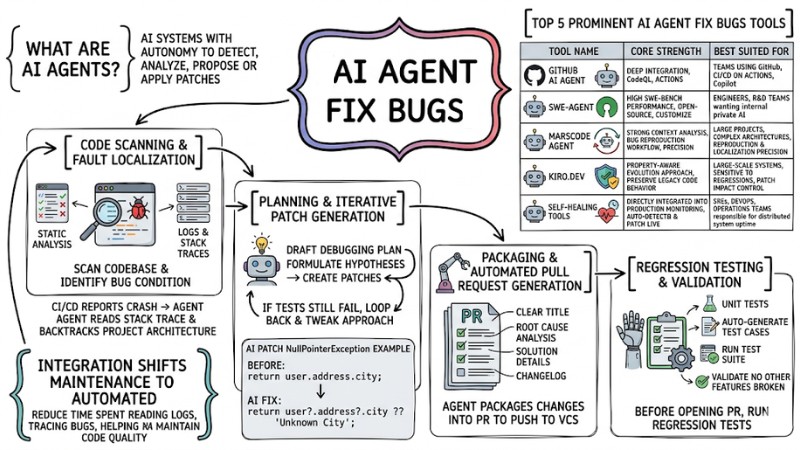
AI Agent fix bugs are artificial intelligence systems with the autonomy to detect, analyze, and propose or apply software patches without constant human intervention, helping automate the bulk of the source code maintenance workflow.
Integrating AI Agents into the SDLC (Software Development Lifecycle) shifts the maintenance phase from manual to semi-automated or fully automated, reducing the time spent reading logs, tracing bugs in the CI/CD pipeline, and helping continuously maintain code quality.
The Difference Between AI Agents and AI Assistants in Bug Fixing
Previously, developers typically used assistant-style tools like GitHub Copilot to highlight a buggy code snippet and request fix suggestions, meaning the human still decided which files to open and what logic to change.
With AI Agents, developers can simply provide a ticket, a GitHub issue, or an error log from CI/CD, and the agent will automatically clone the repository, analyze the full context, deduce the root cause, and propose a patch as a complete pull request following a pre-configured workflow.
| Criteria | AI Assistant (e.g., Copilot) | AI Agent (e.g., SWE-agent) |
|---|---|---|
| Autonomy Level | Operates per developer command, providing suggestions right in the editor but doesn't run the debugging workflow autonomously. | Operates automatically triggered by signals like issues, error logs, or pipeline events; can plan and execute a chain of analysis, fixing, and testing steps within granted permissions. |
| Trigger Method | Triggered when a developer types a prompt, highlights code, or interacts directly in the IDE. | Triggered by the system via events like build failures, new issues, alerts from monitoring systems, or scheduled tasks. |
| Output Format | Returns line-by-line or block code suggestions for developers to review and insert into the source code. | Generates a complete pull request or patch, complete with a changelog and often accompanied by automated test results. |
| Human Interaction | Developers are involved in every step, from triggering and selecting suggestions to editing and committing. | Humans mainly participate in the review, approval, and final tweaking stages before merging into the main branch. |
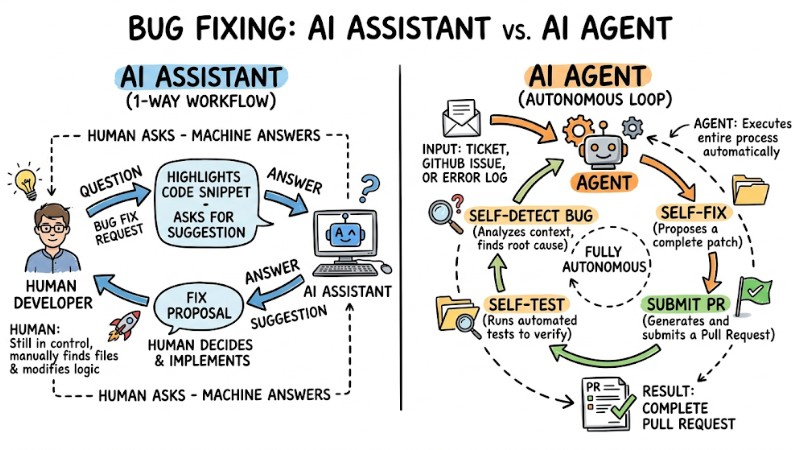
The difference between an AI Assistant with an AI Agent
The Workflow of AI Agents Automatically Finding and Fixing Source Code Bugs
This workflow is typically organized into four sequential steps, from fault localization to testing and generating a complete pull request.
Step 1: Code Scanning and Fault Localization
Upon receiving a bug report, the AI Agent first uses static code analysis techniques and data from logs and stack traces to scan the codebase and identify the bug condition.
For example: When the CI/CD system reports an application crash, the Agent can read the stack trace, backtrack through the project architecture, and isolate the related files, functions, or logic blocks, combining this with tools like CodeQL to parse code structure rather than just doing text-based searches.
Step 2: Planning and Iterative Patch Generation
After isolating the suspect areas, the AI Agent drafts a debugging plan, formulates hypotheses about the root cause, and creates experimental patches iteratively based on large language models. If a hypothesis doesn't match the expected behavior (e.g., tests still fail), the system loops back, tweaks the approach, and tries another vector.
Example before and after the AI patches a NullPointerException:
// Trước khi sửa: Lỗi khi user không có thuộc tính address
function getUserCity(user) {
return user.address.city;
}
// Sau khi AI Agent tự động sửa: Thêm Optional Chaining
function getUserCity(user) {
return user?.address?.city ?? 'Unknown City';
}
Step 3: Packaging and Automated Pull Request Generation
Once the patch passes internal checks, the AI Agent packages the changes into a pull request (PR) to push to the version control system. A standard PR generated by an Agent usually includes:
- A clear PR title, accurately describing the resolved bug.
- Root cause analysis of the original error.
- Solution details detailing what was applied and why that method was chosen.
- A detailed changelog for each file.
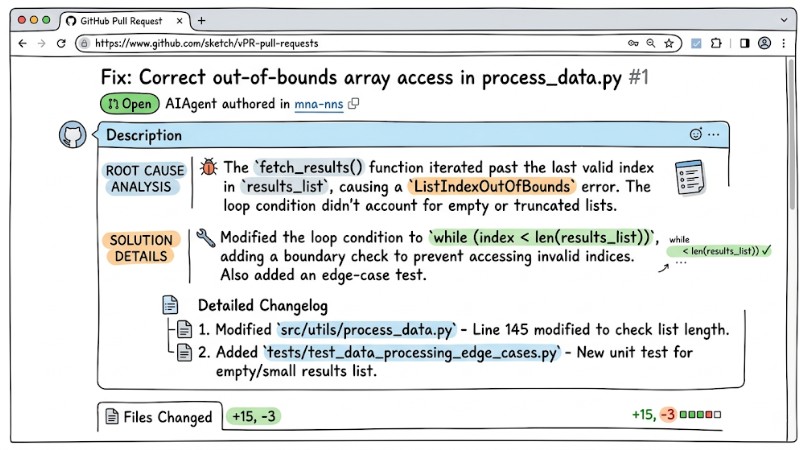
A real Pull Request created by an AI Agent on GitHub
Step 4: Regression Testing and Validation
Before opening the PR or tagging it as ready for review, the system runs regression testing to ensure the post-fix behavior meets the expected state (postcondition). These steps include:
- Reading the project's existing Unit tests.
- Auto-generating new test cases specifically targeting the newly fixed bug.
- Running the entire Test Suite to ensure the patch clears the old error.
- Validating that no other features are broken before opening the PR.
The Debugging Paradox: Top 3 Challenges When Using AI Agents
The "Sledgehammer Instead of a Scalpel" Problem (Over-engineering)
A common risk is AI Agents generating patches that far exceed the necessary scope; instead of just tweaking the exact error spot, they refactor the entire function or module. Abusing refactoring, stacking guard clauses, and adding secondary validation structures can bloat the code, making it harder to maintain and deviating from the dev team's original design intent.
Practical Comparison:
- Code to fix (human-proposed): Add a simple
if (!isValid)flag and stop. - AI-generated code: Wraps the whole function in a try-catch block, extracts multiple new helper functions, and injects a slew of data type checks.
Breaking Working Code
Lacking the ability to uphold the preservation property is a major risk when deploying AI Agents for debugging.
In principle, a patch should fix the faulty behavior while keeping the correct behaviors intact. However, an AI Agent might fix bug A while inadvertently tweaking logic that breaks feature B. This stems from the system not fully grasping the architectural context and failing to clearly define the boundary between buggy code and code that must remain untouched.
AI Trust and Safety Risks (Hallucinations)
Some AI-generated patch strategies tend to prioritize passing tests over addressing the root cause—for instance, using empty try-catch blocks to swallow errors just to prevent crashes without solving the underlying issue.
Furthermore, hallucinations can cause the system to reference libraries or functions that don't exist in the codebase, triggering new errors during compilation or deployment. Besides that, if automated patches aren't vetted against InfoSec standards, they can inadvertently widen the attack surface, creating new security vulnerabilities in the app.
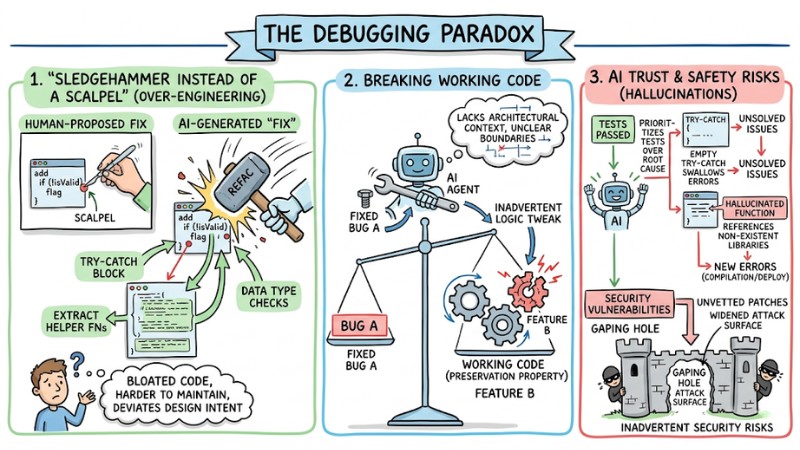
Hallucination may introduce new errors during compilation or deployment
Top 5 Prominent AI Agent Fix Bugs Tools Today
To choose the right solution, you need to clearly distinguish the strengths and target user bases of the various AI Agent fix bugs tools on the market.
| Tool Name | Core Strength (USP) | Best Suited For |
|---|---|---|
| GitHub AI Agent | Deep integration with the GitHub ecosystem, leveraging CodeQL and GitHub Actions. | Teams already using GitHub, CI/CD on GitHub Actions, and Copilot as their primary foundation. |
| SWE-agent | High performance on the SWE-bench benchmark; an open-source project you can self-host and customize. | Engineers and R&D teams wanting to build or extend internal AI systems on private infrastructure. |
| MarsCode Agent | Strong context analysis capabilities, clear bug reproduction workflows, and a high success rate on complex projects. | Large projects with complex architectures requiring high precision in bug reproduction and localization. |
| Kiro.dev | Applies a property-aware evolution approach, focusing heavily on preserving legacy code behavior. | Large-scale systems sensitive to regressions, needing strict control over a patch's impact. |
| Self-healing tools | Directly integrated into production monitoring systems, auto-detecting and patching bugs in live environments. | SREs, DevOps, and operations teams responsible for distributed system uptime. |
1. GitHub AI Agent (Prototype)
GitHub AI Agent operates as a built-in service within the GitHub ecosystem, capable of scanning codebases, analyzing issues, and automatically generating pull requests containing patches. The tool leverages existing infrastructure like GitHub Actions and CI/CD pipelines to seamlessly hook into a team's current development lifecycle.
Its core power lies in exploiting a massive knowledge base of vulnerabilities and code patterns from the community, paired with the CodeQL engine to perform semantic analysis rather than basic string searches. This helps detect and resolve bugs on a deeper level, making it highly suitable for teams with standardized GitHub workflows.
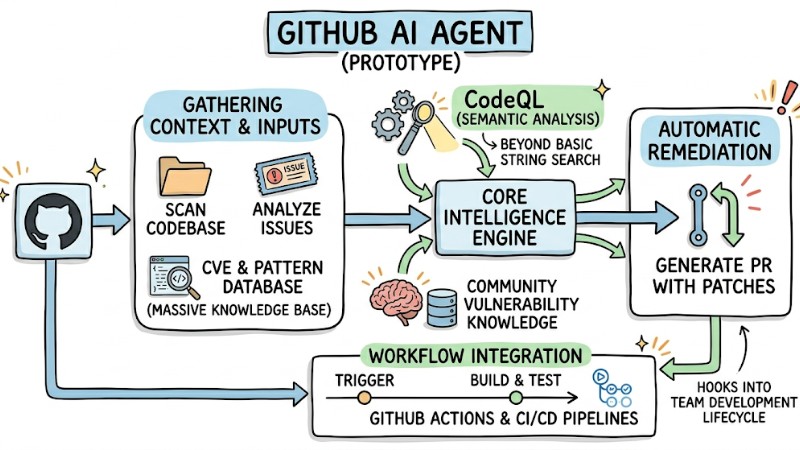
GitHub AI Agent operates as a built-in service within the GitHub ecosystem
2. SWE-agent (Princeton)
SWE-agent is an open-source tool designed to tackle real-world GitHub issues, from reading bug descriptions to editing code and preparing patches. SWE-agent's architecture supports a multi-step workflow, allowing the Agent to interact with the repository just like a developer following a structured process.
Its performance has been benchmarked on the SWE-bench dataset, demonstrating its ability to resolve a significant percentage of standard bugs without constant intervention. This makes the tool an excellent choice for engineering teams wanting to build or tweak internal AI systems based on open platforms.
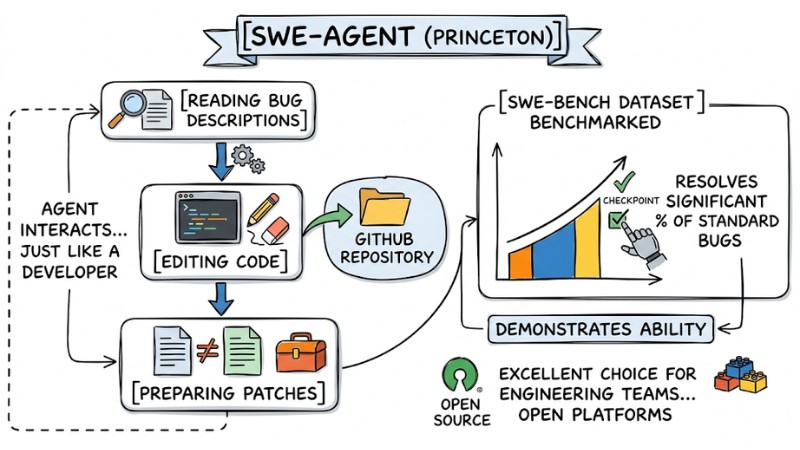
SWE-agent is an open-source tool designed to resolve real-world GitHub issues
3. MarsCode Agent
MarsCode Agent was developed as an AI-native system strictly focused on accurately reproducing bugs before proposing fixes. The tool prioritizes the workflow of reproducing the error, isolating the fault location, and only then generating the patch, slashing the risk of editing the wrong spots.
As a result, MarsCode Agent fits complex architectural projects where reproducing and isolating bugs is the primary challenge. Emphasizing context and behavior prior to patching boosts the successful fix rate without causing unforeseen side effects.
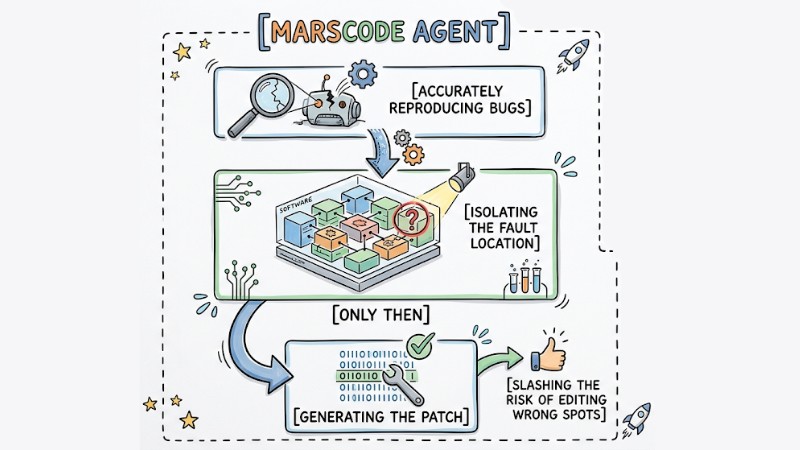
MarsCode Agent focuses on accurate bug reproduction
4. Kiro.dev
Kiro.dev applies a property-aware code evolution methodology, meaning every change is evaluated based on the system properties it needs to preserve. The tool forces the Agent to strictly differentiate between the buggy code zone and the safe code zone, thereby restricting sprawling edits that cause unnecessary impacts.
In its operational workflow, Kiro.dev often requires designing test cases before generating fix code, helping verify both the bug resolution and the preservation of existing behavior. This approach is exceptionally well-suited for massive systems highly sensitive to regressions that cannot tolerate code-mutation risks.
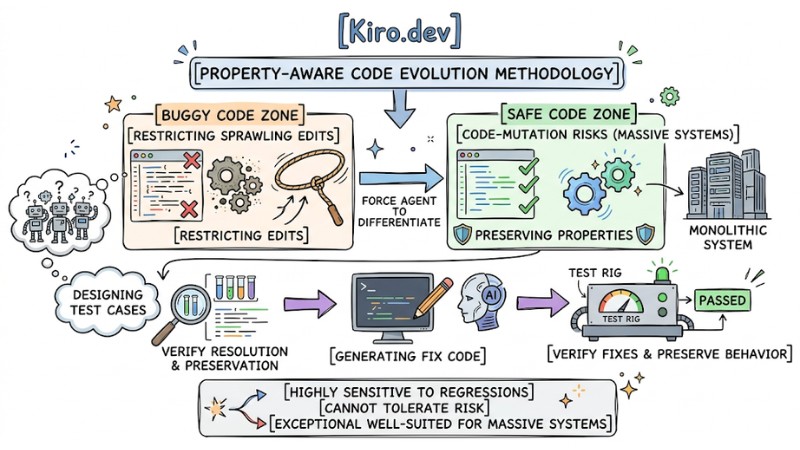
Kiro.dev enforces a clear distinction between buggy and safe code regions
5. Internal Self-healing Code Systems
Internal self-healing systems are typically custom-built and deployed by enterprises within their own infrastructure, tied directly to monitoring, logging, and alerting tools. When a runtime error occurs, the Agent can parse the logs, pinpoint the root cause, and propose or deploy a patch within allowable parameters.
These solutions usually combine automated mechanics with manual approvals—for example, auto-creating a hotfix branch, running tests, and waiting for confirmation before deployment. This model fits SRE and DevOps teams running distributed systems that demand high uptime but still require tight control over all production environment changes.
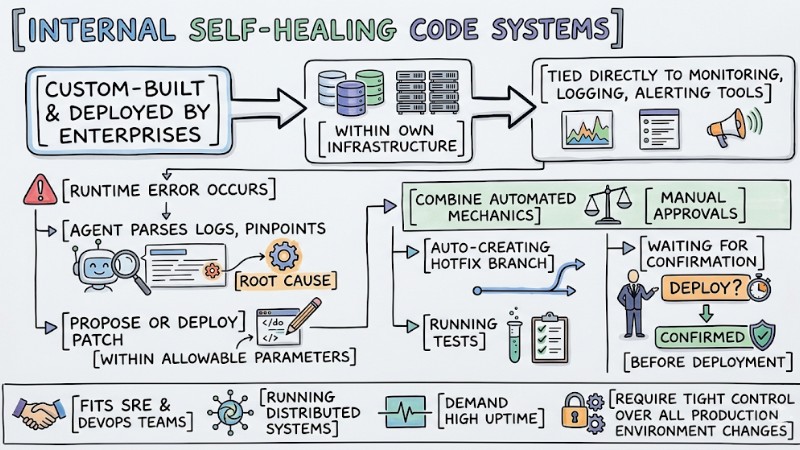
Internal self-healing systems can identify root causes and propose patches
How to Safely Control and Use AI Agent Fix Bugs
Clearly Define the Bug Scope Before Handing Work to the AI
When delegating a debugging task to an AI Agent, you must clearly describe the bug condition, the exact location to edit, and the source code scope that must remain untouched. Explicitly defining the bug condition and code context helps the Agent understand exactly where to intervene, while lowering the risk of fixes bleeding into stable, working code.
Standard Prompt Example: "Fix the NullPointer error on line 45 of UserAuth.ts. Requirement: Only handle the null check for the userData variable, absolutely do not alter the logic of the validateToken function below, and do not import external libraries."
Applying Test-Driven Development (TDD) and Differential Testing
Unit tests serve as a crucial control mechanism to steer the AI Agent toward fixing the exact bug without altering the system's intended behavior. By combining TDD with differential testing, the debugging workflow is constrained by the initial failing test, post-fix validation tests, and supplemental checks designed to protect related parts of the app.
- Write a failing test: A human (or AI) writes a test case accurately describing the occurring bug and confirms this test fails on the current codebase.
- Assign the AI to fix: Command the Agent to focus purely on making that specific test pass.
- Run Property-based testing: The system auto-generates hundreds of input scenarios to guarantee the AI's patch doesn't crash adjacent features.
- Verify results: The PR is only opened once the entire test suite turns green.
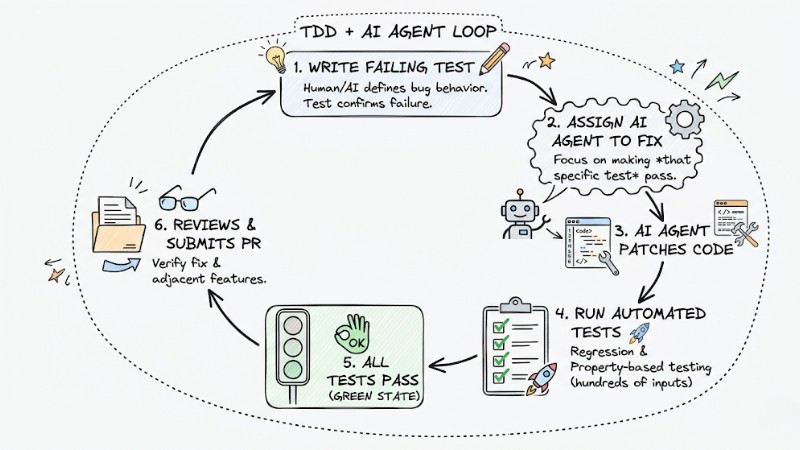
The TDD loop combined with an AI Agent
The Role of Software Engineer Code Reviews
Even though AI Agents can autonomously parse errors, generate patches, and run tests, the final evaluation still requires a responsible software engineer. Humans need to verify the correctness of the solution, its alignment with the system architecture, and risks that automated tests might not have covered.
In the autonomous software engineering model, an engineer's role pivots from writing line-by-line code to reviewing, auditing, and approving changes prior to merging. This is an essential control layer to ensure AI-generated patches don't cause regressions, drift from the design, or introduce new security risks.
Frequently Asked Questions About AI Agent Fix Bugs
How can I prevent an AI Agent from breaking other code parts when fixing a bug?
You need a broad enough test suite and must apply differential testing to verify both the bug being fixed and the legacy behaviors that are working correctly. The AI should not be allowed to open a PR if it fails any tests that were previously passing.
Can AI Agents auto-merge code without human inspection?
Technically yes, but this should be strictly limited to very minor changes like fixing typos, formatting, or low-risk mechanical updates. For logic errors, system behavior changes, or security-related patches, a human code review is still mandatory before merging.
Which project types do AI Agent Fix Bugs tools perform best on?
They are most effective on projects with clear architectures, relatively robust documentation, and strong unit test suites. With legacy code, unstructured source code, or projects with virtually zero test cases, AI easily misidentifies root causes and generates unreliable patches.
Read more:
- AI Agents for Enterprise: An A-Z Practical Deployment Roadmap
- What are Autonomous Agents? Mechanisms, Classifications and Applications
- When to Use an AI Agent? 7 Signs You Need Automation
AI Agent fix bugs are undeniably a major leap forward in the software development lifecycle (SDLC) for the near future, where delegating a high degree of autonomy to the system vastly accelerates maintenance. However, to avoid over-engineering and unintended bugs, projects still require a rock-solid testing barrier and a clear control workflow surrounding every AI-proposed patch.
Are you ready to let AI start autonomously cleaning up your codebase? Test out tools like SWE-agent on a side branch of your project, observe its impact on your test suite and code quality before considering a wider rollout.
Tags