When to Use an AI Agent? 7 Signs You Need Automation

Many enterprises are wasting resources by equating AI Agents with standard AI Chatbots. A chatbot only knows how to answer questions, whereas an AI Agent is an autonomous ecosystem capable of self-reasoning and taking action on behalf of humans. If your smart automation system still requires manual human intervention at the final step, you are falling behind. Below are the 7 clearest signs that it is time for your business to upgrade to an AI Agent.
Key Takeaways
- Operational Principles: Master the closed-loop execution mechanism (Perception - Decision - Action), combining the reasoning power of LLMs with practical execution capabilities via toolsets.
- Core Differences: Clearly distinguish the "self-correcting loop" mindset of AI Agents from the rigid "If-Then" logic of traditional Business Process Automation (BPA) tools.
- Identifying Signs: Recognize the 7 real-world signs indicating it's time for your enterprise to upgrade to an AI Agent system.
- Practical Applications: Explore 5 operational scenarios that yield the highest Return on Investment (ROI).
- Deployment Standards: Master the 3-step standardization roadmap to ensure your AI system operates safely and accurately.
- Risk Management: Establish Human-in-the-loop principles and enforce least privilege access to guarantee absolute safety for mission-critical enterprise data.
- FAQ: Get answers to concerns about operating costs, selecting the right LLM model, and alleviating fears regarding workforce replacement.
What is the Nature of an AI Agent?
Defining Autonomous AI Agents
An autonomous AI agent is an artificial intelligence system powered by Large Language Models (LLMs). Beyond just generating text, this system is capable of recognizing goals, planning actions, and utilizing tools to complete tasks without human supervision.
AI Agents possess 3 core traits that set them apart:
- Reasoning: Parses complex requests and slices them into actionable execution steps.
- Long-term planning: Retains context and orchestrates logical workflow sequencing.
- Action-oriented: Directly manipulates third-party software via data integration ports.
Quickly Distinguishing AI Agents from Traditional Automation Tools (BPA)
Do not confuse AI Agents with Business Process Automation (BPA) tools like Zapier or Make. BPA tools run on rigid Scenarios based on the "If-Then" principle (If this happens, then do that). A single minor anomaly in the input data will cause the entire workflow to crash.
Conversely, AI Agents possess Autonomy. They are capable of Self-correction. If a tool fails, the AI Agent automatically hunts for an alternative path or tool to achieve the ultimate goal.
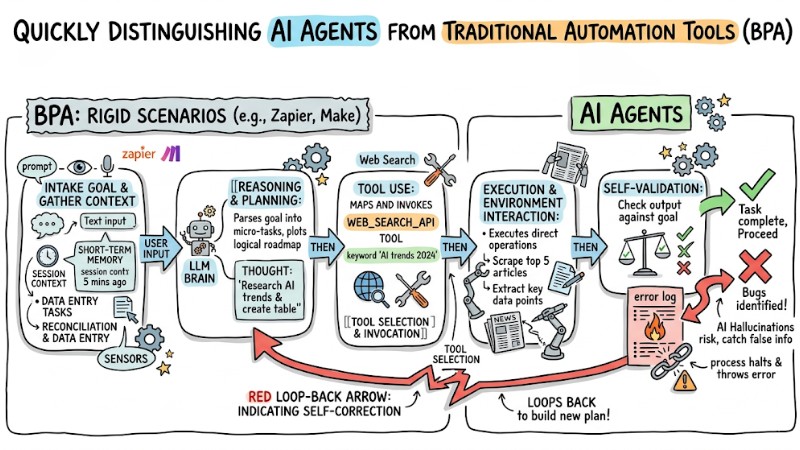
AI Agents vs. Traditional Business Process Automation (BPA)
Direct Comparison: The Difference between AI Agents and Traditional AI Chatbots
| Criteria | AI Chatbot | AI Agent | Practical Conclusion |
|---|---|---|---|
| Reasoning Capability | Low. Only answers based on scripts or pre-existing data. | High. Autonomously parses, decomposes problems, and plans solutions. | AI Agents replace human logical thinking in narrow tasks. |
| Action Execution | No. Stops at providing text-based information. | Yes. Autonomously clicks, fills forms, and invokes APIs on external software. | AI Agents do the work instead of just talking about it. |
| Personalization Level | Basic. Calls the customer's name based on available variables. | Deep. Autonomously fetches purchase history and preferences to make recommendations. | AI Agents deliver 1-on-1 experiences at scale. |
| Ideal Use Case | Answering FAQs, welcoming customers, providing general info. | Business process automation, closing sales, deep-dive customer support. | Use Chatbots to route, use AI Agents to execute. |
Execution Mechanism: Conversational Responses vs. Task Execution
Visualize an AI Chatbot as a Receptionist. A customer asks, "What is the refund policy?" The Receptionist recites the exact policy to the customer. The process stops at a conversation.
Meanwhile, an AI Agent is a smart Private Secretary. When a customer requests a refund, the Secretary doesn't just explain the policy. It autonomously handles Task Execution: querying the order ID in the system, validating the return conditions, autonomously triggering the refund command on the payment gateway, and shooting a confirmation email to the customer.
Reasoning and Tool-use Capabilities
Tool-use capability is the ultimate "money-maker" of this system. An AI Agent is not locked inside a chat window. It can connect with the outside world by hooking into APIs (Application Programming Interfaces).
Below is a complex task resolution flow of an AI Agent:
- Intake: Receives a message from a customer on Telegram requesting to reschedule an appointment.
- Reasoning: The AI deduces it needs to check the doctor's availability and update the schedule.
- Tool-use: The AI autonomously invokes the Google Calendar API to hunt for an open time slot.
- Execution: The AI responds to the customer to select a time, then autonomously logs the status update into the CRM software.
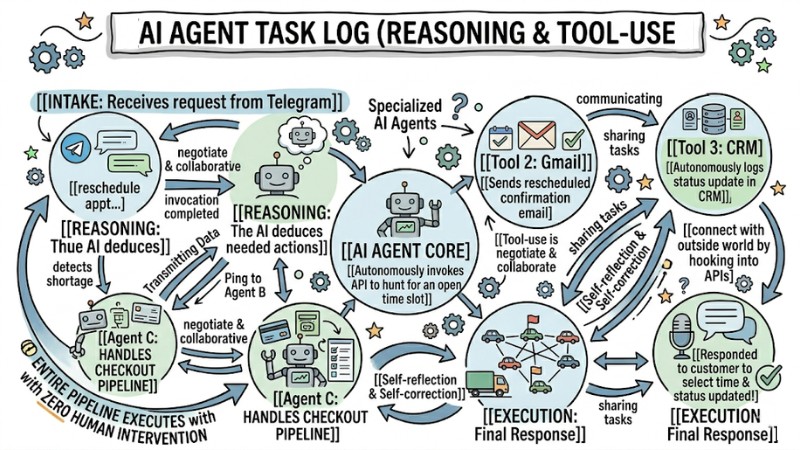
Reasoning and Tool-use Capabilities
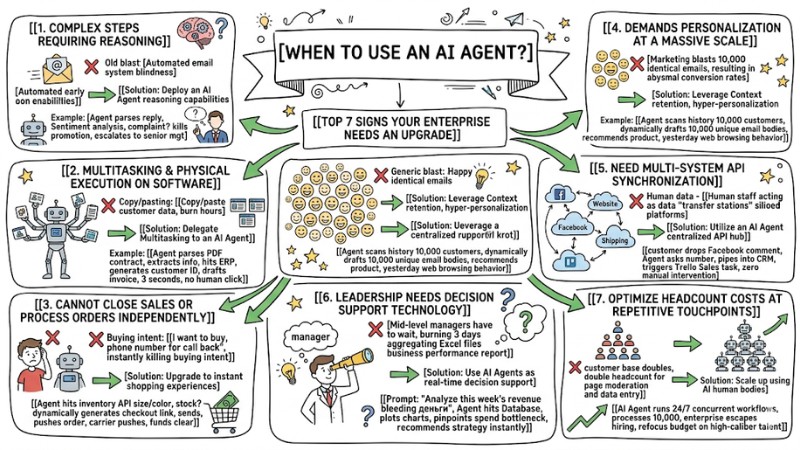
When to Use an AI Agent? Top 7 Signs Your Enterprise Needs an Upgrade
It is time to integrate an AI Agent into your Workflow if you spot these 7 signs:
- The workflow involves complex steps requiring reasoning.
- You need multitasking and physical execution on software.
- Your current chatbot cannot close sales or process orders independently.
- The workload demands personalization at a massive scale.
- You need multi-system API synchronization without manual intervention.
- Leadership needs real-time decision support technology.
- The goal is to optimize headcount costs at repetitive touchpoints.
1. When the Workflow Involves Complex Steps Requiring Reasoning
- Current reality: The current automated email system blindly fires off scheduled emails, regardless of whether the customer is happy or furious.
- Solution: Deploy an AI Agent leveraging its reasoning capabilities.
- Example: Instead of blindly blasting emails, the AI Agent parses the customer's reply and runs Sentiment analysis. If the customer is complaining, the AI automatically kills the promotional email sequence and immediately escalates the issue to senior management with a summarized brief.
2. When the Enterprise Needs Multitasking and Physical Execution on Software
- Current reality: Staff burn hours every day just copy/pasting customer data from the CRM software to the ERP accounting system.
- Solution: Delegate Multitasking to an AI Agent.
- Example: When a contract is successfully e-signed, the AI Agent autonomously parses the PDF, extracts the company info, hits the ERP to generate a new customer ID, and drafts a draft invoice within 3 seconds without a single human mouse click.
3. When the Current Chatbot Cannot Close Sales or Process Orders Independently
- Current reality: The AI Chatbot hits a wall after quoting prices. When the customer says "I want to buy," the chatbot asks them to leave a phone number for a rep to call back, instantly killing buying intent.
- Solution: Upgrade to instant shopping experiences.
- Example: The AI Agent will directly hit the inventory API based on the selected size/color. If in stock, it dynamically generates a unique checkout link, sends it to the customer, and automatically pushes the order to the shipping carrier the second the funds clear.
4. When the Workload Demands Personalization at a Massive Scale
- Current reality: The Marketing team blasts 10,000 identical emails to the entire customer base, resulting in abysmal conversion rates.
- Solution: Leverage Context retention capabilities for hyper-personalization.
- Example: The AI Agent scans the interaction history of every single person in the 10,000-customer cohort. It dynamically drafts 10,000 unique email bodies, recommending the exact product each person is interested in based on their web browsing behavior from yesterday.
5. When You Need Multi-System API Synchronization Without Manual Intervention
- Current reality: Human staff are acting as data "transfer stations" between siloed platforms (Facebook, Website, Shipping software).
- Solution: Utilize an AI Agent as a centralized API integration hub.
- Example: A customer drops a comment on Facebook. The AI autonomously asks for their phone number, pipes it straight into the CRM, and simultaneously triggers an API to spawn a task for the Sales team on Trello with absolutely zero manual intervention.
6. When Leadership Needs Decision Support Technology
- Current reality: Mid-level managers have to wait until month-end, burning 3 days aggregating Excel files just to ship a business performance report.
- Solution: Use AI Agents as real-time decision support technology.
- Example: You just prompt: "Analyze this week's revenue, why is Campaign A bleeding money?". The AI Agent autonomously hits the Database, plots charts, pinpoints the ad spend bottleneck, and recommends an optimization strategy instantly.
7. When the Goal is to Optimize Headcount Costs at Repetitive Touchpoints
- Current reality: Digital Transformation has stalled due to bloated CapEx. Every time the customer base doubles, you have to double the headcount for page moderation and data entry.
- Solution: Scale up using AI instead of human bodies.
- Example: An AI Agent runs 24/7 and can process 10,000 concurrent workflows. The enterprise escapes the trap of mass-hiring entry-level staff to refocus its budget on high-caliber talent.
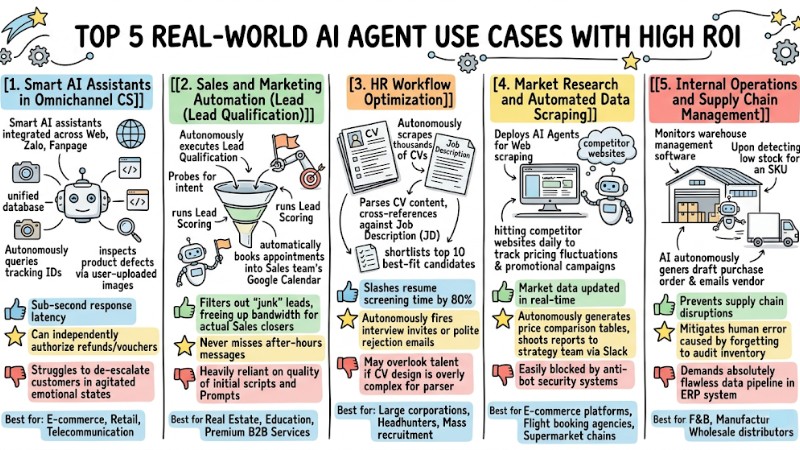
Top 5 Real-World AI Agent Use Cases with High ROI
1. Smart AI Assistants in Omnichannel CS
- Operational mechanism: Smart AI assistants integrated across all platforms (Web, Zalo, Fanpage), hitting a single, unified database. Autonomously queries tracking IDs and inspects product defects via user-uploaded images.
- Pros: Sub-second response latency. Can independently authorize refunds/vouchers based on predefined thresholds.
- Cons: Struggles to de-escalate customers in highly agitated emotional states.
- Best for: E-commerce, Retail, Telecommunication services.
2. Sales and Marketing Automation (Lead Qualification)
- Operational mechanism: Autonomously executes Lead Qualification. Probes for intent, runs Lead Scoring, and automatically books appointments into the Sales team's Google Calendar.
- Pros: Filters out "junk" leads, freeing up bandwidth for actual Sales closers. Never misses after-hours messages.
- Cons: Heavily reliant on the quality of the initial scripts and Prompts.
- Best for: Real Estate, Education, Premium B2B Services.
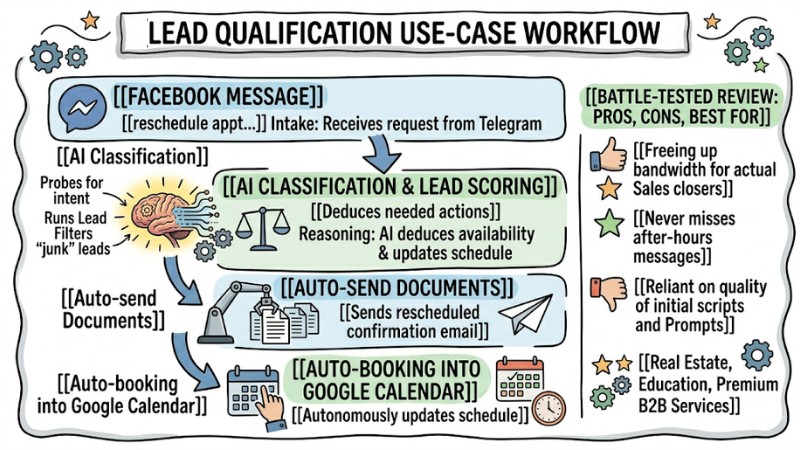
Sales and Marketing Automation
3. HR Workflow Optimization
- Operational mechanism: Autonomously scrapes thousands of CVs from recruitment platforms. Parses CV content, cross-references it against the Job Description (JD), and shortlists the top 10 best-fit candidates.
- Pros: Slashes resume screening time by 80%. Autonomously fires off interview invites or polite rejection emails.
- Cons: May overlook top talent if the CV features an overly complex design that the parser struggles to read.
- Best for: Large corporations, Headhunters, Mass recruitment enterprises.
4. Market Research and Automated Data Scraping
- Operational mechanism: Deploys AI Agents for Web scraping, hitting competitor websites daily to track pricing fluctuations and promotional campaigns.
- Pros: Market data is updated in real-time. Autonomously generates price comparison tables and shoots reports to the strategy team via Slack.
- Cons: Easily blocked by competitor websites' anti-bot security systems.
- Best for: E-commerce platforms, Flight booking agencies, Supermarket chains.
5. Internal Operations and Supply Chain Management
- Operational mechanism: Monitors warehouse management software. Upon detecting low stock for an SKU, the AI autonomously generates a draft purchase order and emails the vendor.
- Pros: Prevents supply chain disruptions. Mitigates human error caused by forgetting to audit inventory.
- Cons: Demands that the current warehouse ERP system has an absolutely flawless data pipeline.
- Best for: F&B industry, Manufacturing, Wholesale distributors.
Top 5 Real-World AI Agent Use Cases with High ROI
Preparation Criteria Before Piping AI Agents into Your Digital Transformation Ecosystem
Current Workflow Optimization
An AI Agent is not a magic wand to fix a broken process. Before applying AI, you must execute human-led Workflow Optimization. Patch the bottlenecks and standardize the execution steps. If the core process is flawed, an AI Agent will just help the enterprise make mistakes... at warp speed.
Digitizing and Cleansing Input Data
AI Agents require a pristine Knowledge Base to learn from. LLMs cannot output correct answers if your training corpus contains conflicting information. You must purge legacy documents and standardize text formats (PDF, DOCX, TXT) before "feeding" data to the AI.
Auditing Data Security Issues
When granting API integration permissions for an AI Agent to execute tasks, strictly enforce the "Least Privilege" principle. This means granting exactly the permissions the AI needs to function (e.g., Only "Read" and "Create" access, absolutely never grant "Delete" access to root data). This mitigates the risk of the AI autonomously mutating or wiping mission-critical company data.
Frequently Asked Questions (FAQ) about Deploying AI Agents
Which departments can an AI Agent replace staff in?
AI Agents were not born to entirely replace humans. They eradicate manual, repetitive grunt work. The goal is to elevate personnel to strategic and supervisory roles instead of functioning like data-entry machines.
Can Small and Medium Enterprises (SMEs) without an IT team use AI Agents?
Absolutely. SMEs should leverage No-code/Low-code platforms (requiring zero coding) like Make, Coze, or Dify. You only need logical thinking and drag-and-drop mechanics to build a powerful Agent without any programming skills.
Which LLM model should I choose to run an enterprise AI Agent?
It depends on the complexity of the workload. For tasks demanding complex reasoning and deep logical comprehension, opt for OpenAI's GPT-4o or Claude 3.5 Sonnet. For basic tasks, rapid data classification, and cost efficiency, utilize GPT-4o-mini or Claude 3 Haiku.
Does it cost a lot to maintain an AI Agent?
The maintenance cost of an AI Agent is exponentially cheaper than a human payroll. You typically pay per Token (the volume of words the AI processes) via an API. On average, to process thousands of tasks monthly, an enterprise only spends a few dozen to a few hundred dollars depending on volume.
Read more:
- What are Autonomous Agents? Mechanisms, Classifications and Applications
- What is Agent Engineering? The Process of Bringing AI Agents into Production
- Misconceptions about AI Agents: What Enterprises Must Avoid to Maximize Performance
Your enterprise will not be replaced by AI, but it will be crushed by competitors who know how to wield AI Agents. Because of this, smart automation is no longer a distant future trend, but a mandatory survival tool in the present. Audit your workflows today. If any of the 7 signs above appear, start testing AI Agent integration on a micro-process to experience the explosive ROI firsthand!
Tags