Coding Agent Review: Top 5 Production-Ready AI Programming Tools

A coding agent is an AI system capable of comprehending source code and actively participating in the software development process, from generating code and fixing bugs to opening pull requests. This article focuses on evaluating coding agents systematically, covering their operational mechanics, evaluation criteria, and a detailed breakdown of the top 5 powerful tools, along with a guide on choosing the right one and using it safely in a production environment.
Key Takeaways
- Coding Agent Concept: Understand that this is an AI system capable of autonomously comprehending a project, modifying source code, and directly manipulating the repository, vastly outperforming the mere text suggestions of a standard chatbot.
- Mechanism: Master the core 3-step workflow: Gathering project-wide context -> Autonomously executing code writing/editing -> Automatically creating a Pull Request in the system.
- Battle-tested evaluation criteria: Identify the 4 vital factors when choosing an AI programmer: Context retrieval capability, autonomy level, seamless integration into your existing workflow, and data security.
- Top 5 reputable tools: Explore the specific strengths of GitHub Copilot Agent (cost-optimized for small teams), Replit Agent 3 (rapid cloud prototyping), Claude Code (handling complex logic), Cursor IDE (professional coding environment), and CodeRabbit (automated code review expert).
- Safe usage principles: Pocket 3 golden rules: Always maintain a final human reviewer (Human-in-the-loop), strictly govern data access, and force the AI to adhere to minimalist coding principles (KISS & YAGNI) to prevent over-engineering the system.
- FAQs: Get answers to concerns about AI replacing developers, the ability for non-coders to build apps, and the safety level of handing over a company's entire source code to an AI.
What is a Coding Agent and how does it differ from an AI chatbot?
Defining a Coding Agent
A coding agent (or AI software engineer) is an AI system capable of automatically comprehending source code, reasoning over existing logic, and executing software development tasks like writing, editing, testing, and preparing changes to be pushed to a repository. Instead of chatting with a bot and manually copy-pasting the results, a coding agent works directly on the project, takes on tasks, and applies edits to the file structure according to its granted permissions.
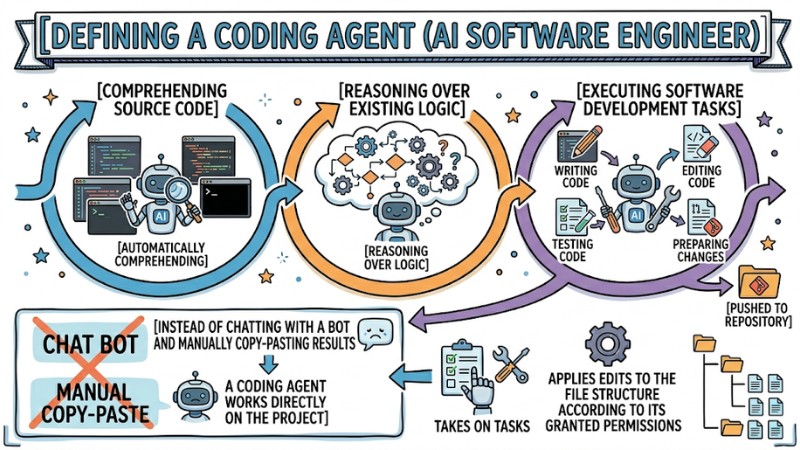
Coding Agents: AI systems capable of operating directly on live projects
How does a coding agent differ from a standard AI chatbot?
Traditional AI chatbots primarily answer questions in text format, offering suggestions or code snippets, but they do not manipulate the repository or participate in the CI/CD pipeline on their own. Conversely, coding agents are designed to interact directly with source control systems and pipelines, featuring the ability to autonomously find relevant files, edit code, run tests, and open pull requests based on configured mechanisms.
Basic Operating Mechanism
Instead of just processing text, Generative AI development tools operate as an organized multi-step programming workflow:
- Context gathering (Context window): The AI reads related files in the project and loads them into temporary memory, thereby grasping the structure and current codebase context.
- Autonomous execution: Receives the request, generates appropriate code, creates or edits relevant files, and performs basic error-checking steps.
- Pull request automation: After finalizing changes, the AI packages the source code into a draft pull request and submits it to the system for review, helping that change blend seamlessly into the existing workflow (workflow integration).
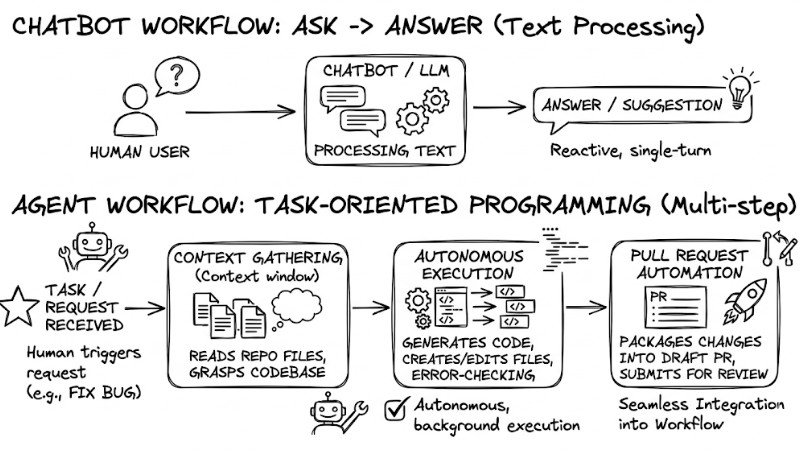
Operational Mechanisms of Chatbots vs. Coding Agents
Criteria for evaluating a coding agent in a real-world project
To evaluate a coding agent's quality in a production setting, you shouldn't just rely on code generation speed; you must consider its overall impact on the software development lifecycle. Below are four critical criteria that should be applied consistently to any SDLC integrating an agent:
Context retrieval
A coding agent must understand the directory structure, dependencies, and core business logic flows within the project to limit generating architecturally misaligned code or inconsistent logic. Lacking this capability significantly increases the risk of bugs caused by the AI misinterpreting the context or generating syntactically correct code that doesn't fit the existing design.
Autonomy
A reliable agent must be able to autonomously identify the files or modules needing edits, set up a test environment, and loop through the edit-test cycle without micromanagement at every step. This level of autonomy must be bounded by pre-configured access rights and policies to prevent the agent from operating outside the scope of the project or pipeline.
Integration with existing workflows
A coding agent needs to integrate directly with the IDE or source control and CI/CD systems to tie into the team's workflow, rather than creating a disconnected operational channel. Good integration is demonstrated by its ability to open pull requests, link to issues, update pipeline statuses, and coordinate smoothly with existing review processes.
Security and privacy requirements
Tools used in environments with proprietary source code must have a clear commitment to not use customer data to retrain public models, and must be transparent about where data is stored, retention periods, and deletion mechanisms. Additionally, you need to verify its ability to configure access scopes, control outbound data flows, and offer on-premise deployment options when projects demand high security.
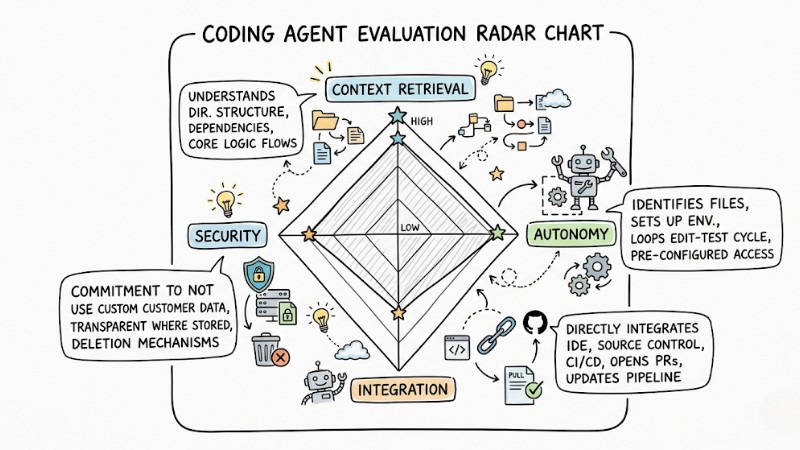
Evaluation Criteria for Coding Agents in Real-World Projects
Detailed review of the top 5 standout coding agents today
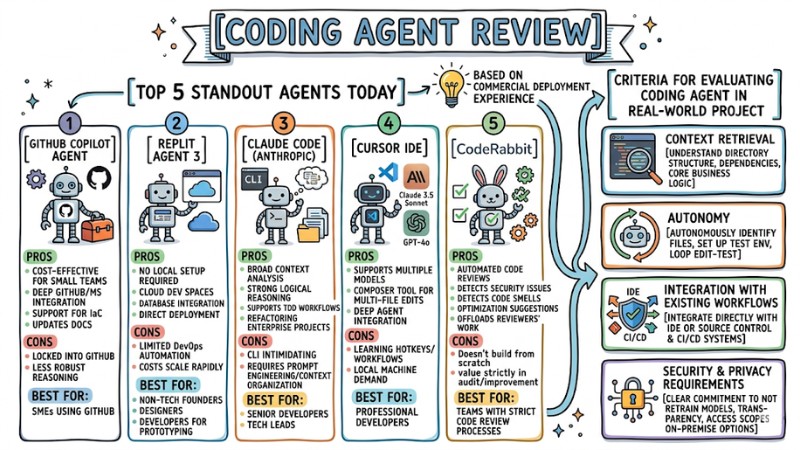
Based on commercial project deployment experience, the review below focuses on the practical applicability of each tool, avoiding reiterating standard, basic features.
1. GitHub Copilot Coding Agent: Cost-effective choice for development teams
GitHub Copilot Coding Agent is suitable for teams already using GitHub who want to automate repetitive development tasks like reading issues, branching, editing code, and opening pull requests without ripping out their current platform.
- Pros: Cost-effective for small teams, deeply integrated into the GitHub and Microsoft ecosystems, offers solid support for Infrastructure as Code scenarios, and updates accompanying technical docs.
- Cons: Locked into GitHub; its long-chain reasoning capabilities aren't as robust as some other premium models.
- Best for: Small to medium enterprises using GitHub as their primary source control system and looking to boost automation in their development workflows.
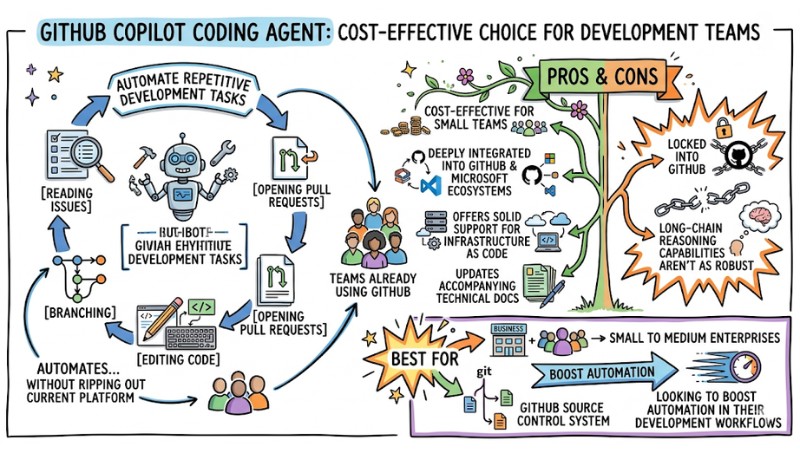
GitHub Copilot Coding Agent is a cost-effective solution for development teams
2. Replit Agent 3: Cloud solution requiring no local setup
Replit Agent 3 targets teams needing a coding and deployment environment right in the browser, focusing heavily on building apps and rapid prototyping on a cloud platform.
- Pros: No local environment setup required, provides ready-to-use cloud dev spaces, database integration, and direct deployment capabilities.
- Cons: Limited in advanced DevOps automation features; costs can scale rapidly when expanding to larger teams or heavy workloads.
- Best for: Non-tech founders, designers, and developers looking to experiment or rapidly build prototypes on Cloud Development Platforms.
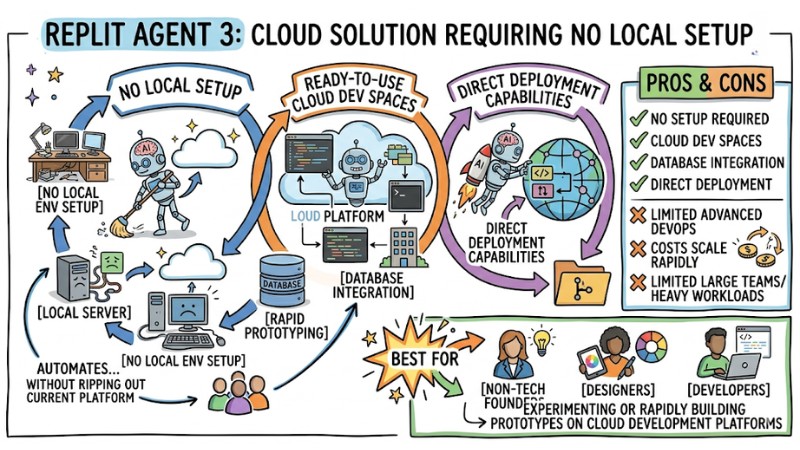
Replit Agent 3 Integrated database and direct deployment capabilities
3. Claude Code (Anthropic): Ideal for complex and legacy projects
Operating via a CLI interface, Claude Code boasts top-tier sequential thinking capabilities via the Model Context Protocol (MCP), making it ideal for complex legacy projects.
- Pros: Broad context analysis capabilities, strong logical reasoning, supports Test-Driven Development workflows, and refactoring enterprise projects.
- Cons: The CLI interface can be relatively intimidating for beginners; requires experience in prompt engineering and context organization.
- Best for: Senior Developers and Tech Leads tackling refactors or scaling systems with complex, large-scale architectures.
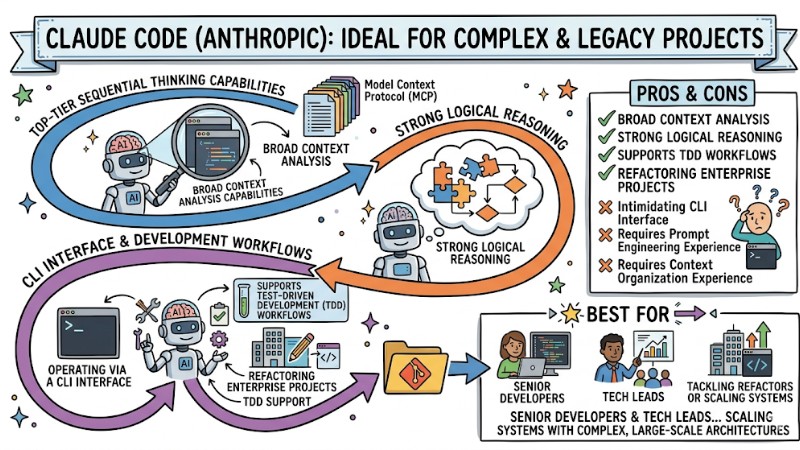
Claude Code with High-level chain-of-thought reasoning via Model Context Protocol
4. Cursor IDE: Optimized integrated development environment for AI
Cursor IDE targets full-time developers who want a VS Code-like IDE that is heavily optimized for interacting with multiple powerful AI models.
- Pros: Supports multiple models like Claude 3.5 Sonnet and GPT-4o, features a Composer tool for simultaneous multi-file edits, and deeply integrates agents into the code editing workflow.
- Cons: Takes time to learn its specific hotkeys and AI-centric workflows; demands a decently powerful local machine setup.
- Best for: Professional developers who want AI directly injected into their IDE to accelerate editing, refactoring, and codebase navigation.
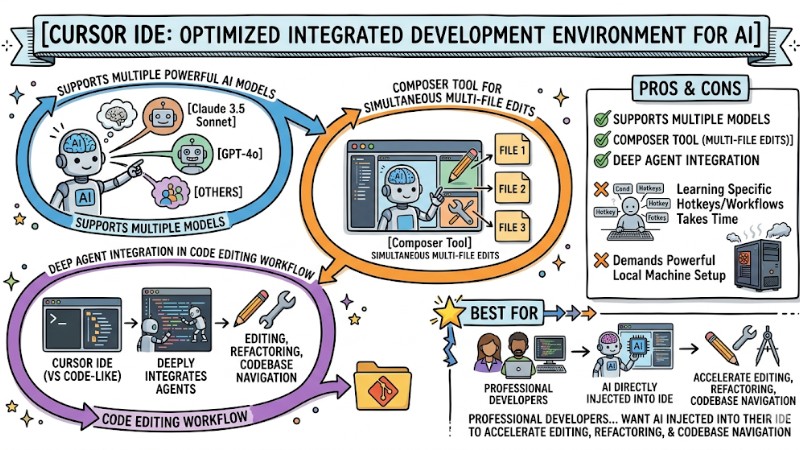
Cursor IDE - The optimized development environment for AI
5. CodeRabbit: Specialized assistant for code review and optimization
Unlike the four tools above that write code from scratch, CodeRabbit focuses entirely on automated source code reviews (Automated testing verification).
- Pros: Rapidly detects security issues and code smells, provides optimization suggestions, and offloads work for the team's primary reviewers.
- Cons: Doesn't handle building apps from the ground up; its value strictly lies in auditing and improving existing code.
- Best for: Teams with strict code review processes wanting to heavily automate testing and code quality assurance.
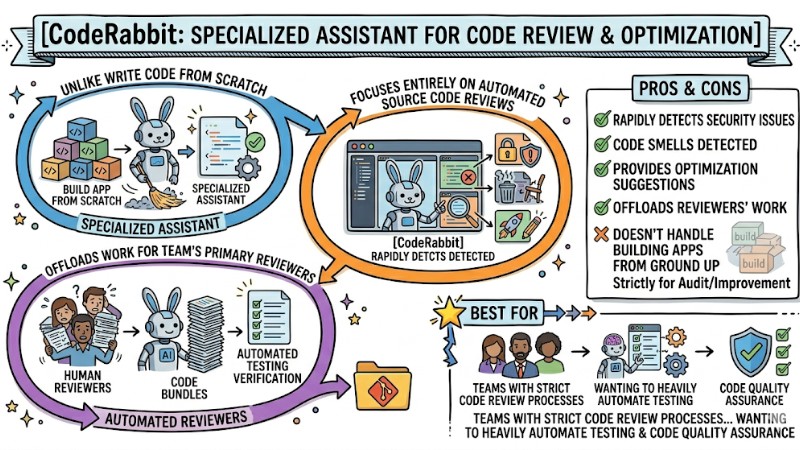
CodeRabbit is a specialized assistant for code review and source code optimization
Quick comparison table and tips for choosing a coding agent based on your needs
The table below provides a quick summary of key features and suggestions for selecting a coding agent tool based on real-world usage contexts:
| Core Feature | GitHub Copilot Agent | Replit Agent 3 | Claude Code | Cursor IDE | CodeRabbit |
|---|---|---|---|---|---|
| Operating environment | GitHub / Cloud | Browser | CLI | Desktop IDE | GitHub / GitLab |
| Autonomy level | High (via Issue) | Very high | High | Medium - High | Low (Mainly reviews) |
| AI model used | GPT-4 / GitHub models | Commercial LLM | Claude 3.5/4.x | GPT-4, Claude, custom models | Assorted, PR analysis |
| Technical requirements | Medium | Low | Very high | Medium | Medium |
| Reference pricing | ~10 USD/user/month | ~20 USD/user/month | ~20 USD/user/month | ~20 USD/user/month | ~12 USD/seat/month |
Battle-tested tip: When putting GitHub Copilot Coding Agent up against Replit Agent 3, Replit is generally a better fit when starting a brand-new project from scratch and needing a fast web-based product delivery with limited technical experience. Conversely, for teams maintaining existing internal systems with massive source code, Copilot or Cursor represent safer, more controllable, and more cost-optimized choices.
Principles for safely using coding agents in real-world projects
You can use AI coding agents for production environments, but it's only safe when placed behind clear control guardrails to mitigate security risks and behavioral drift. Below are three core principles to uphold when introducing agents into the SDLC:
1. Always maintain a human-in-the-loop mechanism
Never configure an agent to push source code directly to the production branch or deploy straight to a live environment. Every agent-generated change must go through a pull request, pass automated tests, and be reviewed by at least one responsible human, ensuring the final decision rests with the engineering team, not an automated system.
2. Security and Data Governance
When provisioning permissions for a coding agent, enforce the principle of least privilege to minimize access to data or resources beyond what's strictly necessary. A classic risk is the agent accidentally leaking sensitive info like API keys in infra files or committing them to the repository; therefore, you must combine secrets management, data leak scanning, and explicitly bound the data sources the agent is allowed to read and write.
3. Keep design and code simple (KISS and YAGNI)
In many cases, a coding agent might propose structures or patterns more complex than needed, leading to over-engineering and inflated maintenance costs. When configuring prompts or agent policies, heavily emphasize the KISS and YAGNI principles, demanding it only implements exactly what's outlined in the spec and prioritizes minimalist solutions that strictly meet current needs.
You can append the following prompt into your project's root config file:
[IMPORTANT]
Always follow KISS and YAGNI principles.
Do not over-engineer. Only implement features explicitly requested.
Do not just simulate the implementation, always write the real, functional code.
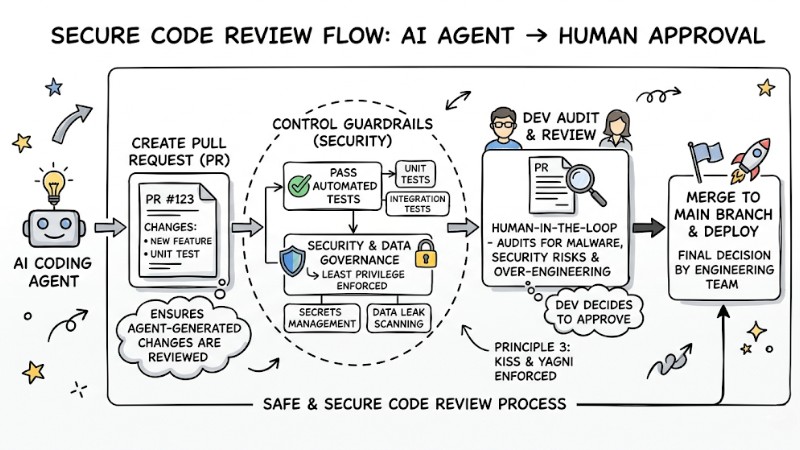
Secure Code Review Workflow for AI Agent Implementation
Frequently Asked Questions
Can AI Coding Agents replace developers?
Currently, coding agents primarily act to accelerate and automate repetitive tasks like generating boilerplate, patching simple bugs, and assisting with refactoring. Developers still dictate the architecture, define quality standards, and hold the ultimate responsibility for the code shipped to production.
If I don't know how to code, can I use these tools to build an App?
You can still use tools like Replit Agent 3 to spin up prototypes or simple apps by describing your requirements in natural language; the agent will help generate the code and deploy it to a web environment. However, if you want to maintain and scale the product long-term, you still need someone with technical know-how backing the project to govern architecture, security, and operational overhead.
Is it safe to let AI read the company's entire source code?
The safety level relies heavily on the data policies of each vendor and the specific tier you subscribe to. For enterprise environments, always prioritize Enterprise plans or dedicated deployments that offer solid commitments not to use your source code for general model training, and feature clear access controls and audit trails.
How do I use Claude Code to write production-ready code?
You need to prepare crystal-clear specification requirements, covering functional and non-functional constraints, alongside the project's coding standards. When working with Claude Code, demand that the agent writes or updates unit tests in parallel with the main logic, and break tasks down by module or feature to keep the context lean, controllable, and easy to review.
Read more:
- Popular Types of AI Agents: How to choose and Real-World Applications
- When to Use an AI Agent? 7 Signs You Need Automation
- What is Agentic Workflow? Autonomous AI Solutions for Enterprise
Coding agents now act as highly practical tools within the SDLC, accelerating development, automating repetitive chores, and supporting refactors across massive codebases—provided they are bounded by proper control guardrails. Choosing and configuring them correctly, combined with human-in-the-loop, data security, and KISS/YAGNI principles, lets you harvest the benefits of AI while maintaining an iron grip over your project's architecture, quality, and safety.