What is a Coding Agent? The Best Automated AI Programming Solution

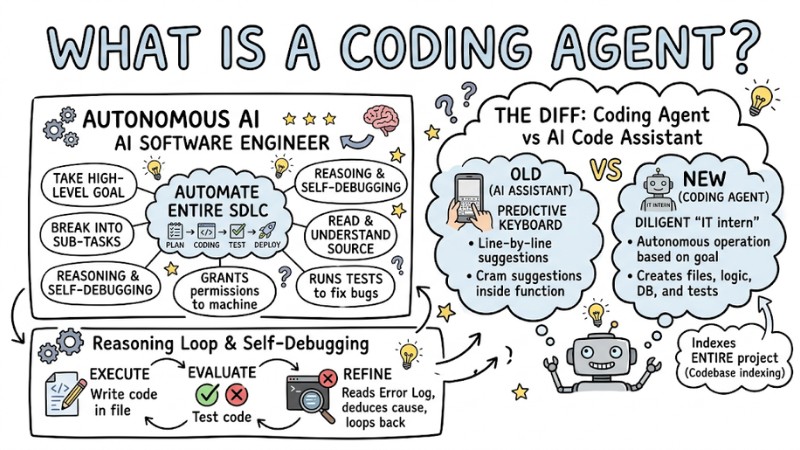
If managing a massive project with a tangled mess of files and petty bugs always leaves you exhausted, now is the time to find out what a Coding Agent is. You can simply understand Coding Agents as autonomous AI Developer Agents capable of self-planning, writing code, and debugging, rather than just suggesting line-by-line like before. This article will help you understand the core of this technology, how they optimize the software development life cycle (SDLC), and highlight the Top 5 tools to help you level up your programming productivity.
Key Takeaways
- Concept: Understand that a Coding Agent is an autonomous programming assistant that boosts productivity by self-planning, writing code, and debugging instead of just suggesting text.
- Mechanism: Master the "Plan - Execute - Evaluate - Refine" workflow, helping you optimize how you interact with and monitor the AI to achieve maximum efficiency.
- Top 5 tools: Choose the right AI tool (like Cursor, Claude Code,...) based on the actual needs of your project and your software development workflow.
- Practical application: Know how to leverage AI to handle time-consuming tasks like code refactoring, writing tests, and documentation, so you can focus on high-value work.
- Limits and security: Identify security risks, AI hallucinations, and context limits to use these tools safely and effectively in a professional environment.
- Career future: Navigate the role shift from a "code typist" to a "software architect", where you orchestrate AIs to create breakthrough solutions.
- FAQ Answers: Get quick answers to questions about security, pricing, and the right way to start using Coding Agents for both beginners and experts.
Overview of Coding Agents
What is a Coding Agent?
Coding AI Agents are autonomous artificial intelligence systems designed to automate the entire software development life cycle (SDLC). If older AI tools were like "predictive text keyboards" on a phone, a Coding Agent is like a diligent "IT intern".
You just assign tasks in natural language, and this AI-Powered Software Engineer will automatically read and understand the source code, look up documentation, write code, and even run tests to fix bugs on its own. They don't wait for you to type line-by-line to offer suggestions; instead, they take a high-level goal, break it down into smaller tasks, and figure out how to complete them.
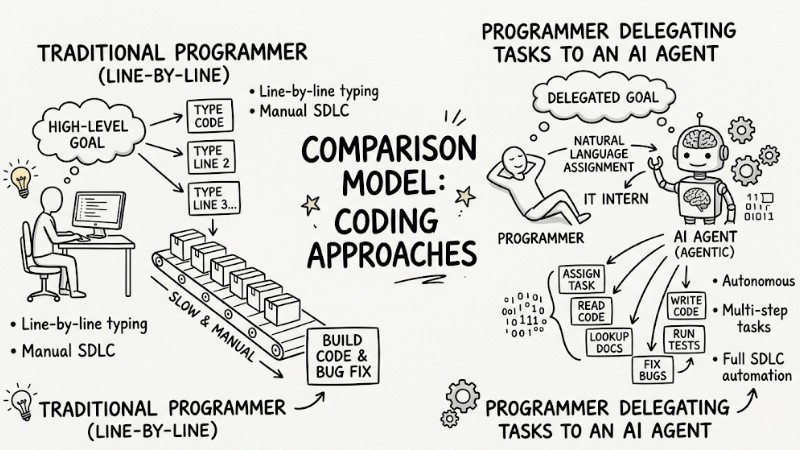
Comparison model between a traditional programmer with a programmer delegating tasks to an AI Agent
The Difference Between Coding Agents and Traditional AI Code Assistants
To clearly see the technological boundary, consider how they handle a request: "Create a login page". With the old GitHub Copilot (an AI Code Assistant), you have to create the files and write the HTML/CSS structure yourself. The AI just fills in the boilerplate code inside the function. But with a Coding Agent, it will autonomously create the UI files, implement the logic, connect to the database, and run tests to check for errors.
Below is a comparison table outlining the differences between a Coding Agent and a traditional AI Code Assistant:
| Criteria | Traditional AI Code Assistant | Modern Coding Agent |
|---|---|---|
| Mechanism | Line-by-line suggestions (Code completion) | Autonomous operation based on goal flows |
| Context Scope | Only understands the open file or a few adjacent files | Indexes the entire project (Codebase indexing) |
| Self-Debugging Capability | None. The user debugs manually | Reads error logs and rewrites code until it runs successfully |
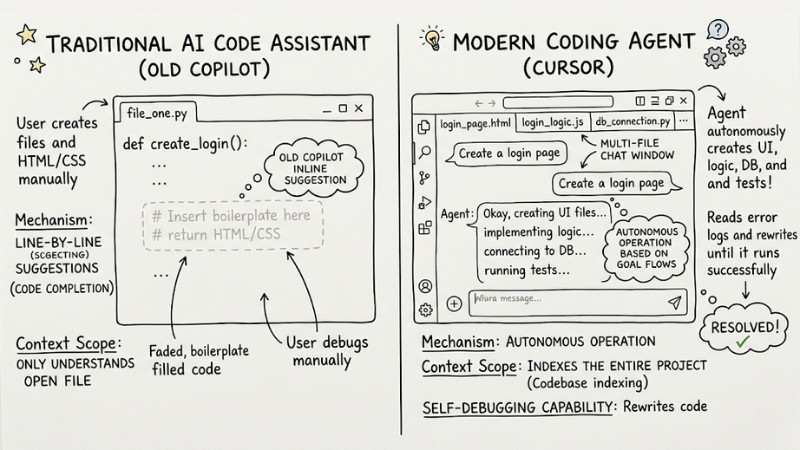
Compare the old Copilot interface with faded inline suggestions to Cursor with its multi-file chat window
Core Mechanisms of a Coding Agent
1. Requirements Analysis and Planning (Planning)
First, the Agent uses a large language model (LLM) to parse your request. It doesn't rush into writing code immediately. Thanks to its Reasoning capability, the AI drafts a detailed plan, breaking the main goal down into sub-tasks. This process is like drawing a mind map before building a house, enabling the AI to execute accurately without breaking the existing architecture.
2. Interacting with the Development Environment (Tool Use)
The true power of an Agent lies in its Tool use capability. They are granted permissions to interact directly with your machine:
- Terminal/File system access: Automatically create, delete, modify files, and read the entire project structure.
- Command Line Execution: Automatically run shell commands (like
npm install) to install missing dependencies. - Web Search: Look up the latest API documentation online if the system has changed.
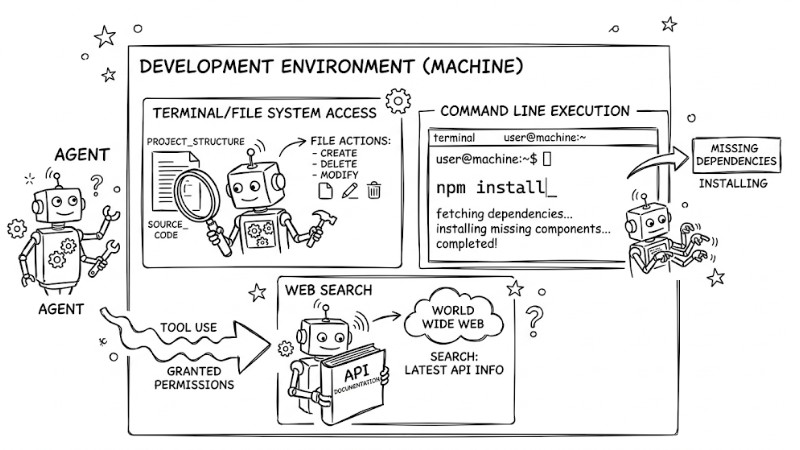
The true power of an Agent lies in its ability to leverage tools
3. Reasoning Loop and Self-Debugging (Reasoning Loop & Debugging)
Once the plan is set, the Agent enters a reasoning loop to implement the feature. This is the Autonomous debugging process that turns the AI into a real developer:
- Execute: Write the source code into the corresponding files in the project.
- Evaluate: Automatically test the newly written code using test commands.
- Refine: If the terminal throws an error, the Agent automatically reads the Error Log, deduces the root cause, and loops back to step 1. It repeats this continuously until the code runs successfully.
Security Warning: Granting terminal execution rights to an AI comes with risks. Never let an Agent freely execute commands directly in a Production environment (live server) without human oversight.
Top 5 Best AI Coding Agents Today
1. Cursor IDE
Cursor is an AI-native Development Environment forked directly from VS Code. This allows you to keep all your familiar extensions while adding an AI brain with lightning-fast Codebase indexing capabilities.
- Pros: The Composer chat window allows for automated multi-file edits. A massive context window helps the AI easily comprehend huge codebases. Deep IDE integration provides a seamless experience.
- Cons: High RAM/CPU consumption when indexing large projects. The free tier limits requests to premium models.
- Best for: Teams needing to refactor large projects, developers wanting an "All-in-one" replacement for VS Code.
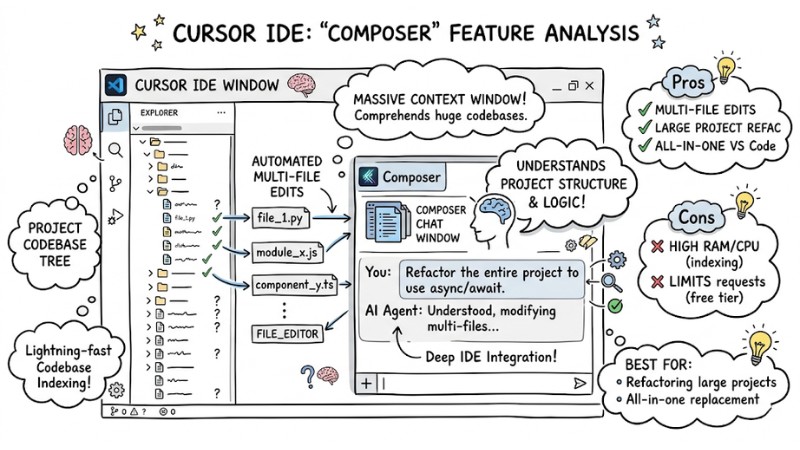
Cursor's Composer Interface Analyzing the Entire Codebase
2. Claude Code (Anthropic)
Unlike Cursor, Claude Code operates purely through a command-line interface (CLI). It leverages the outstanding reasoning capabilities of the Claude 3.5 Sonnet model, making it exceptionally strong at handling complex business logic flows.
- Pros: No pre-indexing required. Loads all relevant files directly into the context incredibly fast. Best System Architecture Design capabilities on the market.
- Cons: The plain CLI interface can be daunting for beginners. No visual GUI to click and select files.
- Best for: Backend engineers, data security experts, and those frequently dealing with legacy code.
3. Augment Code
Augment Code is an emerging tool focused on speed and enterprise environment performance.
- Pros: Blazing fast response times. Deeply understands coding habits by reading commit histories. Highly optimized for team collaboration.
- Cons: Relatively new user community, limited troubleshooting documentation.
- Best for: Startup teams needing to accelerate feature development velocity.
4. GitHub Copilot Workspace
This is a major step forward for Microsoft. Instead of just suggesting code inside the IDE, Copilot Workspace offers Autonomy right in the browser, deeply integrated with the GitHub platform.
- Pros: Turns an Issue into a detailed implementation plan. You can review and tweak the plan before the AI generates a Pull Request. Fast and frictionless development.
- Cons: Strictly vendor-locked to the GitHub ecosystem. Very hard to use if your project is hosted on GitLab or Bitbucket.
- Best for: Enterprises managing their entire project lifecycle on GitHub.
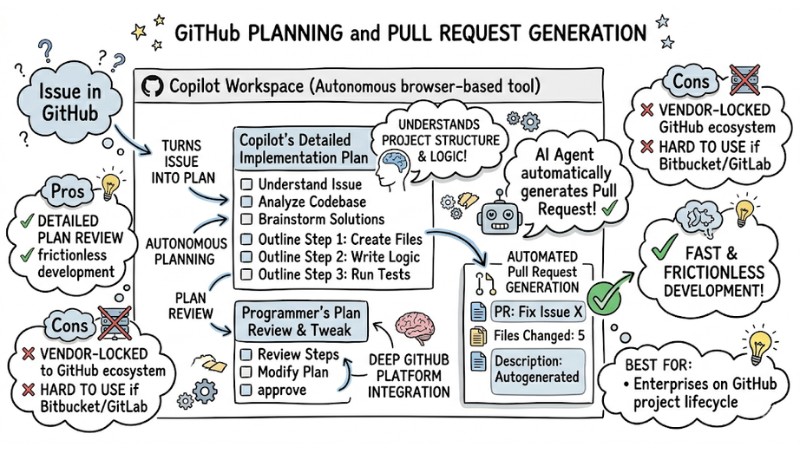
Copilot Workspace Interface Automated Planning and Pull Request Generation from an Issue
5. Devin (Cognition) / OpenDevin
Devin is dubbed the first autonomous AI software engineer, operating entirely within an isolated sandbox environment.
- Pros: Multi-agent orchestration capabilities. Devin can pick up tasks on Upwork, read docs independently, and deploy complete systems.
- Cons: Extremely high cost and a very long waitlist for access.
- Best for: Tech research teams or fully automating isolated programming tasks.
Practical Applications of AI Agents in Workflows
Developing New Features and Code Refactoring
Coding Agents show their highest value during Code Refactoring. Suppose you inherit a legacy project with a 1000-line function full of spaghetti logic. You simply select that file and prompt:
“Please refactor this file following Clean Code standards. Extract the API handling functions into a separate service file and rename variables for clarity.”
Immediately, the Agent parses the data flow. It creates new files, moves shared code out, renames variables, and updates import paths across all related files. Your productivity will multiply exponentially compared to manual copy-pasting, without breaking the system's logic.
Automated Software Testing and Documentation
Writing tests and docs always drains a developer's time. You can hand off Automated Software Testing to the Agent. The AI will scan through your logic files and automatically generate dozens of Unit Tests covering tricky Edge-cases. Furthermore, they can summarize the entire project to draft a highly accurate README.md file for newcomers.
Current Practical Limitations of Coding Agents
Context Window Limits and Hallucinations
Despite having large memory capacities, the Context window remains a weak point. With massive projects containing hundreds of thousands of lines of code, AI easily gets overloaded and misses critical files. You particularly need to watch out for Hallucinations. This is when the AI confidently fabricates non-existent libraries or calls undefined functions. To maintain accuracy on large projects, you need careful Prompting, break tasks down, and limit the directory scope for the AI to search.
Security Risks and Control
Handing over control of your File System and Terminal to a machine carries immense risks. If it misinterprets a flow, the Agent might accidentally run a command that deletes data or installs malware from the internet.
Safety note: Always enforce a Human-in-the-loop mode. Require the AI to report its plan and wait for your "Accept" before running commands. Prioritize running AI inside Virtualized sandbox environments (like Docker) to fully isolate risks.
Struggles with Complex Business Logic
AI excels at mastering Syntax but fumbles with highly specific Business Logic. Designing the overarching architecture, making database schema decisions, or handling multi-step payment flows still absolutely requires direct guidance from human intuition.
The Future of Developers with AI Coding Agents
The AI boom doesn't mean you'll lose your job. The future of developers with AI Coding Agents is a paradigm shift in roles: moving from a "code typist" toiling over syntax errors to a "System Architect".
Your core value now lies in systems thinking and your ability to design Human-Computer Interaction (HCI). You will act as a true Tech Lead, conceptualizing ideas, monitoring risks, and orchestrating dozens of underlying AI Agents to do the heavy lifting of typing code.
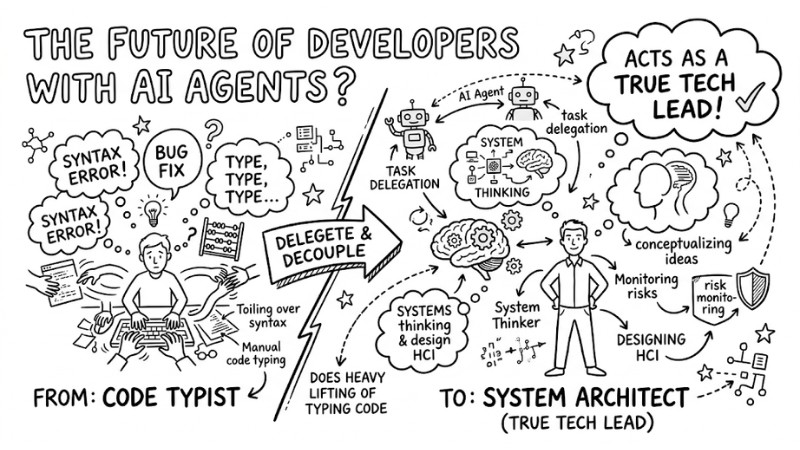
The Future of Software Engineering with AI Coding Agents
Frequently Asked Questions (FAQ)
Will Coding Agents completely replace developers?
No. Agents only automate code authoring based on directives. Developers are still the ones analyzing business requirements, designing systems, and holding final security responsibility for the product.
Should beginners (Freshers/Newbies) use Agents?
Yes, but with restraint. You should use AI to explain legacy code and learn best practices. Avoid over-relying on auto-generation to prevent losing your fundamental algorithmic thinking skills.
Are the usage costs (Subscription/API usage) for these tools expensive?
Most tools like Cursor or Copilot have a flat rate of $10 - $20/month. If you use API versions (pay-as-you-go based on token consumption) like Claude Code, the cost depends on usage, typically ranging from $5 - $30/month.
What is a Coding Agent?
Coding Agents are autonomous AI systems capable of understanding programming requirements, self-planning, writing code, running tests, and debugging independently, going far beyond the simple code completion of traditional tools.
How do AI Coding Agents differ from AI Code Assistants like GitHub Copilot?
AI Code Assistants primarily suggest code based on context. In contrast, Coding Agents are capable of planning, interacting with development environments (tool use), and automating debugging loops to accomplish complex tasks.
How do AI Coding Agents work?
They operate on a reasoning loop: parsing requirements, planning, using tools (like the terminal, file system), writing code, testing, and autonomously debugging based on feedback until the goal is met.
What is Cursor IDE and what are its advantages?
Cursor is an AI-tailored IDE forked from VS Code, featuring full codebase analysis, a large context window, and integrated direct AI chat to support end-to-end development.
What are the strengths of Claude Code?
Claude Code stands out with its ability to process complex code, analyze deep logic, and focus on security by loading directly into the context rather than indexing, making it suitable for projects requiring high safety.
What's new in GitHub Copilot Workspace compared to traditional GitHub Copilot?
GitHub Copilot Workspace expands the AI's autonomy, allowing it to plan and execute more complex tasks seamlessly within the GitHub ecosystem, significantly boosting productivity.
Should I worry about security when using AI Coding Agents?
Yes. Granting access to the file system and terminal requires extreme caution. You should use virtualized sandbox environments and enforce a "human-in-the-loop" workflow to mitigate security risks.
Read more:
- When to Use an AI Agent? 7 Signs You Need Automation
- What are Autonomous Agents? Mechanisms, Classifications and Applications
- What is Agent Engineering? The Process of Bringing AI Agents into Production
In summary, Coding Agents are pioneering a completely new approach to software development, where AI doesn't just suggest a few lines of code but can parse requirements, plan, write code, test, and debug like a real developer. If you leverage the right tools and sandbox the AI safely, you can pivot from being "glued to typing code" to becoming a system architect, focusing on product thinking and designing high-value solutions for the business.