7 Practical Coding Agent Use Cases to Optimize Your Workflow

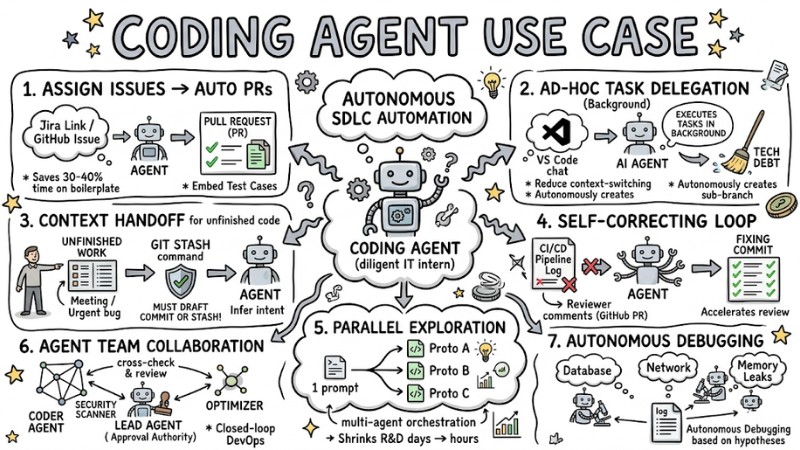
Constant context switching and handling repetitive tasks consume hours of a developer's day. To permanently solve this issue, modern AI tools now go beyond local code completion and actively participate in the software development lifecycle. Below are 7 practical coding agent use cases to help you automate workflows, free up time, and maximize your productivity.
Key Takeaways
- Concept: Understand that a Coding Agent is an autonomous AI system capable of executing complex background tasks, replacing manual copy/pasting to optimize the development workflow.
- 7 Practical Use Cases: Master scenarios like automated PR creation, background task delegation, context handoffs, and setting up Agent Teams to drastically accelerate development.
- Workflow Optimization: Learn how to use "Plan Mode" and domain separation strategies to efficiently manage LLM resources, avoid code conflicts, and save API costs.
- Secure Setup: Learn how to configure your VS Code environment and GitHub with strict access controls, ensuring security when AI interacts directly with your codebase.
- Multi-Agent Teams: Master the technique of coordinating specialized agents to automate testing, debugging, and create a closed-loop code quality enhancement process.
- FAQs: Get answers to questions about tool differences, choosing the right solution for your project size, and mitigating risks when running AI in the background.
What is a Coding Agent?
Coding agents are AI programming assistants capable of making their own decisions and executing complex task chains without human intervention at every step. The biggest difference with these tools lies in their autonomy and ability to run in the background.
With standard AI-powered coding assistants (like ChatGPT), you have to copy/paste code constantly. Conversely, a coding agent can perceive the entire project context, autonomously read files, make edits, and create new branch commits.
The process of coordinating these agents is called Orchestration. Thanks to this system, asynchronous development flows become seamless, allowing you to tackle multiple issues concurrently.
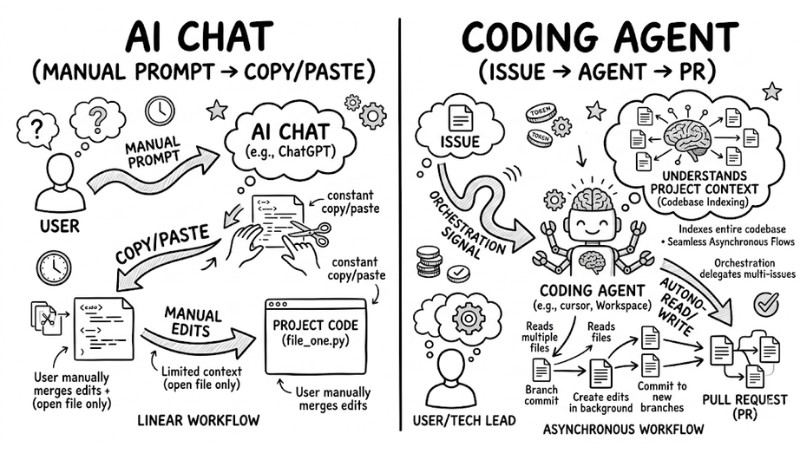
Comparison of AI Chat vs Coding Agent
Top 7 Coding Agent Use Cases for Professional Workflows
1. Assign Issues Directly for Automated Pull Requests
This workflow turns a task description ticket into actual, working code. You simply provide a Jira link or GitHub Issue, and the Agent will automatically check out a new branch, write the code, update dependencies via Dependabot, and open a Pull Request (PR).
- Pros: Saves 30-40% of the time spent on boilerplate code and initial environment setup. Perfect for Tech Leads or Senior Devs managing projects.
- Cons: Might generate redundant code or break structures if the system lacks context.
- Practical Experience: To ensure the Pull request automation system works accurately, I always embed specific Test Cases directly into the Issue description. This acts as Acceptance Criteria, forcing GitHub or integrated CI/CD Pipelines tools to generate a standard-compliant Automatic Pull Request on the first try.
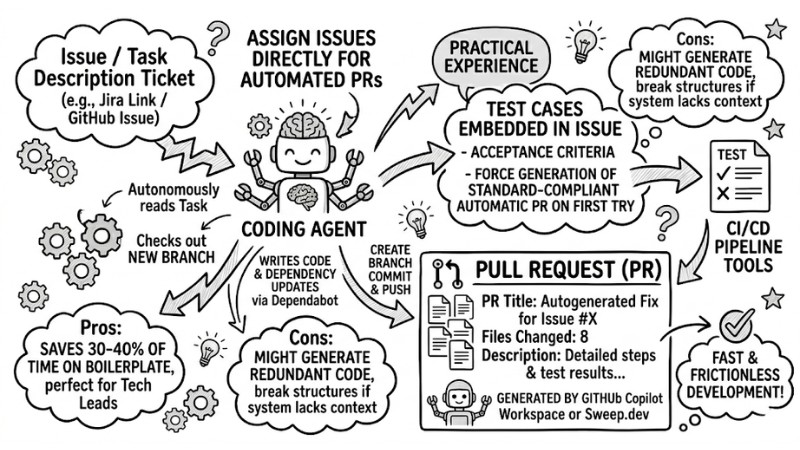
An automated PR created by GitHub Copilot Workspace or Sweep.dev on GitHub
2. AI Task Delegation for Background Ad-hoc Tasks
When you spot a function needing refactoring or lacking unit tests, instead of stopping what you're doing, you can offload that task straight to an agent.
This AI task delegation process happens entirely in the background, offering the massive benefit of drastically reducing context-switching, helping teams clean up Technical Debt without impacting delivery schedules.
- Use quick chat commands in VS Code to assign tasks.
- The Agent autonomously creates a sub-branch and executes background coding automation.
Advice: Apply a domain separation strategy. Only assign ad-hoc tasks to the AI in directories or files you aren't currently editing manually to avoid code conflicts.
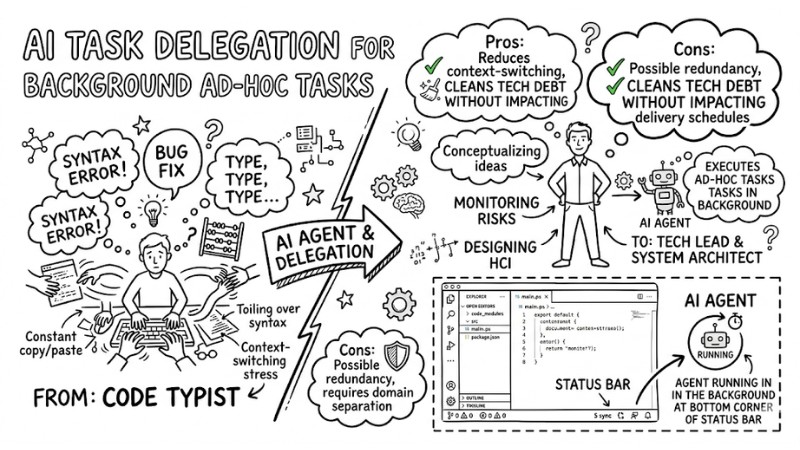
Agent running in the background in the status bar corner
3. Context Handoff for In-Progress Code
Sometimes you're tackling a complex feature but need to stop for a meeting or pivot to an urgent bug fix. At this point, the Handoff technique allows you to transfer the entire Context window of your unfinished work to the agent to complete.
The system infers your intent to continue writing the logic, add error handling, or write docs. This feature optimizes repository management and sustains continuous AI pair programming workflows.
Risk Warning: You MUST make a draft commit or use the git stash command before triggering Asynchronous Offloading. Otherwise, the agent might overwrite and completely wipe out your local code.
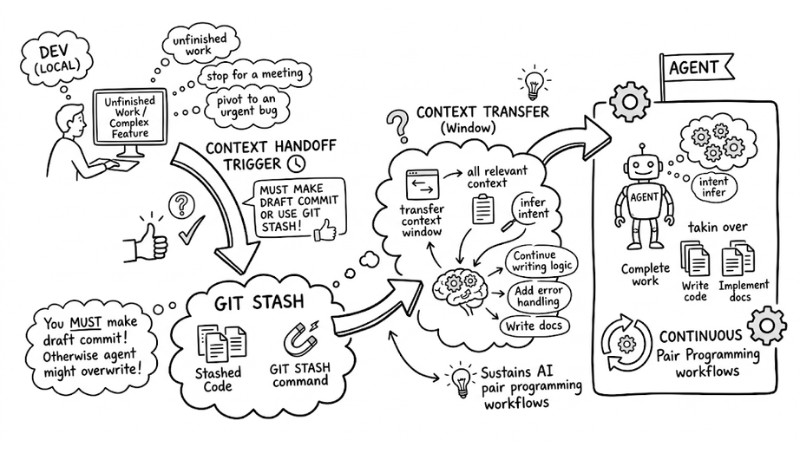
Context Handoff for In-Progress Code
4. Create a Self-Correcting Loop: Iterating on Code Reviews and Bug Fixes
Coding agents don't just write code; they can also self-correct based on system or human feedback.
- The Agent listens to webhooks from the CI/CD system to detect build failures or failed tests.
- Directly reads and analyzes reviewer comments on a GitHub PR.
- Triggers a self-correcting loop to generate and push fixing commits immediately.
This accelerates AI-driven code review processes, freeing up time for Senior Devs.
While the autonomous self-correction mechanism is powerful, the effectiveness of this feedback loop relies entirely on whether the human review comments or error logs are clear and detailed enough.
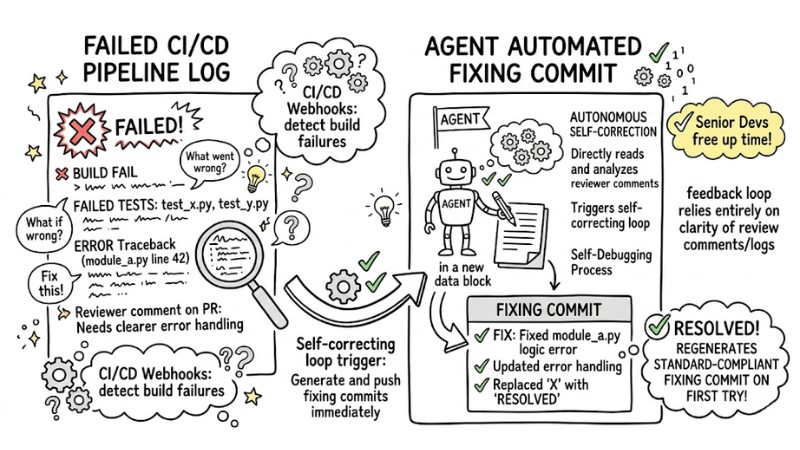
Iterating through the Code Review and Bug-Fixing Loop
5. Parallel Exploration: Concurrently Exploring Complex Architectures
Instead of sequentially testing each solution, you can deploy a multi-agent orchestration system to build 3-4 prototype versions for a complex feature simultaneously.
This parallel software development technique is especially useful for Software Architects when they need to evaluate system architectures, compare library performance, or database organizational structures. The Parallel Task Execution process shrinks R&D time from days to just a few hours.
However, you must strictly manage the cost implications (Trade-off). Running multiple agents concurrently will burn through a massive amount of LLM tokens in a short period.
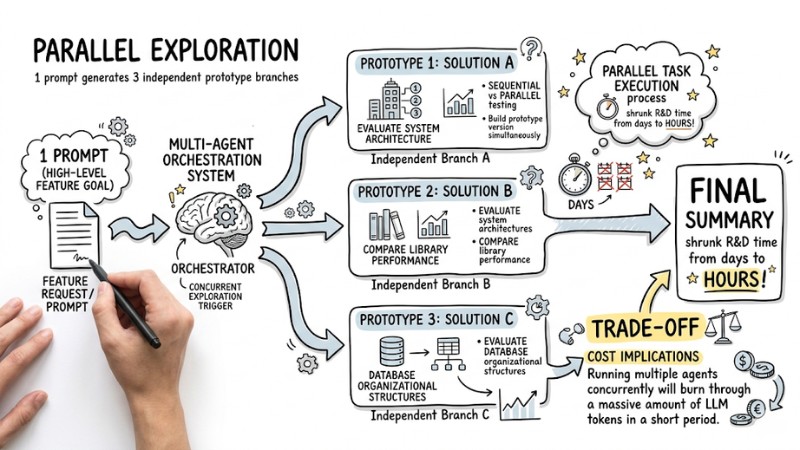
Branching diagram showing a single prompt generating 3 independent prototypes
6. Agent Teams Collaboration and Security Scanning
Instead of using one general-purpose agent, the current trend is to set up specialized Agent teams for cross-task delegation. A standard team usually includes:
- Coder Agent: Focuses on writing feature logic.
- Security Scanner Agent: Acts as the Red Team, specializing in finding security vulnerabilities.
- Optimizer Agent: Reviews and optimizes memory performance.
These sub-agents, particularly on systems like Claude Code, continuously cross-check and review each other's code to form a closed-loop DevOps Automation Framework.
Management Experience: You must configure a "Lead Agent" holding final Approval authority. Otherwise, independent agents can get stuck in an infinite argument loop over which pattern to apply.
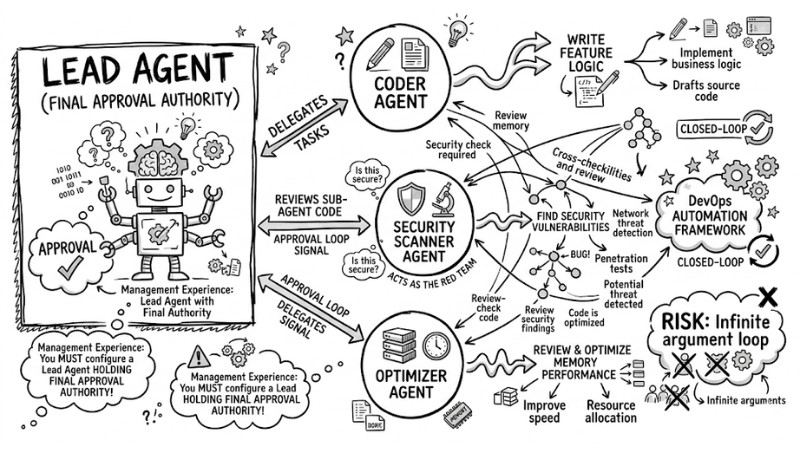
Multi-task Coordination and Security Auditing
7. Autonomous Debugging Based on Independent Hypotheses
When a system crashes for unknown reasons, you can feed the log files to multiple independent agents to hunt down the "Root cause". Through sub-agent workflows, each agent pursues a distinct hypothesis: one checks the Database, one inspects the Network, and another analyzes Memory leaks.
This approach by Autonomous Systems narrows down the error scope rapidly, multiplying Development Efficiency significantly compared to manual debugging.
Note: There is a strict security rule here: you must absolutely never grant Write permissions to an Agent in a Production environment. The system must only be allowed Read-only access to parse logs to prevent a system catastrophe.
Best Practices for Managing AI Coding Agents and Multi-Agent Teams
Context Window Optimization and Task Allocation (LLM Token Optimization)
Cramming your entire codebase into the Context window wastes resources and degrades accuracy. To implement LLM token optimization for teams, immediately create a .cursorrules or .agentignore file in your root directory to exclude build folders, node_modules, or irrelevant documentation files.
One of the most effective best practices for multi-agent software engineering is the "Plan Mode" strategy. You require the agent to output a text-based plan first (Plan Mode). Only when the dev approves and verifies the logic do you allow it to switch to "Execution Mode" to write code, saving maximum API tokens.
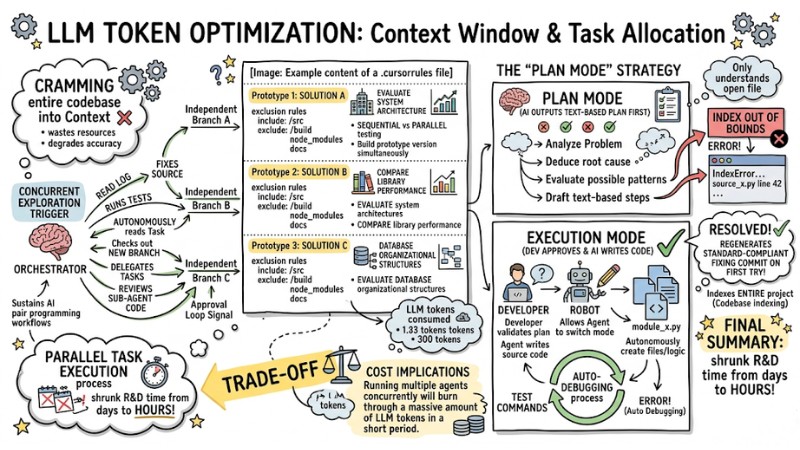
Example content of a .cursorrules file
Managing Integrated Environments in VS Code and GitHub
Granting permissions for Background workflows requires meticulous control within VS Code. Clearly compartmentalize your workspace and configure your settings.json file to cap tokens and block auto-push features to the main branch.
Below is a standard Settings.json configuration template for Agent environments:
{ // Enable background execution for Agent Teams
"CLAUDE_CODE_EXPERIMENTAL_AGENT_TEAMS": "1",
// Cap the maximum number of LLM Tokens per session
"github.copilot.advanced": { "maxTokens": 4096
},
// Prevent Agents from automatically pushing code directly to remote
"git.confirmSync": true,
"git.enableSmartCommit": false,
// Open chat sessions in a View for easy monitoring
"chat.agentSessionsViewLocation": "view" }
Frequently Asked Questions (FAQ) About Coding Agents
What is the difference between Agent Teams and independent Sub-agents?
Agent Teams share a common task list and can communicate directly to coordinate. Independent sub-agents operate in completely isolated contexts, work on their own, and return results independently.
Can AI coding agents run natively in the background within VS Code?
Yes. Tools like GitHub Copilot Workspace or Cursor let you delegate tasks right inside the IDE. The agent spawns a background process, branches off, and codes without blocking your main UI.
GitHub Copilot Agent vs. Claude Code: Which is better for Multi-agent orchestration?
| Feature / Tool | GitHub Copilot Agent | Claude Code |
|---|---|---|
| Core Strengths | Deep integration into PRs, the GitHub ecosystem, and CI/CD. | Exceptional reasoning capabilities, handles massive contexts. |
| Multi-agent Orchestrators | Limited, leans toward isolated tasks. | Robust native support for internal Agent Teams. |
| Ideal Use Case | Enhancing individual workflows, repo automation. | Complex architectural R&D, establishing AI team models. |
What is a coding agent?
A coding agent is an AI tool that automates programming tasks, runs in the background, and interacts with the codebase. They differ from standard AI chats in their ability to operate autonomously without constant prompting, streamlining the software development lifecycle.
How do I use coding agents for ad-hoc tasks?
You can offload time-consuming tasks like writing unit tests, refactoring code, or building UI components to a coding agent. They run in the background, minimizing your context-switching and letting you focus on core deliverables.
Which coding agent should I use for workflow automation?
GitHub Copilot Agent is highly effective for PR automation and deep GitHub integration. Claude Code shines in complex reasoning and orchestrating Agent Teams for cross-domain tasks.
How can a coding agent help me finish work-in-progress code?
You can save your current state and hand it over to a coding agent. The agent will wrap up the missing pieces like documentation, error handling, or code optimization, then open a pull request for your review.
Should I use coding agents for security scanning?
Yes, you can assemble an "Agent Team" comprising a coder agent, a security scanner agent, and an optimizer agent. These agents cross-evaluate each other, helping detect vulnerabilities early.
How does a coding agent auto-fix bugs after a code review?
Coding agents can listen to CI/CD pipelines or reviewer comments on GitHub. Based on that feedback, the agent autonomously parses the issue, fixes the bug, and pushes a new commit, offloading the reviewer.
Are Agent Teams resource-intensive?
Agent Teams can consume more tokens because each member maintains its own context window. However, they are highly effective for collaborative tasks and parallel exploration, ultimately saving overall R&D time.
Read more:
- When to Use an AI Agent? 7 Signs You Need Automation
- Popular Types of AI Agents: How to choose and Real-World Applications
- What is Agentic Workflow? Autonomous AI Solutions for Enterprise
The rise of Coding Agents is completely redefining the architecture of the AI Development Ecosystem, shifting developers from "code typists" to "system orchestrators". To start reclaiming your time, install an agent in VS Code today and try delegating a simple Issue to automate a Pull Request.