Coding Agent Workflows: 7 Steps to Integrate AI into Your Software Development Process

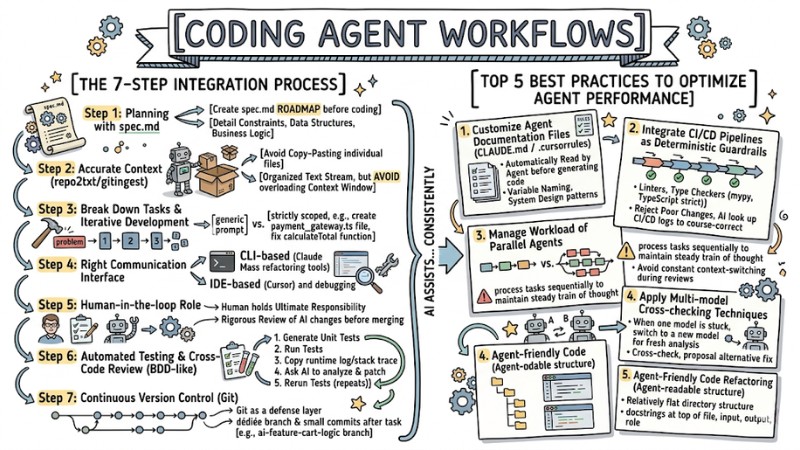
A Coding Agent Workflows is a restructuring of the software development process where developers focus on designing requirements, contexts, and guardrails, while the AI assists with generating code, refactoring, and automating repetitive steps in the SDLC. This article details the steps to deploy this workflow, best practices to optimize performance, how to handle common errors, and how to choose the right Coding Agent for safe application in real-world projects.
Key Takeaways
- Concept: Understand that the Coding Agent Workflows is a mindset shift from "writing code by hand" to "providing context while AI writes the code," freeing up labor from repetitive mechanical tasks.
- Practical process: Master the deployment roadmap from drafting specs, setting context, breaking down tasks, and choosing communication interfaces to automated testing and version control, helping you master AI systematically.
- Best Practices: Pocket performance-boosting secrets like creating agent-specific documentation files and refactoring code to be AI-friendly, keeping the system stable and consistent.
- Troubleshooting: Know how to deal with AI generating incorrect code or breaking project architecture by narrowing the context and using the git reset command promptly.
- Tool Evaluation: Identify the strengths of the top 3 tools - Cursor, Claude Code, and GitHub Copilot - to make the right choice for your specific needs.
- Risk Management: Remember the "Human-in-the-loop" principle - humans must always be the final checkpoint reviewing code before pushing it to Production.
- FAQs: Get answers to questions about actual productivity gains, the risk of AI replacing developers, and how to secure source code when using large language models.
What is a Coding Agent Workflows? A Paradigm Shift in Modern Programming
A Coding Agent Workflows is a systematic process between humans and AI, where developers design requirements and provide context, while the AI Agent handles code generation, refactoring, and automating repetitive tasks.
The programming industry is shifting from a hands-on approach of writing most of the source code to an Agent-First Development model, where developers focus on defining the problem, scope, and constraints instead of directly manipulating every line of code. The major challenge today doesn't lie in the AI's ability to generate code, but rather that many developers haven't fully applied software engineering disciplines when describing requirements to agents, leading to ambiguous inputs and unusable outputs.
For an AI Pair Programming Workflows to operate effectively, developers need to build a working environment with clear requirements, complete context, and strict guardrails throughout the software development lifecycle. When a Coding Agent Workflows is properly designed, AI can more consistently assist with generating code, modifying existing code, and automating repetitive steps in the SDLC.
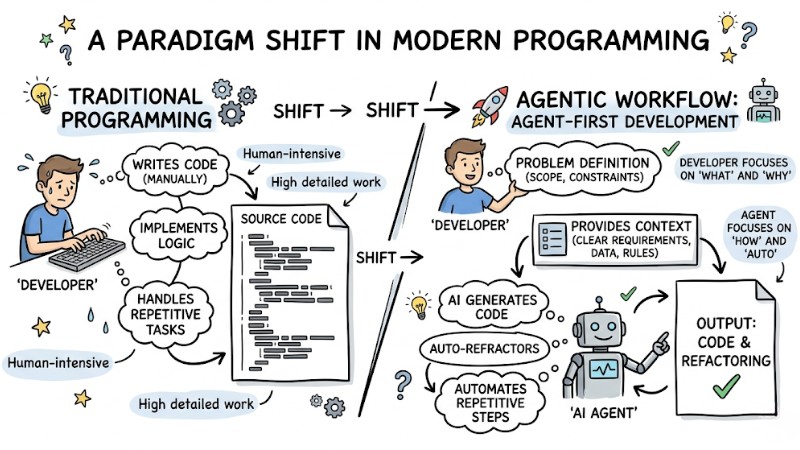
The difference between Traditional Programming and Agentic Workflow
The Process of Integrating a Coding Agent Workflows into Real-World Projects
Step 1: Planning and Defining Requirements with spec.md
Avoid kicking off projects with a code-first approach and prioritize a spec-driven mindset, where every AI-assisted project starts with a clear specification. Before opening the terminal, create a spec.md file in the root directory to act as a roadmap for the AI's thought process and constraints, clearly detailing tech constraints, data structures, and core business logic.
spec.md: Audio Export Feature
- Tech stack: Python 3.10, yt-dlp, ffmpeg.
- Input: URL Youtube.
- Output: .mp3 file saved to /downloads.
- Constraints: Mandatory use of rotating proxies to avoid rate limiting.
- Retry logic: Maximum 3 retries with a 5-second interval on download failure.
- Testing: Write unit tests with mocked data from yt-dlp.
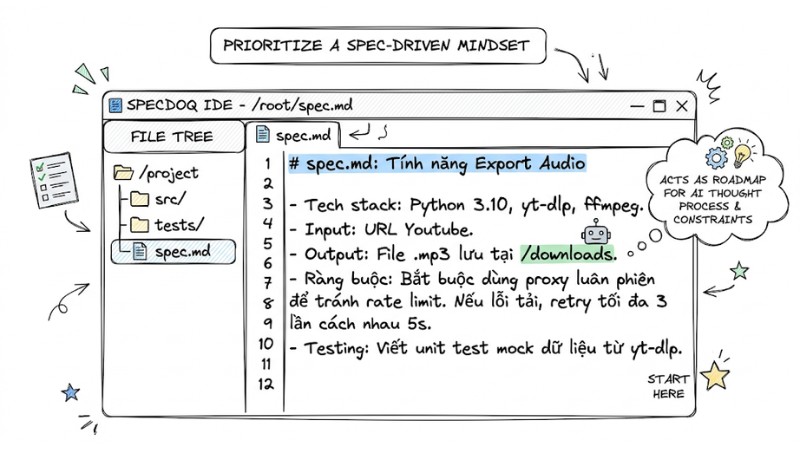
Planning and Requirement Definition using spec.md
Step 2: Setting Accurate Context for the AI
The AI's effectiveness heavily depends on the completeness and relevance of the context developers provide, making setting project context a crucial skill. You should use context packing techniques via tools like gitingest or repo2txt to bundle the directory structure, source code, and related documentation into an organized text stream for the AI, rather than copy-pasting individual files.
Note: Keep an eye on context window limits and avoid dumping the entire source code of a large project into a single prompt; only provide the modules directly related to the task to reduce the risk of information overload and hallucination errors.
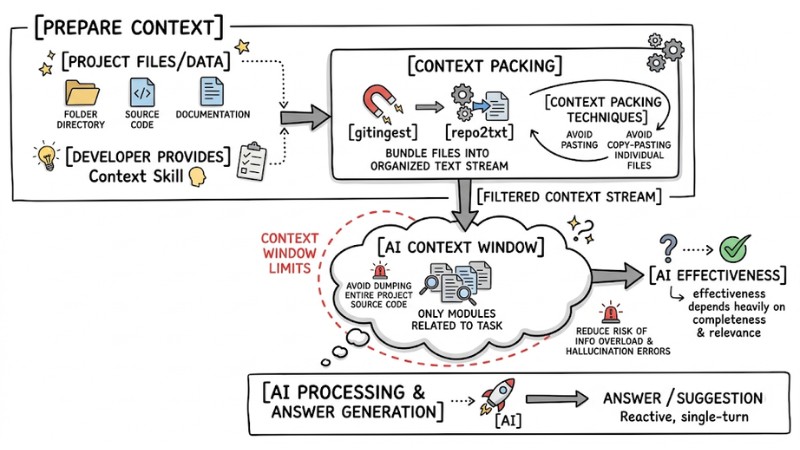
Flowchart of loading context into an LLM
Step 3: Breaking Down Tasks and Applying Iterative Development
You shouldn't ask the AI to execute overly broad requests like building an entire complex feature in one go; instead, break the project into smaller modules and apply iterative execution principles. An iterative development approach helps the AI focus better on each step and allows for early bug detection, for instance, switching from a generic prompt to a strictly scoped one like just creating the payment_gateway.ts file according to spec.md or only fixing the calculateTotal function in cart.js to properly update the tax calculation logic.
| Bad Prompt (Generic) | Good Prompt (Focused) |
|---|---|
| "Write the payment feature for the web" | “Based on spec.md, create the payment_gateway.ts file. Only define the interface and handle the Stripe API connection. Ignore the UI.” |
| "Fix the shopping cart bug" | "In cart.js, the calculateTotal function is miscalculating tax. Rewrite this function to add 10% VAT, keeping the old variables intact." |
Step 4: Choosing the Right Communication Interface
Depending on the nature of the work, select the most optimal Natural language interface:
- Use CLI-based (Claude Code, Codex CLI): Ideal for quick file system operations, running terminal commands, mass refactoring, or scaffolding a new project.
- Use IDE-based (Cursor): Best for visual tasks, deep codebase comprehension, detailed code diff reviews, and debugging complex logic straight in the editor.
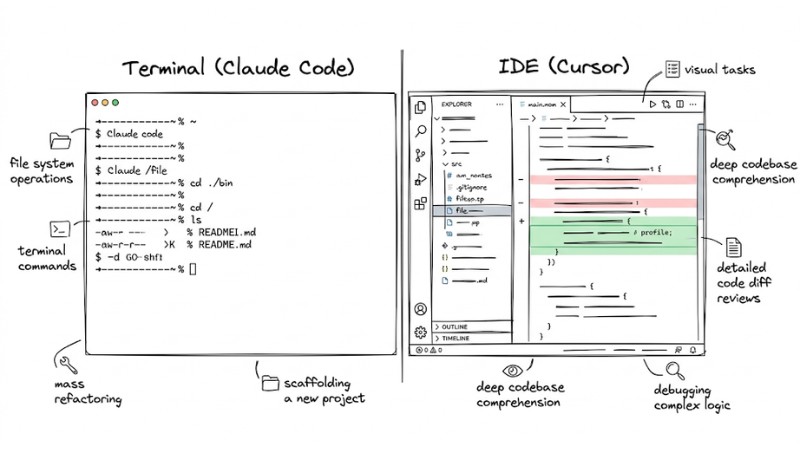
Choosing the Right Communication Interface
Step 5: Upholding the Human-in-the-loop Role
Developers hold ultimate responsibility for source code quality, while the AI acts as an assistant in a human-machine collaboration system. AI-generated code should be treated as output requiring rigorous review, grasping its intent, scanning diffs, and defending the system's architectural consistency before deciding to keep the change. Don't apply AI changes directly to a production environment without fully understanding how the code block works or without verification through testing and reviews.
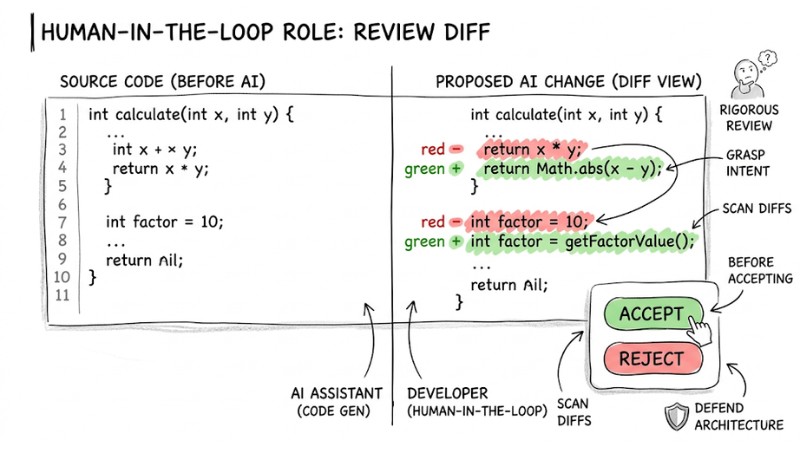
Developers should review Diffs before accepting changes
Step 6: Automated Testing and Cross-Code Review
An AI-assisted debugging workflow needs testing integrated from the very start; you can apply BDD-like principles by asking the AI to help write tests for the desired behavior before finalizing the logic.
An effective AI debugging workflow usually entails:
- Ask the AI to generate Unit Tests for the newly written feature.
- Run tests locally. If the code fails, don't try to fix it manually.
- Copy the entire runtime log (or stack trace) and throw it back into the prompt.
- Ask the AI to analyze the error itself and propose a patch.
- Rerun automated testing until it passes.
Step 7: Continuous Version Control
Git should be used as a defense layer for the project while working with AI, logging changes frequently and supporting rollbacks when needed. You should create dedicated branches for AI-assisted experiments and make small commits after every completed task instead of letting changes pile up; for instance, create an ai-feature-cart-logic branch, then commit immediately after the AI finishes the calculateTotal function integrating Stripe and passing the necessary checks.
# Create a separate branch to test AI's ideas
git checkout -b ai-feature-cart-logic
# Code generated successfully, commit immediately
git add .
git commit -m "feat: AI-generated calculateTotal function with Stripe integration"
Top 5 Best Practices to Optimize Coding Agent Performance
1. Customize Agent-specific documentation files (CLAUDE.md / rules.md)
To avoid repeating coding convention requirements in every single prompt, create config files like CLAUDE.md, AGENTS.md, or .cursorrules in the root directory to define specific rules for each Coding Agent. These files are automatically read by the agent prior to generating code and can explicitly outline linter requirements, variable naming conventions, or system design patterns.
# AI Standard Configuration
Strictly prohibit the use of any in TypeScript.
All functions must include JSDoc explaining parameters.
Use camelCase for variables and PascalCase for Classes.
Prioritize Functional Programming over OOP for this module.
2. Integrate CI/CD Pipelines as Deterministic Guardrails
Natural language is often ambiguous, whereas source code and tests are deterministic, so you should use CI/CD Pipelines as deterministic guardrails for AI-assisted projects. Don't just rely on prompts to ask the AI for clean code; configure linters and type checkers like mypy or TypeScript strict mode to run automatically, so the system rejects poorly formatted or ill-typed changes on its own, guiding the AI to look up the CI/CD logs to course-correct.
3. Manage the Workload of Parallel Agents
Running multiple Coding Agents simultaneously can churn out massive volumes of changes in a short time, forcing developers to context-switch constantly during reviews. This often impairs the ability to build a consistent mental model of the system; therefore, in many cases, it's better to process tasks sequentially to maintain a steady train of thought rather than trying to orchestrate multiple parallel agents.
4. Apply Multi-model Cross-checking Techniques
When an AI model repeatedly proposes ineffective solutions for a specific code block or bug, don't keep forcing that model to fix it in the same chat context. You can apply multi-model cross-checking techniques by copying the request and relevant code snippet into a new session, switching to a different model, and asking the new model to re-analyze, cross-check, and propose an alternative fix.
5. Agent-Friendly Code Refactoring (Agent-readable structure)
Besides optimizing the codebase for developers, you can reorganize the project structure to be easily queryable for agents, such as maintaining a relatively flat directory structure and avoiding overly deep nesting when unnecessary. Write docstrings or brief descriptions at the top of every file and interface to clarify its inputs, outputs, and role, helping the agent grasp the context using just a few core files instead of untangling multiple dependency layers.
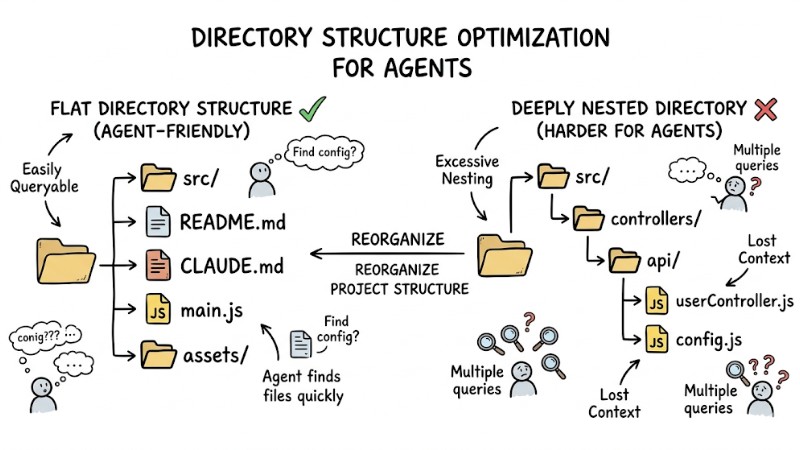
A flat directory structure vs a deeply nested directory
Handling Errors When the AI Coding Agent Generates Subpar Code
When the AI Generates Incorrect Code or Hallucinates
Managing the output quality of a Coding Agent is mandatory, especially when the model hallucinates code using non-existent libraries or APIs mismatched with the project.
- Root Cause: The context window is overloaded with too much noise, or the
spec.mdfile hasn't clearly detailed technological constraints and versions. - Solution: Halt the current chat thread, spawn a new session, provide a condensed context, and only pass the strictly necessary files alongside specific error logs or stack traces.
When the AI Breaks Architectural Constraints
In some scenarios, an AI's proposal might mutate the structure of an entire class or module just to patch a localized bug, risking the system's overall architecture.
- Root Cause: Architectural constraints and modification scopes weren't stated clearly enough, causing the system to prioritize meeting functional requirements while ignoring agreed-upon design decisions.
- Solution: Use your version control system for a quick rollback using
git reset --hard HEADif needed, then update thespec.mdfile and append explicit directives in the prompt, like "You are only allowed to modify function X, do not edit files Y and Z."
Top 3 Coding Agents Fit for the SDLC Workflow
Cursor (IDE-based Agent)
Cursor is an integrated development environment offering a built-in Coding Agent right in the editor, ideal for developers who want to merge code authoring, diff viewing, and AI interaction into a unified interface.
- Target Audience: Developers prioritizing a visual GUI, working full-stack, and frequently touching multiple files in a single session.
- Pros: Excellent autocomplete capabilities, the Composer feature assists in generating and editing code contextually, and its in-editor context management mechanics are convenient for multi-file workflows.
- Cons: Requires relatively hefty system resources, and the UI can get cluttered when multiple code diffs pop up during a single edit.
Claude Code (CLI-based Agent)
Claude Code is a CLI-based Coding Agent that supports reading, editing, and executing source code directly from the terminal, fitting perfectly into backend and infra-heavy workflows.
- Target Audience: Backend developers, DevOps engineers, and users comfortable with terminal operations.
- Pros: Fast response times, supports file and directory management natively in the command line, and is capable of handling multi-step tasks like reading, editing, and running commands in a single session.
- Cons: Demands strong command-line skills, and inspecting complex diffs is less intuitive than in deeply integrated IDE tools.
GitHub Copilot (Workspace/Enterprise)
GitHub Copilot is a code assistance suite integrated into various IDEs and GitHub services, designed to fit the working environments of large-scale development teams and enterprise organizations.
- Target Audience: Enterprise projects and multi-member teams with strict security, governance, and standardized workflow requirements.
- Pros: Deeply integrated with the GitHub ecosystem, supports code suggestions across many IDEs, features pull request review assistance, and boasts organizational security policy management mechanisms.
- Cons: Its ability to grasp entire workspace contexts is sometimes less nimble than IDEs with specialized context engines like Cursor, especially in projects with complex architectures.
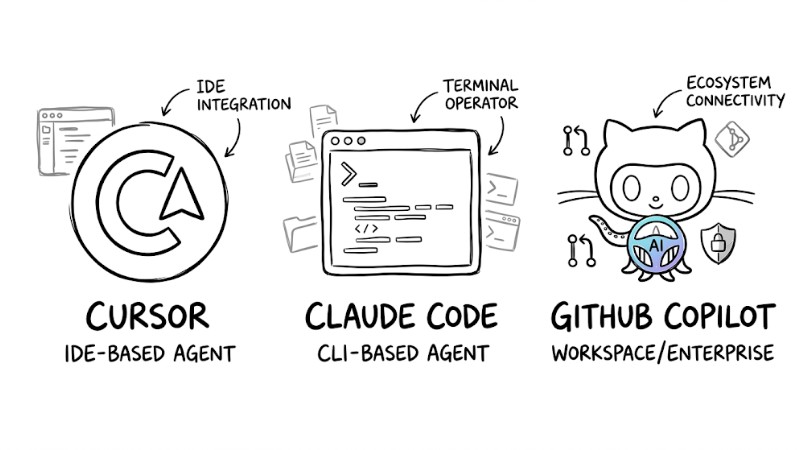
Top 3 Coding Agents Fit for the SDLC Workflow
Frequently Asked Questions
How much actual productivity gain does a Coding Agent Workflows provide?
Productivity gains using an AI Coding Agent typically range from 1.5x up to nearly 10x depending on the task type and process standardization level. Repetitive tasks like writing boilerplate, generating unit tests, translating code between languages, or mass refactoring can achieve massive time savings, whereas in brownfield projects with heavy implicit logic and legacy constraints, the boost usually hovers around 1.5x to 2x.
Can AI Coding Agents replace Software Engineers?
Currently, AI Coding Agents heavily assist in generating and modifying code but do not replace the software engineer's role in analyzing problems, selecting architectures, evaluating trade-offs, and holding final responsibility for the system. Developers are gradually shifting toward designing requirements, providing context, and setting guardrails within an LLM-assisted development workflow, where major decisions are still driven by humans.
How do I secure my source code when using LLMs?
Avoid using public AI models lacking data commitments for sensitive source code, and prioritize enterprise plans with explicit clauses stating customer data won't be used to retrain the model. For highly secure data or systems, you can deploy internal models or open-source models like Llama on your private infrastructure to fully control source code storage and processing.
What is the best way to start applying an Agentic Coding Framework?
You should start with low-risk tasks like having the AI generate unit tests for existing code, write docstrings, or assist in refactoring isolated functions before handing over critical architectural pieces. Once you're comfortable providing specs, managing context, and auditing outputs, you can gradually scale up to larger features and let the agent participate in more steps of the software development process.
Read more:
- Coding Agent Review: Top 5 Production-Ready AI Programming Tools
- AI Agent Fix Bugs: Operational Mechanisms and Safe Usage
- What is Agent Engineering? The Process of Bringing AI Agents into Production
A Coding Agent Workflows is only effective when built upon a foundation of clear specs, intentional context management, tight testing and version control workflows, alongside appropriate technical guardrails. By combining these principles with choosing the right tools like Cursor, Claude Code, or GitHub Copilot, and starting with low-risk tasks, your team can significantly boost productivity while safeguarding architectural quality and source code security.