Optimizing AI Agent Developer Workflow: Enhancing Programming Efficiency

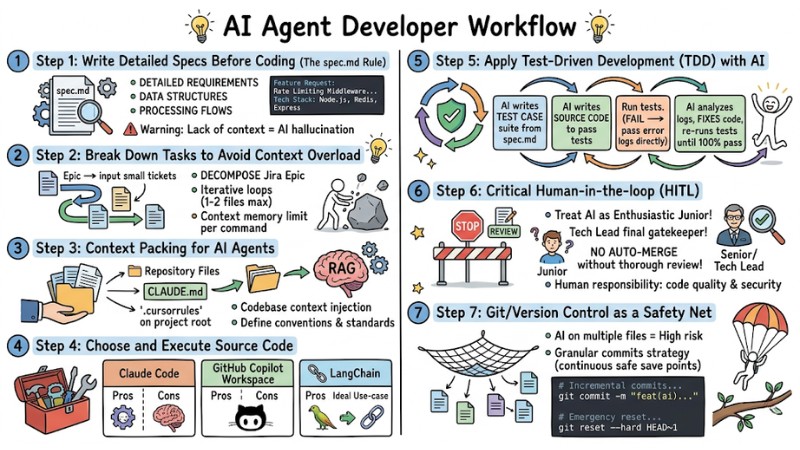
Studies show that developers can lose a massive portion of their daily time up to 60 - 89% on context switching, continuous interruptions, and handling tasks not directly related to coding. In this article, I provide a detailed roadmap to integrate an AI agent developer workflow into the current Software Development Life Cycle (SDLC), helping you hand over repetitive tasks to AI and reclaim time for more strategic and higher-value missions.
Key Takeaways
- Understanding AI Agent Developer Workflow: Master the difference between autonomous AI Agents (executing the entire task lifecycle) compared to standard coding assistants (which only suggest single lines of code).
- 7-Step Roadmap for Building a Practical Workflow: Apply a methodical approach from writing detailed Specs (
spec.md) and Context Packing to applying TDD and using Version Control (Git) as a safety net. - Tools and Execution: Objectively evaluate today's most powerful orchestration tools such as Claude Code, GitHub Copilot Workspace, and LangChain for specific project goals.
- 4-Stage Transformation Roadmap: Implement from a safe "Read-only" level to supervised automated development tasks (HITL) and finally to full autonomy (Autonomous).
- FAQ: Clarify the role of the AI-augmented orchestrating architect, CI/CD integration methods, and security strategies to ensure code quality during automated AI execution.
What is an AI Agent Developer Workflow?
An AI agent developer workflow is an automated working process where AI agents take over the entire lifecycle of a software development task. Instead of just suggesting a few lines of code, these agents are capable of reading requirements, planning, writing code, running tests, and self-correcting errors.
The biggest difference in AI Agent Developer Workflows lies in the level of autonomy. Standard AI coding assistants (like the old version of GitHub Copilot) primarily act as automated code suggestion tools within the context of an open file, without maintaining state or operating autonomously across multiple sessions or tabs. In contrast, an AI agent operates continuously and implicitly within the system to handle complex workloads.
Practical Experience: The biggest challenge for a developer is context switching (the brain having to constantly shift between different work contexts). Every time you are interrupted by a Slack message or a Jira ticket, it takes over 20 minutes to regain focus. Integrating AI coding assistants helps the system automatically handle PR reviews and bug triage, protecting your deep work space.
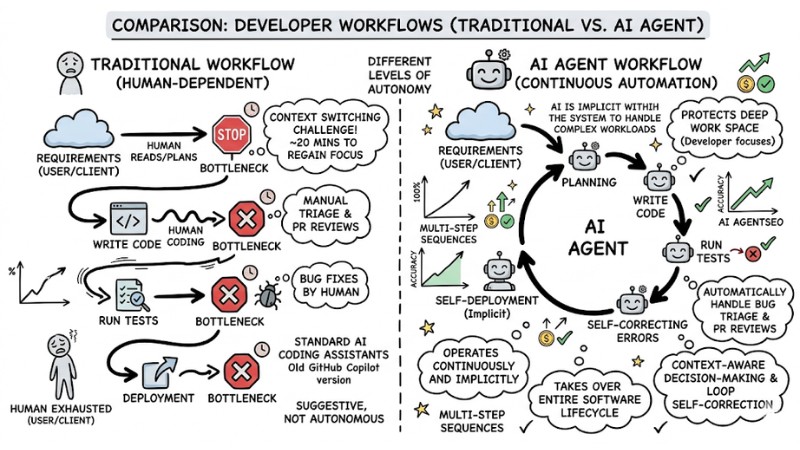
Comparing Traditional Workflow and AI Agent Workflow
7 Steps to Building a Practical AI Agent Developer Workflow
Step 1: Write Detailed Specs Before Coding (The spec.md Rule)
Many developers make the mistake of throwing a short, brief requirement at an AI and expecting perfect results. Lack of context inevitably leads to AI hallucination (fabricating information or using the wrong libraries).
You need to apply prompt engineering skills for developers to build architectural documentation. Create a spec.md file containing all requirements, data structures, and main processing flows. This will be the mandatory roadmap before the AI generates any line of code.
Feature Request: Rate Limiting Middleware
- Objective: Limit to 100 requests per minute per IP address.
- Tech Stack: Node.js, Redis, Express.
- Constraints:
1. Latency overhead must not exceed 10ms.
2. Return HTTP 429 if the threshold is exceeded.
- Edge Cases: Implement a failover mechanism to local memory if Redis becomes unavailable.
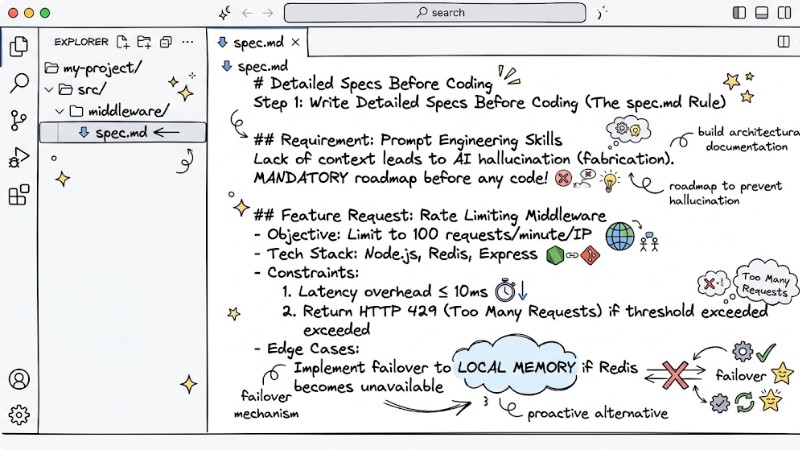
Write detailed specifications before coding (spec.md rules)
Step 2: Break Down Tasks to Avoid Context Overload
Every LLM model has a context memory limit, so if you ask the AI to read and edit the entire source code at once, it may forget initial requirements or generate inappropriate code.
You should decompose a Jira Epic into small iterative loops. Limit the scope of each command so the AI handles a maximum of 1 or 2 modules/files. Only after completing the database file and testing successfully should you ask the AI to continue writing the API controller file.
- Provide input in small, clear, compact tickets.
- Save the results of the previous step as context for the next step.
- Check and finalize each feature before expanding the scope.
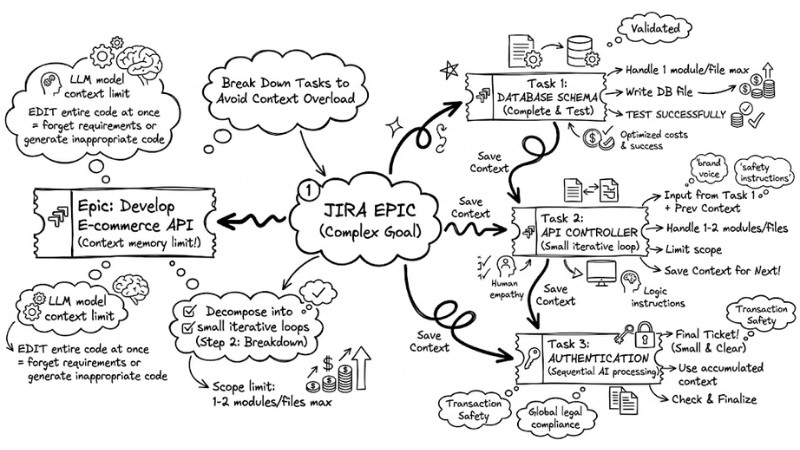
Break down tasks into smaller parts to avoid overloading the context
Step 3: Context Packing for AI Agents
To prevent the AI from breaking the existing architecture, it needs to understand the entire codebase. Modern systems use Retrieval-Augmented Generation (RAG) technology to scan and understand the entire source code repository.
You need to perform codebase context injection by setting up Repository Files containing project rules. Create files like CLAUDE.md or specific rule files (e.g., .rules, .cursorrules) in the project's root directory to clearly define conventions and standards that the AI must follow.
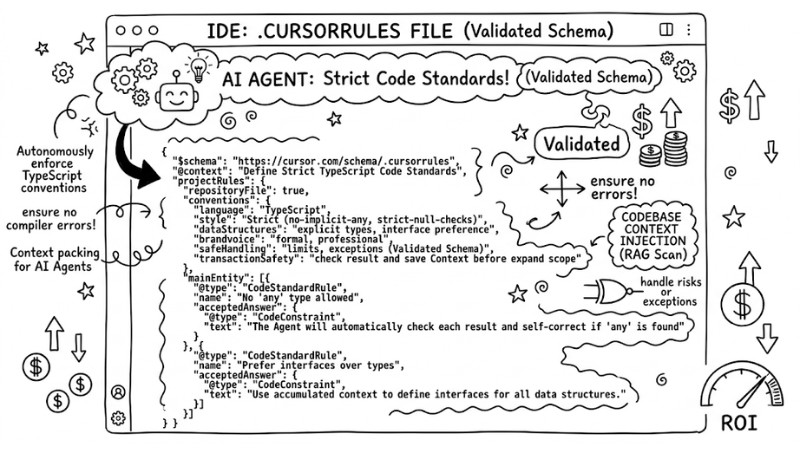
The actual content of a .cursorrules file specifying strict TypeScript code standards for a team
Step 4: Choose and Execute Source Code with Appropriate Tools
This is when you apply agentic orchestration - the coordination of AI agents acting independently to achieve a common goal. Here is an objective evaluation of the most popular tools for your selection:
| Tool | Pros | Cons | Ideal Use-case |
|---|---|---|---|
| Claude Code | Excellent logical reasoning, few syntax errors. | Integration into the current ecosystem is not yet very deep. | Writing complex algorithms, handling difficult business logic. |
| GitHub Copilot Workspace | Perfectly integrated with GitHub, smooth PR reading. | Autonomy level is still limited for large refactors. | Automating code reviews, writing test cases, bug triage. |
| LangChain | Highly flexible customization, connects many external tools. | Steep learning curve, takes time for initial setup. | Building specific internal agents for enterprises. |
Step 5: Apply Test-Driven Development (TDD) with AI
Automated testing is the only shield when you allow AI to write code in bulk. Apply Test-Driven Development (TDD) with AI to ensure every feature works as designed.
The greatest power of an agent lies in its ability to self-correct source code (automatically reading error logs and fixing the code). The process works as follows:
- Ask the AI to write a Test Case suite based on the
spec.mdfile. - Ask the AI to write the actual source code to pass the Test suite.
- The system automatically runs the tests. If they fail, pass the error logs directly to the AI.
- The AI automatically analyzes logs, fixes the code, and re-runs tests until 100% pass.
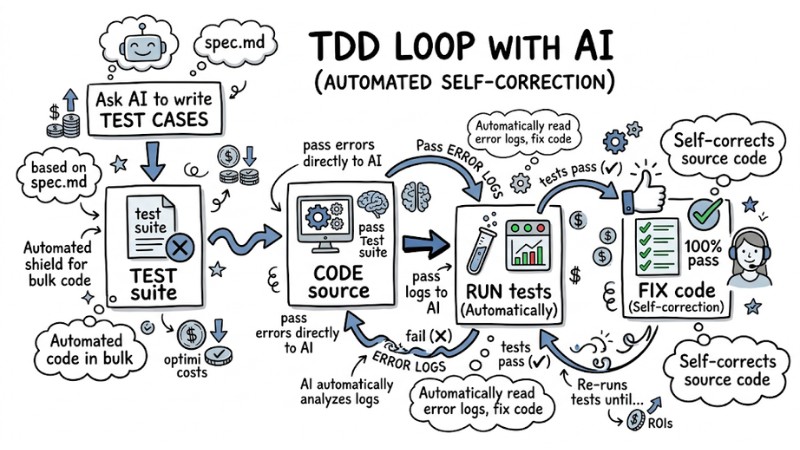
The 4-step TDD loop between AI and Test Runner
Step 6: Maintaining Critical Human-in-the-Loop (HITL)
No matter how smart the AI is, always treat it as an enthusiastic but inexperienced Junior Developer. Seniors or Tech Leads must maintain the role of the final gatekeeper in the development process.
Warning: You must absolutely not set up an auto-merge mechanism for AI-generated code that has not undergone thorough review. Code quality and security must always be the direct responsibility of humans. Without careful review, you are creating security and stability risks for your project.
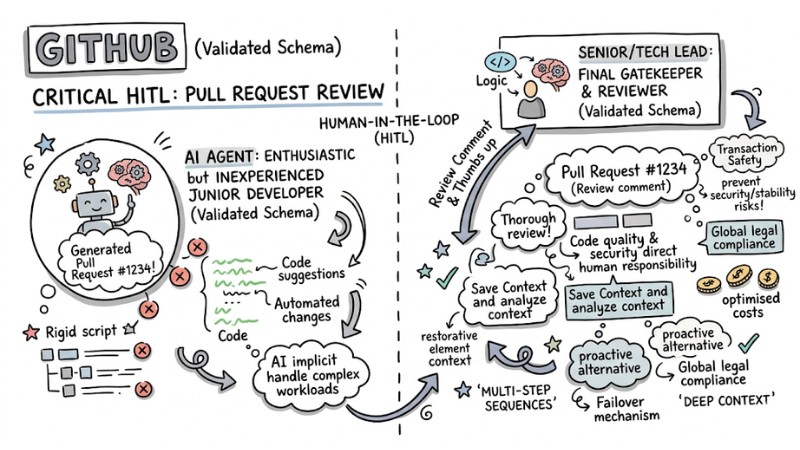
Maintaining Critical Human-in-the-Loop
Step 7: Use Git/Version Control as a Safety Net
When AI starts operating on multiple files simultaneously, the risk of affecting system logic is very high. At this point, apply a granular commits strategy (committing continuously after every tiny change) to create secure save points.
You should create separate branches for safe experimentation with AI. If the agent goes off track or generates unusable code, you can easily discard the entire session using Version Control.
# Incremental commits after each AI module completion
git add module_a.js
git commit -m "feat(ai): implement login logic verified by tests"

# Emergency reset if AI breaks the system architecture
git reset --hard HEAD~1
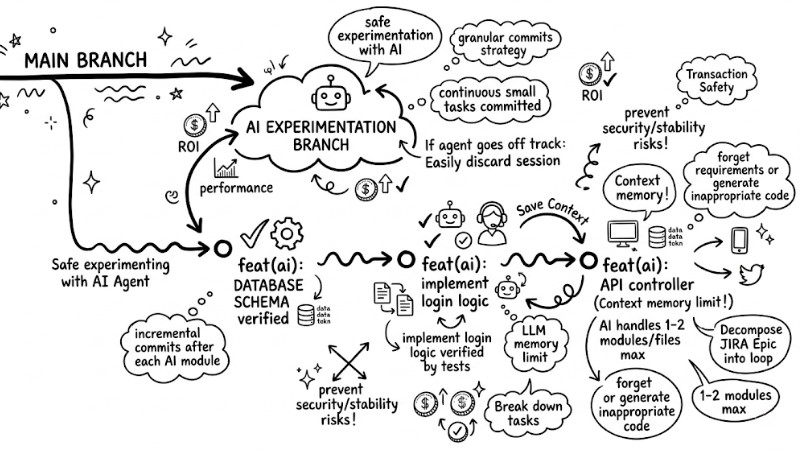
Use Git/Version Control as a safety net
4-Stage Roadmap for Adopting AI Agents for Engineering Teams
The AI agent adoption strategy needs to take place gradually so as not to shock the team and not break the existing system architecture.
| Stage | Intervention Level | Practical Application to Projects |
|---|---|---|
| Stage 1 | Read-Only | AI scans source code, detects dead code, warns of style guide violations. |
| Stage 2 | Safe Tasks | AI writes comments, generates Readmes, creates Unit test suites for independent functions. |
| Stage 3 | Guided Development | AI proposes code for new features behind feature flags, requiring human approval. |
| Stage 4 | Autonomous | Completing end-to-end autonomous workflows handling cross-repository dependencies. |
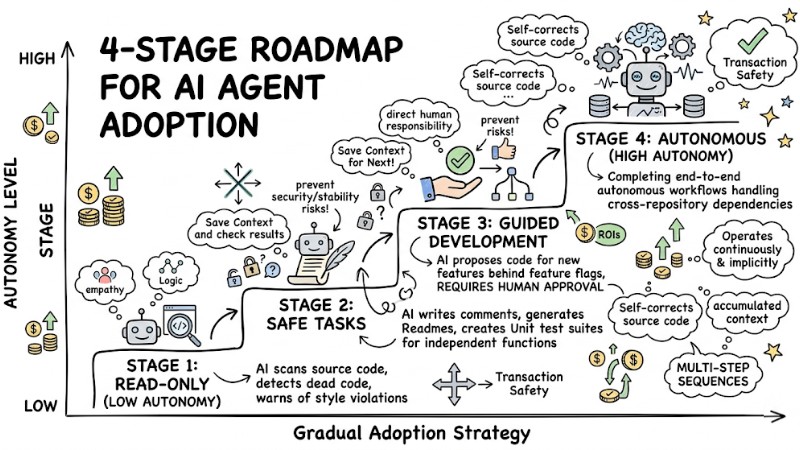
A 4-stage roadmap for implementing AI Agents in Engineering Teams
Measuring Effectiveness: Core Metrics to Track
To prove the ROI of adopting DevOps Automation and AI into the team, you need to closely track the following software metrics:
- Developer Time Allocation: The ratio of actual coding time compared to time spent on context switching.
- PR turnaround drops: The average time from opening a Pull Request until it is merged (must decrease sharply).
- Feature delivery velocity: Total Lead time from receiving a ticket to deploying to production.
- Autonomy Rate: The percentage of tasks completed by AI from start to finish without developer intervention for error correction.
FAQ
What is the biggest difference between traditional workflow and an AI agent workflow?
The core difference is the reduction of context switching. Instead of having to manually write boilerplate code, constantly switch tabs, and wait for reviews, you act as the orchestrating architect of the AI.
Integrating AI agents into the developer workflow is expected to significantly reduce time wasted on context switching and trivial tasks, thereby freeing up a significant portion of daily working time, though specific ratios will vary between teams and projects.
How can I ensure an AI agent doesn't break the current system architecture?
You need to apply 3 gatekeepers simultaneously: Create clear spec.md files, set up Repository Files (.cursorrules) combined with RAG to force AI to follow standards, and mandatorily maintain Human-in-the-loop (HITL) to review every Pull Request before merging.
Can AI agents be integrated directly into CI/CD pipelines?
Absolutely. You can set up automatic triggers for agents via GitHub Actions or GitLab CI. When a CI pipeline reports a build error or test failure, the trigger will call the AI agent to automatically read error logs, propose a patch, and automatically create a bug-fix PR immediately.
Why does a traditional workflow waste developer time?
Traditional workflows often cause significant time waste due to continuous context switching. On average, a developer takes about 23 minutes to regain focus after each interruption. This results in them only spending a small portion of the day on actual coding, often under an hour, or only about 2–4 hours, depending on the case.
How should I start adopting AI agents to minimize risk?
Start with read-only tasks, then move to automating simple jobs, then progress to having AI suggest source code changes with supervision, and finally to fully automated processes.
How can I break down tasks for an AI agent effectively?
Break development tasks into small, manageable parts, each focusing on a specific module or group of files. This helps the AI agent process efficiently within the context window limits and avoids generating inconsistent source code.
What is the main benefit of using AI agents in the development process?
The main benefit is accelerating task processing speed, minimizing human error, eliminating context switching time, and allowing developers to focus on creative work, thereby enhancing productivity and job satisfaction.
Read more:
- AI Agent SEO: How to Set Up Content Automation and Keyword Optimization Workflows
- What is AI Agent Marketing? Benefits and 7 Optimal Application Methods
- What is an AI Sales Agent? Comparing AI Sales Agents vs. Chatbots
Mastering the AI agent developer workflow is the key to performing AI-Augmented Software Engineering in the future. The greatest benefit is not just speed, but giving you precious hours to focus on deep technical thinking. Do not hesitate any longer; open your IDE, create a spec.md file for tomorrow's task, and let the AI start the work today.
Tags