Debugging AI Agents: A Workflow from JSON Logs to Visualization

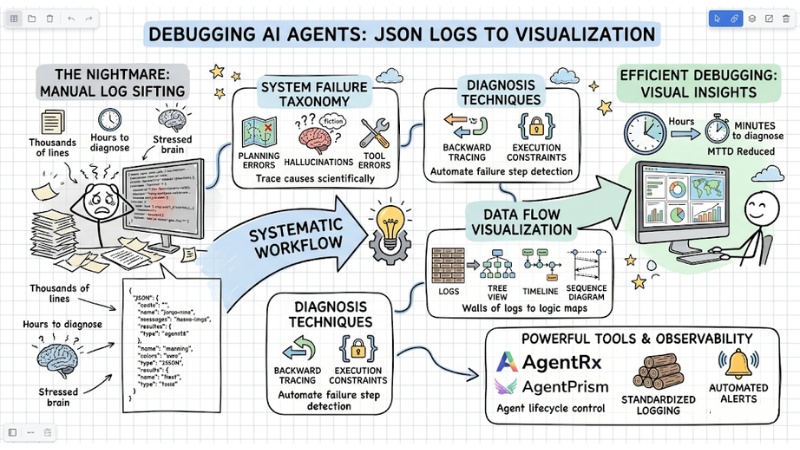
Debugging AI Agents often turns into a "nightmare" when you have to sift through thousands of JSON log lines to find a single point of failure. This article provides a systematic workflow to help you transition from manual log reading to trace and error visualization techniques, reducing diagnosis time from hours to minutes.
Key Points
- Nature of the challenge: Understand why randomness, long reasoning cycles, and complex JSON log structures make debugging AI Agents a major hurdle.
- System Failure Classification: Master Failure Taxonomy (error groups ranging from planning and hallucinations to tool errors) to trace causes scientifically.
- Diagnosis Techniques: Apply backward tracing and execution constraints to automate the detection of precise failure steps.
- Data Flow Visualization: Use Tree View, Timeline, and Sequence Diagram methods to turn walls of logs into easy-to-follow logic maps.
- Powerful Supporting Tools: Leverage specialized solutions like AgentRx, AgentPrism, and LangSmith to manage agent lifecycles and professional debugging.
- Setting up Observability: Build standardized logging processes and automated alerts to control operations and reduce incident response time.
- FAQ Resolution: Grasp strategies to prevent infinite loops, control "hallucinations," and measure performance (MTTD) to maintain a stable AI system.
Why is Debugging AI Agents a major challenge?
Unlike traditional programming (where code follows a fixed flow), an AI Agent operates based on Large Language Models (LLMs) with specific characteristics:
- Randomness: Given the same input, an Agent can generate different action flows, making errors difficult to reproduce.
- Long Cycles: Agents perform dozens of complex reasoning steps. If an error occurs at step 3, all 10 subsequent steps become meaningless.
- Multi-agent Complexity: In multi-agent systems, errors can be passed from one agent to another, making root cause analysis extremely difficult.
- JSON Log "Walls of Text": Raw log files are often massive nested JSON structures that are not intuitive for the human brain.
Consequently, debugging AI Agents becomes a major challenge because you must simultaneously deal with stochastic behavior and long reasoning chains while managing interactions between multiple agents and hard-to-read JSON log "walls," making finding the exact point of failure particularly arduous.
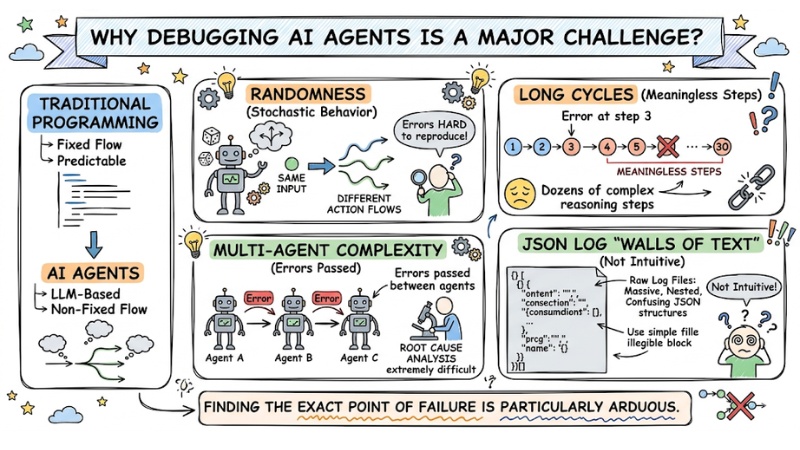
Debugging AI Agents often encounters many difficulties
Building a system debugging mindset for AI Agents
Instead of using print() or guessing, you need to establish a systematic tracing mindset and apply a Failure Taxonomy to categorize errors scientifically:
- Plan Non-compliance Errors: The Agent ignores important steps or arbitrarily adds steps/actions not present in the original plan.
- Information Fabrication Errors: The Agent “hallucinates,” making up data that was not present in the input or the tool's return results.
- Tool/API Call Errors: Calling with the wrong format, missing required parameters, or using incorrect data types when interacting with APIs/tools.
- Tool Result Misinterpretation Errors: The tool returns correct data, but the Agent interprets it incorrectly, leading to skewed subsequent decisions or actions.
- System Errors: Technical issues such as connection loss, timeouts, or errors from the LLM provider side that disrupt the process.
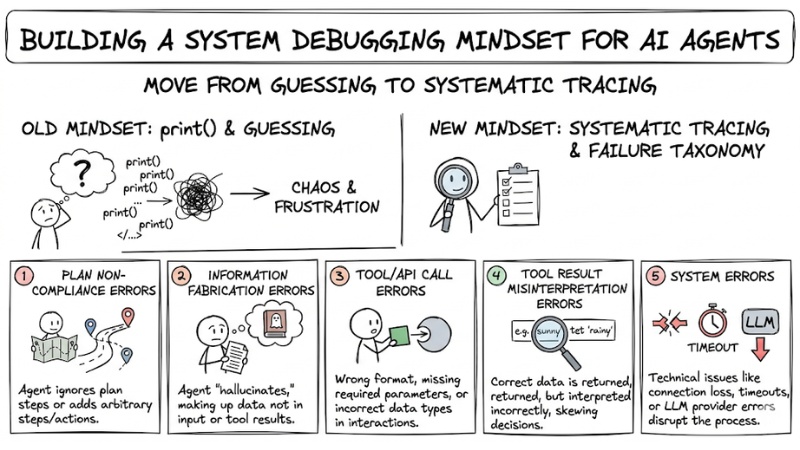
Building a system debugging mindset for AI Agents
Technical methods for effective AI Agent Debugging
Debugging Methods Comparison Table
| Method | Benefits | Best Used For |
|---|---|---|
| Tree View | Understanding parent-child relationships between steps in the processing flow. | Debugging logic errors and decision branching. |
| Timeline View | Clearly visualizing execution sequence and identifying bottlenecks. | Optimizing costs and system latency. |
| Sequence Diagram | Visualizing the sequence of interactions between components. | Onboarding and debugging complex workflows. |
Automated diagnosis and root cause tracing
First, you can use Executable Constraint techniques to automate the error-checking step. This means setting clear rules, for example: “Tool X must return valid JSON; otherwise, it is considered an error.” Every time an Agent violates a rule, the system automatically logs it immediately, helping you avoid missing silent failures.
Next, to find the critical failure step in the entire flow, use backward tracing:
- Identify the step where the Agent returned the final incorrect result.
- Check the logs of the previous step to see if the input information was accurate.
- Step back until you find the first step where the Agent's reasoning or data began to deviate.
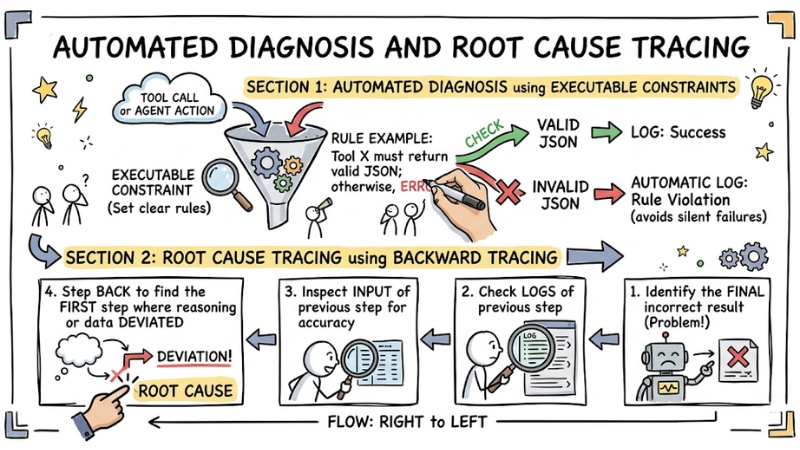
Automated diagnosis and root cause tracing
Recommended popular AI Agent Debugging toolset
To ensure AI Agent debugging is no longer like “finding a needle in a haystack,” you can leverage several specialized tools widely used by the community as follows:
- AgentRx: A specialized framework for isolating and analyzing failures from Agent action trajectories.
- AgentPrism: A React library that turns dry log files into visual interfaces (Tree View, Timeline, Sequence Diagram) directly within your IDE.
- LangSmith: A powerful tool for tracking Agent lifecycles, monitoring token costs, and managing complex prompts.
Steps to set up an Observability process
Comprehensive Recording: Integrate OpenTelemetry into every node of the workflow to capture requests, prompts, and responses between components. For example, every step should have a standardized log with fields such as: Step ID, action being performed, success/failure status, processing time, and accompanying data.
Example of a standardized log structure
{
"step_id": "step_001",
"action": "query_db",
"status": "success",
"latency_ms": 120,
"payload": {"query": "SELECT..."}
}
- Standardize logs: Even if you use multiple models or different services, convert all logs to the same unified JSON structure to make filtering, searching, and analysis easier later on.
- Automated Alerts: Set up alerts based on critical thresholds (e.g., alert if the Agent repeats an action more than 3 times – a sign of an infinite loop).
FAQ for debugging AI Agents
How to prevent infinite loops?
Set a "step-limit" for each Agent session. If the threshold is exceeded, the system should stop and require human intervention.
How to know if an Agent is "hallucinating"?
Use the grounding method. Require the Agent to cite specific data from the tool output for every claim it makes. If there is no evidence, it is a sign of hallucination.
Which metrics are most important when debugging AI Agents?
The critical metrics for debugging AI Agents are:
- MTTD (Mean Time to Detection)
- Success Rate for specific task flows.
Is it necessary to install a third-party dashboard?
Not mandatory. You can use libraries like AgentPrism to integrate visualization components directly into your own administration interface.
What is an AI agent and why are they hard to debug?
AI agents are programs that automatically perform tasks based on artificial intelligence. They are hard to debug due to their stochastic nature, long reasoning processes, and the fact that data logs are often in complex JSON formats, making failure hunting manual.
What are common types of failures in AI agents?
Common failures include: Plan compliance errors (agent skips steps or does redundant work), tool calling errors (wrong parameters, schema), tool output interpretation errors, and system errors like timeouts or LLM provider failures.
Which tools help with AI agent visualization and debugging?
Notable tools include AgentPrism (a React library for trace interfaces), AgentRx (an in-depth failure diagnosis framework), and LangSmith (tracking lifecycles, costs, and tokens for LLM applications).
How to set up an Observability process for AI agents?
Setting up an observability process includes: Tagging telemetry with OpenTelemetry, standardizing logs into auditable formats, and establishing automated alerts for potential issues like infinite loops or high error rates.
See more:
- How to Transition from Single-Agent to Multi-Agent Systems
- Guide to Building AI Agents for Efficient Workflow Automation
- Guide to Managing AI Agent Permissions to Ensure System Security
Debugging AI Agents is not merely about fixing code errors but about managing and visualizing the reasoning data flow. By applying a systematic tracing mindset, categorized failure taxonomy, and visualization tools, you will control your system instead of letting it "run wild." Start by standardizing logs and experimenting with trace tools to see an immediate difference.
Tags