Boost remote team performance with AI Agents: A step‑by‑step guide

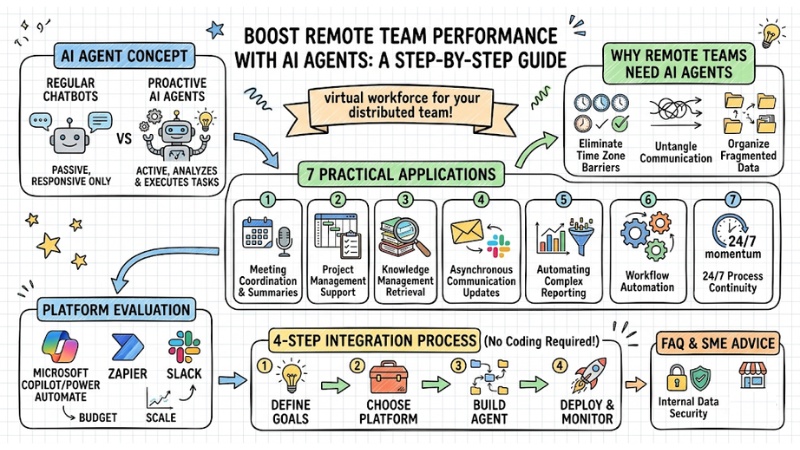
Managing a distributed team often comes with challenges like time zone barriers, broken communication, and fragmented data flows. This article guides you through applying AI Agents to solve these problems for good. You will learn how to set up an "AI employee" that automates processes, summarizes information, and maintains project momentum 24/7 without requiring complex programming knowledge.
Key Points
- AI Agent Concept: Clearly distinguish between regular Chatbots and proactive AI Agents to build a true "virtual workforce" for your business.
- Why Remote Teams Need AI Agents: Learn how to eliminate time zone barriers, untangle asynchronous communication, and thoroughly handle data fragmentation.
- 7 Practical Applications: Master methods to increase productivity, from meeting coordination and knowledge management to automating complex reporting workflows.
- Platform Evaluation: Choose the right tools (Microsoft, Zapier, Slack) that fit your budget and scale to optimize deployment efficiency.
- 4-Step Integration Process: Gain a detailed roadmap to quickly bring AI Agents into real-world workflows without requiring programming knowledge.
- Frequently Asked Questions (FAQ): Gain peace of mind regarding internal data security and receive smart AI deployment advice for small and medium-sized enterprises (SMEs).
AI Agent for Remote Team: Concept and applications
The Difference Between Regular Chatbots and Agentic AI
Traditional chatbots operate passively based on pre-set scripts, only responding directly to user commands. In contrast, Agentic AI (autonomous AI) operates with complete proactivity.
After receiving a command, the AI Agent analyzes the context itself, breaks the goal into steps, searches for suitable tools, and automatically performs a sequence of actions until the task is completed.
Criteria Regular Chatbot Agentic AI (AI Agent):
| Criteria | Conventional Chatbot | Agentic AI (AI Agent) |
|---|---|---|
| Operating Method | Passive, waits for commands (Q&A style). | Proactive (Receive command – Plan – Execute). |
| Autonomy | None. Requires step-by-step human guidance. | Very high. Self-corrects and adjusts strategies. |
| Connectivity | Confined within a single interface. | Cross-interacts with various APIs and other software. |
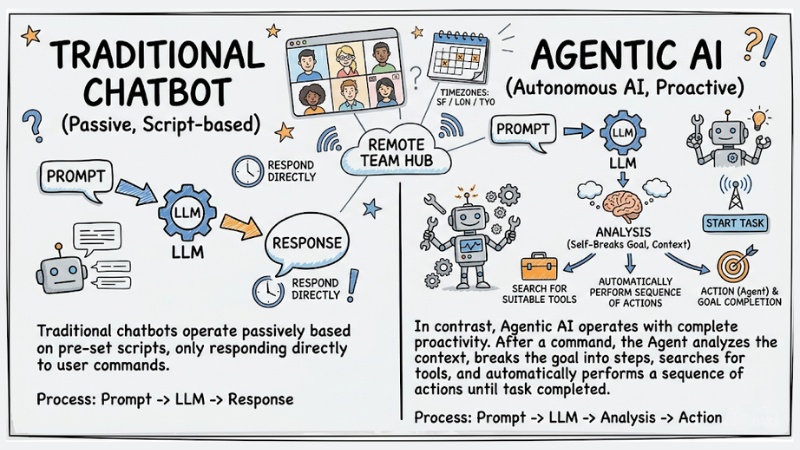
The Difference Between Regular Chatbots and Agentic AI
The Concept of "AI virtual team member" in the Digital Workplace
In the digital workspace, an AI virtual team member involves giving the AI a digital identity. They have their own accounts, their own emails, and access rights to project folders on Slack, Teams, or Jira.
Practical Perspective: Treat the AI Agent like an excellent intern. They have the capacity to handle a massive workload, but they need you to provide clear context, guide them with standard processes, and cross-check results in the early stages.
Why remote teams need AI Agents to optimize Work?
Optimizing Asynchronous Communication
Working remotely means personnel are often overwhelmed by hundreds of messages at the start of their shift. AI Agents help untangle this by scanning the entire communication history across channels. For example:
- Automatically summarize long discussion threads into 3-4 core bullet points.
- Directly extract "Action Items" (tasks to be done) and tag the responsible person.
- Categorize message priority so employees know which tasks to handle first.
Completely Eliminating Time Zone Barriers
Global teams often face bottlenecks when waiting for approvals or information from a member on the other side of the globe. Meanwhile, an AI Agent acts as a bridge that never sleeps, ensuring workflows remain continuous.
For example, when the US team finishes their workday, the AI summarizes progress, performs real-time multi-language translation, and hands over detailed context to the Vietnam team the next morning.
Minimizing Information Fragmentation
Remote team data is often scattered: documents on Google Drive, tasks on Jira, and exchanges via Email. Consequently, these information silos often make searching very time-consuming.
An AI Agent acts like an aggregate librarian. Through a natural language command, the AI can scan the entire storage system, cross-reference data, and return accurate results along with original links.
Warning: According to corporate productivity research, remote employees can waste work time every day just searching for information or waiting for responses if they lack a centralized knowledge management system.
Top 7 Practical AI Agent Applications for Remote Teams
1. Coordinating and Summarizing Online Meetings
- Task: AI joins video meetings (Teams/Zoom) as a coordinator. It automatically records, transcribes, summarizes decisions, and sends meeting minutes immediately after the meeting ends.
- Pros: Ensures accuracy of handed-over information.
- Cons: Sometimes misidentifies slang or very heavy local accents.
- Suitable for: Project Managers, Scrum Masters.
2. Project Management Automation
- Task: Monitor Kanban boards, remind about deadlines, and automatically change task status when identifying code pushed to Github or documents being signed and approved.
- Pros: Proactive intervention capability, reducing risks of schedule delays due to humans forgetting to update.
- Cons: Requires setting up tight logic from the start, otherwise the AI will spam junk notifications.
- Suitable for: Team Leaders, Product Managers.
3. Knowledge Management and Internal Retrieval
- Task: Acts as Retrieval agents, providing instant answers to questions about company policies, technical documentation, or project history based on internal data.
- Pros: AI understands the context of the question. New employees don't need to bother senior staff for basic information.
- Cons: Completely dependent on the quality of input data. Junk data will generate junk answers.
- Suitable for: All remote working personnel.
4. AI-Supported Remote Onboarding
- Task: Provide personalized integration roadmaps. AI sends documents day by day, collects feedback, and tracks employee sentiment through chat language.
- Pros: Creates a consistent, professional onboarding experience regardless of the employee's time zone.
- Cons: Lacks warmth and human connection during the sensitive initial phase.
- Suitable for: HR Managers, Line Managers.
5. Generative AI Workflows for Agile Teams (Code & Test)
- Task: Convert feature requirements (user stories) into preliminary code. Automatically write test cases and run error simulations based on Agile methods.
- Pros: Speeds up the software development cycle (Sprint). Reduces repetitive workloads for the technical team.
- Cons: Code generated by AI always needs a senior Developer to review for security vulnerabilities before going live.
- Suitable for: Software Engineers, QA/QC Testers.
6. Reporting and Analysis Workflow Automation
- Task: Periodically collect data from multiple sources (Salesforce, Google Analytics, ERP). Analyze figures and export chart reports sent via Slack/Email every morning.
- Pros: Seamlessly connects the enterprise productivity ecosystem, providing real-time data for management decision-making.
- Cons: Initial API setup costs and computing server maintenance are relatively high.
- Suitable for: C-level, Data Analysts, Marketing Managers.
7. Complex Multi-Task Coordination
- Task: Multiple AI Agents working together. For example: Agent A collects customer data -> Agent B writes response emails -> Agent C schedules appointments in the system.
- Pros: Ensures output consistency and completely frees up labor in linear operational processes.
- Cons: Managing debugging when an Agent in the chain fails is very complex.
- Suitable for: Operations Managers, Customer Success Managers.
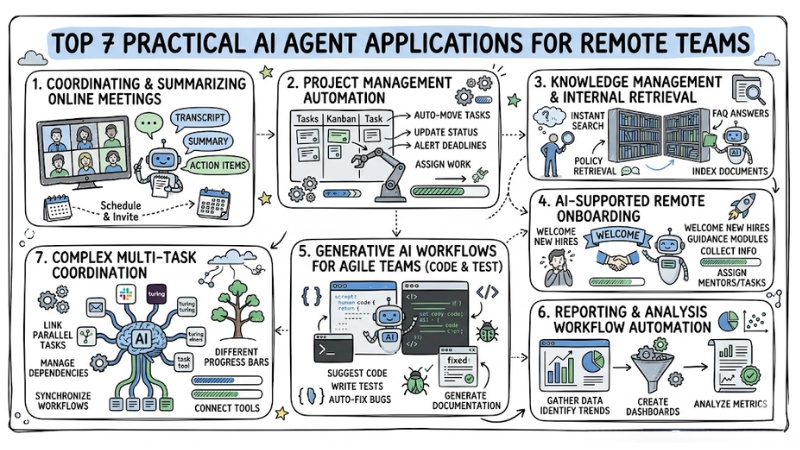
Top 7 Practical AI Agent Applications for Remote Teams
Evaluating AI Agent Platforms for Remote Teams
To integrate AI Agents, choosing the right platform that fits your budget and current infrastructure is a prerequisite.
| Platform | Integration Capability | Cost | Target Business |
|---|---|---|---|
| Microsoft Copilot Studio | Microsoft 365 ecosystem (Teams, SharePoint, Outlook). | High (Requires Enterprise license). | Corporations, large-scale enterprises (Enterprise). |
| Zapier Central | Almost every popular SaaS application (over 6,000+ apps). | Medium - Flexible based on task volume. | Small and Medium Enterprises (SMEs), Startups. |
| Slack AI | Deeply integrated within Slack channels and chat threads. | Low (Add-on for existing paid plans). | Any team using Slack as their primary communication hub. |
Microsoft Copilot Studio & SharePoint Agent Builder
This is a comprehensive solution for companies already using Office 365. This tool has very strong integration capabilities, allowing AI Agents to securely read and understand any document on SharePoint. Additionally, these tools get a big plus for ensuring enterprise-grade security.
Flexible Low-code/No-code AI Development (Zapier Central, Slack AI)
The tools mentioned above are suitable for quickly deploying simple tasks. You don't need to know programming; just use the drag-and-drop interface or enter prompts to connect applications. This is the cost-optimal choice for small teams starting to experiment with the power of AI.
4-Step Guide to Integrating AI Agents into Remote Team Workflows
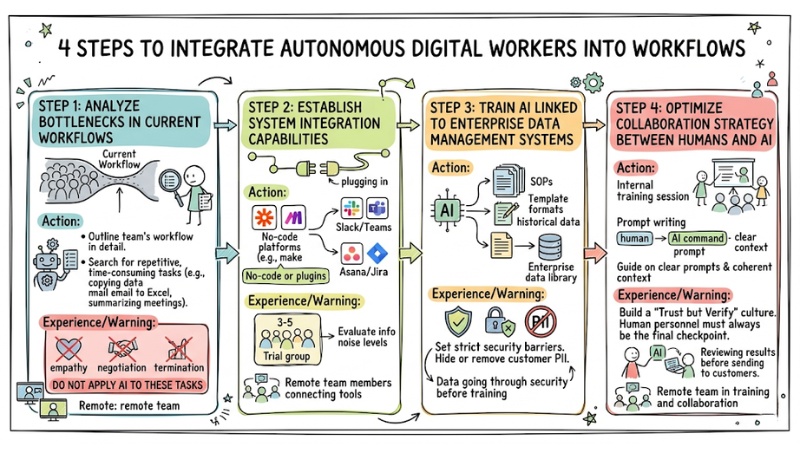
4 Steps to Integrate AI Agents into Remote Team Workflows
Step 1: Analyze Bottlenecks in Current Workflows
- Action: Outline the team's workflow in detail. Search for repetitive, time-consuming tasks (e.g., copying data from email to Excel, summarizing meetings).
- Experience/Warning: Absolutely do not apply AI to tasks requiring empathy, direct negotiation, or the decision to terminate employees.
Step 2: Establish System Integration Capabilities
- Action: Use no-code platforms (Zapier/Make) or available plugins to connect AI Agent accounts with communication software (Slack/Teams) and task management tools (Asana/Jira).
- Experience/Warning: Apply Workflow Automation to a small group of 3-5 people before company-wide deployment to evaluate information noise levels.
Step 3: Train AI Linked to Enterprise Data Management Systems
- Action: Provide the AI Agent with standard documents (SOPs), template formats, and historical data so it learns the company's writing style and processes.
- Experience/Warning: Set strict security barriers. You must hide or completely remove customer PII (Personally Identifiable Information) before feeding it into AI training.
Step 4: Optimize Collaboration Strategy Between Humans and AI
- Action: Organize an internal training session. Guide the team on how to write clear prompts and provide coherent context when assigning work to AI personnel.
- Experience/Warning: You need to build a "Trust but Verify" culture. Human personnel must always be the final checkpoint reviewing results before sending them to customers.
Frequently Asked Questions About Using AI Agents to Optimize Remote Teams
What is an AI Agent for remote teams?
An AI Agent for a remote team is software that uses artificial intelligence to perform automated tasks and support remote employees. They act as a "virtual member" in the team, helping to optimize communication and workflows.
What is the difference between a regular Chatbot and an AI Agent?
A regular Chatbot mainly answers questions based on pre-set scripts, while an AI Agent has higher autonomy, can analyze context, plan, and self-execute complex sequences of actions to complete a mission.
What does the concept of "AI virtual team member" in the Digital Workplace mean?
"AI virtual team member" refers to granting access rights and roles to an AI so it operates as a digital employee within the digital workspace, participating in processes and supporting colleagues.
Why does remote work need AI Agents?
Remote work often encounters barriers regarding time zones, asynchronous communication, and information fragmentation. AI Agents help overcome these problems by operating 24/7, summarizing information effectively, and automating repetitive tasks.
How do AI Agents help optimize asynchronous communication in remote teams?
AI Agents can automatically summarize long message threads on chat platforms, extract action items, and notify users, helping them grasp information quickly without reading the entire chat history.
Can AI Agents eliminate time zone barriers for remote teams?
Yes, AI Agents operate 24/7, allowing team members, regardless of time zone, to access information, perform tasks, and receive support from AI at any time.
How do AI Agents minimize information fragmentation in remote teams?
AI Agents have the capability to connect and retrieve data from many different sources (email, drive, project management tools), aggregating it into coherent information as requested by the user, which helps reduce search time.
How do AI Agents help coordinate and summarize online meetings?
AI Agents can record, transcribe, and summarize meeting content, listing decisions and assigned tasks, helping members easily grasp important information after a meeting.
Can AI Agents automate project management for remote teams?
Yes, AI Agents can track work progress, remind about deadlines, assign tasks based on pre-set rules, and provide early warnings for potential project risks.
How do AI Agents support knowledge management in remote teams?
AI Agents can act as a "smart library," helping employees quickly search for documents, policies, and necessary specialized knowledge using only natural language questions.
How does AI support remote onboarding of new personnel?
AI Agents can provide personalized training roadmaps, answer FAQs from new employees about processes and company culture, and provide necessary documents, helping them integrate quickly.
How do Generative AI workflows support remote Agile teams?
Generative AI can help create user stories, write acceptance criteria, generate test code, or draft technical documentation, speeding up the software development cycle for remote Agile teams.
Can AI Agents automate reporting and analysis workflows for remote teams?
Yes, AI Agents can collect data from multiple sources, aggregate it into periodic or on-demand reports, and even perform preliminary analysis to provide useful insights for the team.
What is coordinating complex multi-tasks with Multi-agent Orchestration?
This is the capability for multiple AI Agents to coordinate with each other to complete a complex goal; for example, one agent fetches data, another analyzes it, and the final agent drafts the report.
Which platforms are popular for building AI Agents for businesses?
Popular platforms include Microsoft Copilot Studio, SharePoint Agent Builder, as well as low-code/no-code solutions like Zapier Central and Slack AI.
How do you integrate AI Agents into remote workflows?
This process typically includes analyzing bottlenecks, establishing integration connections, training AI with business data, and optimizing the collaboration strategy between humans and AI.
Is internal company data safe when using AI Agents for remote teams?
It is completely safe if you use Enterprise versions (such as Copilot, ChatGPT Enterprise). These platforms commit to not using your internal data to train general language models. However, if you use the free version, the risk of data leakage is real.
Should small businesses (SMEs) invest in Copilot Studio or use free tools?
For SMEs, start with low-cost Low-code/No-code tools like Zapier Central or the built-in features of Notion AI/Slack AI. You should not invest immediately in Copilot Studio because license costs and infrastructure deployment time are very expensive.
Will AI Agents take the jobs of remote workers?
No. AI Agents act as support tools, freeing humans from repetitive administrative work. Remote personnel will shift roles from "executors" to "managers and coordinators of AI workflows."
Read more:
- AI Agent SEO: How to set up an automated Content workflow and optimize keywords
- What is AI Agent Marketing? Benefits and 7 optimization application methods
- What is AI Agent Sales? Comparing AI Agent Sales with chatbots
AI Agents were not born to replace remote teams; they play a role in connecting, lubricating, and maintaining that distributed machine to run smoothly 24/7. Start auditing your workflow this week and try out a virtual staff member for your team's most time-consuming task!
Tags