What is no-code? Opportunities, risks, and when you should use it

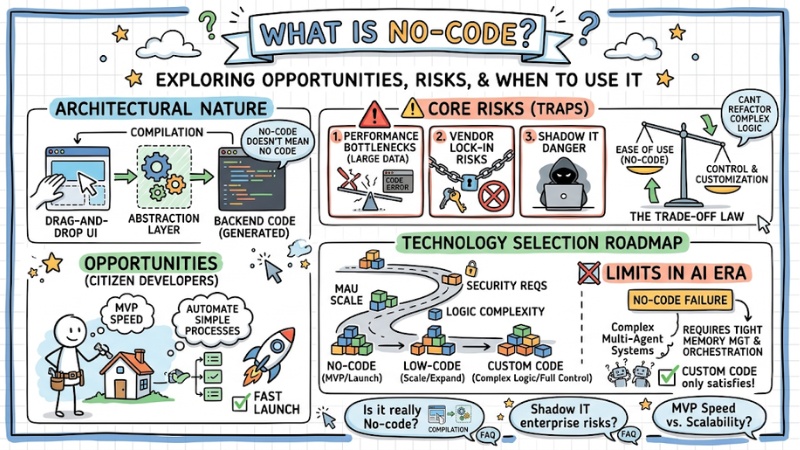
No-code platforms allow users to build applications using drag-and-drop operations, cutting down time-to-market from months to just a few days. However, they carry hidden risks of technical debt and limit scalability if abused without standard system design thinking. This article dives straight into the architectural nature behind No-code and points out the safety boundaries so businesses can avoid falling into the technology "trap".
Key points
- The architectural nature of No-code: Understand that No-code doesn't mean "no code", but rather a background compilation mechanism via Abstraction Layers, where every drag-and-drop action translates into backend source code.
- The power of Citizen Developers: Leverage non-technical personnel to build MVPs and automate simple processes, helping businesses accelerate product launches at minimal costs.
- Identifying core risks: Grasp the technical "traps" including performance bottlenecks with large data, vendor lock-in risks, and the danger of Shadow IT.
- The Trade-off law: The easier a system is to use (No-code), the more its customization and control are locked down. When complex business logic exceeds the available templates, the system becomes impossible to refactor.
- Technology selection roadmap: User scale (MAU), high-level security requirements, and business logic complexity dictate whether to choose No-code, Low-code, or Custom Code.
- Limits in the AI era: Understand why No-code fails when deploying complex Multi-Agent systems, which require tight memory management and orchestration that only Custom Code can satisfy.
- FAQ answers: Clarify the nature of No-code, Shadow IT risks in the enterprise, and tool selection strategies based on balancing MVP speed with long-term scalability.
What is No-code?
No-code is a software design approach that allows users to build applications using a visual graphical user interface (GUI) and pre-configured logic blocks, instead of writing traditional lines of code.
However, from a systems perspective, every drag-and-drop action on the UI is actually generating source code. No-code platforms operate on the concept of Abstraction layers. This is an implicit compilation mechanism tasked with translating visual programming actions into static API requests, standard scripts, and database queries on the backend.
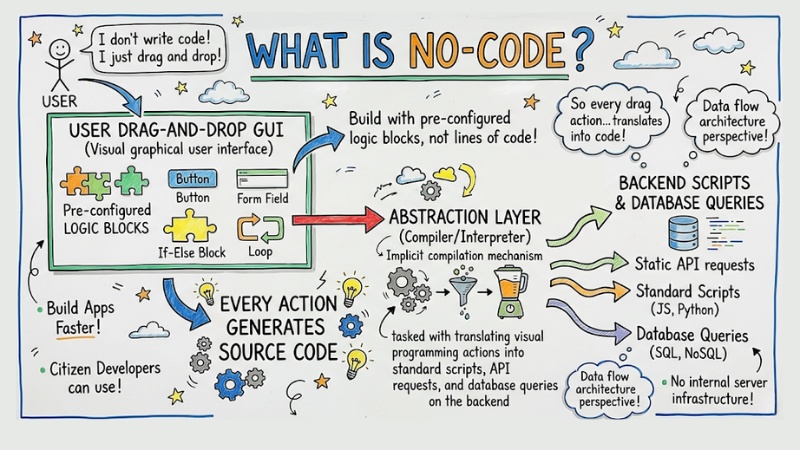
No-code data flow architecture diagram
The biggest trade-off is that all logic processing gets pushed onto the No-code platform's servers. When you create a loop using visual programming, the system has to generate multiple intermediate code layers and redundant libraries – things that a software engineer could write much more cleanly and optimally.
The rise of "Citizen Developers"
Hiding server infrastructure complexity has empowered a new group of users: Citizen developers (non-technical staff in Marketing, HR, Ops). Now, they can build internal tools themselves without waiting for the IT team.
For process automation problems, like automatically sending emails or syncing customer data from a form to a CRM, these No-code platforms maximize their potential. Thanks to the citizen developer workforce, businesses can shorten the time to market for an MVP at the lowest cost.
Risks of applying No-code: An in-depth perspective
When applied in an Enterprise environment, fully relying on a drag-and-drop interface carries 3 core risks:
- Scalability limits: Performance conflicts when handling large datasets.
- Dependency risks: Being tied to the vendor's infrastructure.
- Shadow IT: Losing control of data and violating security standards.
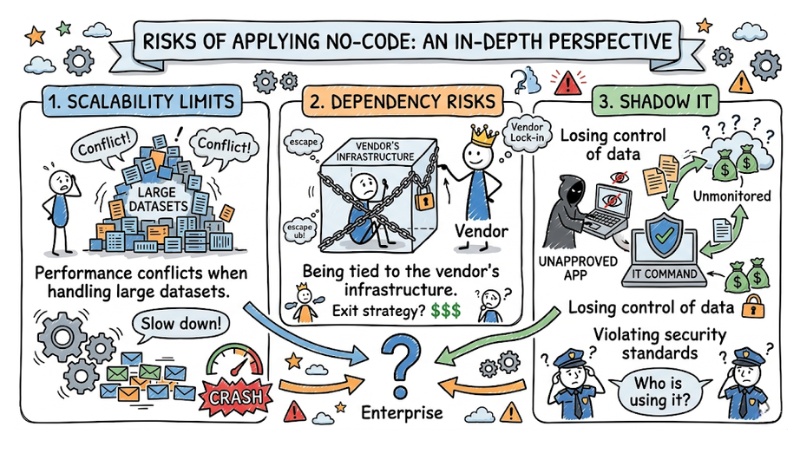
Risks of applying No-code: An in-depth perspective
Scalability limits
Regarding scalability, the biggest limitation of No-code lies in performance bottlenecks. Real-world No-code deployments show that when querying a database with millions of rows, the system's hidden loops often cause crashes or drive costs up to massive levels.
From an algorithmic perspective (Big O), auto-generated queries usually lack optimal indexes, causing computational complexity to increase exponentially as data grows. This creates massive technical debt that future engineering teams will find almost impossible to refactor.
Dependency risks
Additionally, vendor lock-in when using No-code is a dangerous boundary. You do not own the core source code. If the third-party platform raises API prices, changes policies, or shuts down, the business cannot migrate the system to AWS or Google Cloud.
Shadow IT
Finally, personnel arbitrarily creating data flows leads to "Shadow IT" risks, causing customer data (PII) to be routed outside company servers, severely violating security standards like SOC2 or GDPR.
The trade-off between speed and customizability of No-code
In Software Engineering, the law of Trade-offs always exists. The easier the UI is to use, the more closed off the "black box" system becomes. You might build a login feature in 5 minutes, but it gets very difficult if you want to intervene deeply to customize it; the system will simply reject it. Technical boundaries are broken when the business's custom logic starts exceeding the available templates.
Should you choose No-code, Low-code, or Custom Code
To avoid the technology trap, IT Managers and CTOs need to clearly define when to use drag-and-drop tools, and when Low-code or Custom Code is strictly required.
| Core Criteria | No-code (Full drag & drop) | Low-code (Drag & drop + Scripting) | Traditional development / Custom code |
|---|---|---|---|
| MVP time-to-market | A few days (Extremely fast). | A few weeks (Fast). | A few months (Slow). |
| Scalability | Low (Prone to bottlenecks). | Medium. | Extremely high (100% resource control). |
| Security and compliance | Vendor dependent. | Partially customizable. | Meets all standards (On-premise, SOC2). |
| Customizability | Extremely low (Limited). | Medium (Write additional logic). | Absolute (Unlimited). |
| Personnel requirements | Non-tech, Business user. | Junior Dev, Data Analyst. | Senior Engineer, Solution Architect. |
Based on the table above, before initializing a project, use the following evaluation checklist:
- Will the expected user scale exceed the 10,000 MAU (Monthly Active Users) mark?
- Will the system process sensitive data requiring high-level security compliance?
- Is the degree of customization for the business logic complex?
If the answer to most of these is "Yes", Custom code is the only path to ensure the system runs smoothly long-term, avoiding the need to tear down and rebuild the entire infrastructure after just 6 months.
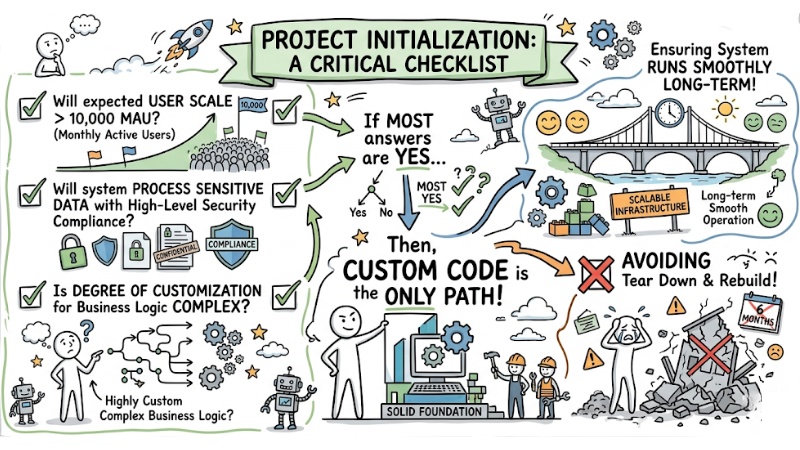
Evaluation checklist for when to use No-code, Low-code, and Custom Code
The intersection: No-code, Low-code, and the AI Agent era
In the booming landscape of AI automation, no-code tools are heavily utilized to connect with large language models (LLM). Calling an API from OpenAI or Anthropic to summarize emails or analyze customer sentiment via a drag-and-drop interface feels incredibly smooth for single, static tasks.
However, the limits become clear when a business wants to move towards a Multi-Agent architecture. Current drag-and-drop platforms fail completely at handling context memory, Context Routing, and complex Orchestration. For a team of AI Agent to operate without "hallucinating" and strictly comply with access rights, the system absolutely must be programmed via Custom Code with the ability to deeply intervene at the RAM processing and Rate limit layers.
Frequently asked questions
What is No-code in software development?
No-code is an application development platform that uses a drag-and-drop interface instead of writing manual code. Essentially, it operates through abstraction layers, compiling visual user actions into executable code blocks and database queries at the backend layer.
What is the core difference between No-code and Low-code?
No-code serves non-technical users with pre-packaged modules, while Low-code allows developers to inject custom code into complex logic sections. You can choose No-code to accelerate MVPs, and pick Low-code when you need a balance between speed and customizability.
Why can No-code pose risks to businesses?
No-code creates vendor lock-in risks and hard-to-control technical debt. When the system scales to millions of hits, the platform's hidden loops often cause performance bottlenecks, making data migration to another environment exceedingly complex.
Should we use No-code to deploy large-scale AI Agents?
No. No-code is fine for making single API calls, but it fails when building complex Multi-Agent systems. AI Agent projects demand tight state management, memory handling, and orchestration, which intrinsically require Custom Code architectures to ensure security and optimal performance.
What is the Shadow IT risk in No-code?
Shadow IT occurs when employees spin up No-code apps on their own without IT department oversight. This can lead to security vulnerabilities, violations of data standards like GDPR or SOC2, and a loss of control over the business's critical data flows.
How do you choose the right development tool?
If the project requires an MVP in a few days, use No-code. If you need deep feature customization and complex system integrations, use Custom code to ensure system scalability and safety.
See more:
- What is AIaaS? A detailed guide to Artificial Intelligence as a Service
- How to Choose the Optimal AI Agent Platform for Your Business in 2026
- Self-hosted vs SaaS AI Agents: Which option is right for your business?
No-code is the ultimate weapon for testing MVPs, automating internal processes, and solving time constraints. However, the technological boundary lies in the core needs of the business. When the problem demands strict security, complex data flows, and enterprise-grade scalability, Custom code remains the irreplaceable gold standard.